Tech Articles


From Resistance to Evolution: 20 Years with PowerBuilder, Artificial Intelligence, and the Future of Enterprise Applications


Introduction

For more than twenty years, I have developed, maintained, optimized, and modernized enterprise applications with PowerBuilder.

During that time, I have seen many technologies emerge with promises to completely transform software development, replace existing platforms, and solve almost every organizational challenge automatically.

Some of those technologies introduced valuable ideas and became industry standards. Others disappeared after only a few years.

For that reason, when generative artificial intelligence began taking a central role in the technology industry, my first reaction was not immediate enthusiasm, but caution.

After many years of working with mission-critical systems, databases, transactions, security, complex business rules, and enterprise processes, you learn that not everything new automatically represents an improvement.

You also learn that an impressive demonstration does not always become a reliable enterprise solution.

At first, I resisted using artificial intelligence.

I wondered what a language model could teach someone with more than two decades of experience solving real business problems with PowerBuilder.

How could artificial intelligence understand the business rules accumulated over many years, the operational exceptions, internal processes, and technical decisions that shaped a mature enterprise application?

Over time, however, I realized that I was asking the wrong question.

Artificial intelligence did not need to replace my experience. It could help me use that experience more effectively.

It did not need to compete with PowerBuilder. It could expand its possibilities.

And I did not have to choose between an established technology and an emerging one. The real opportunity was learning how to combine them.
Read more

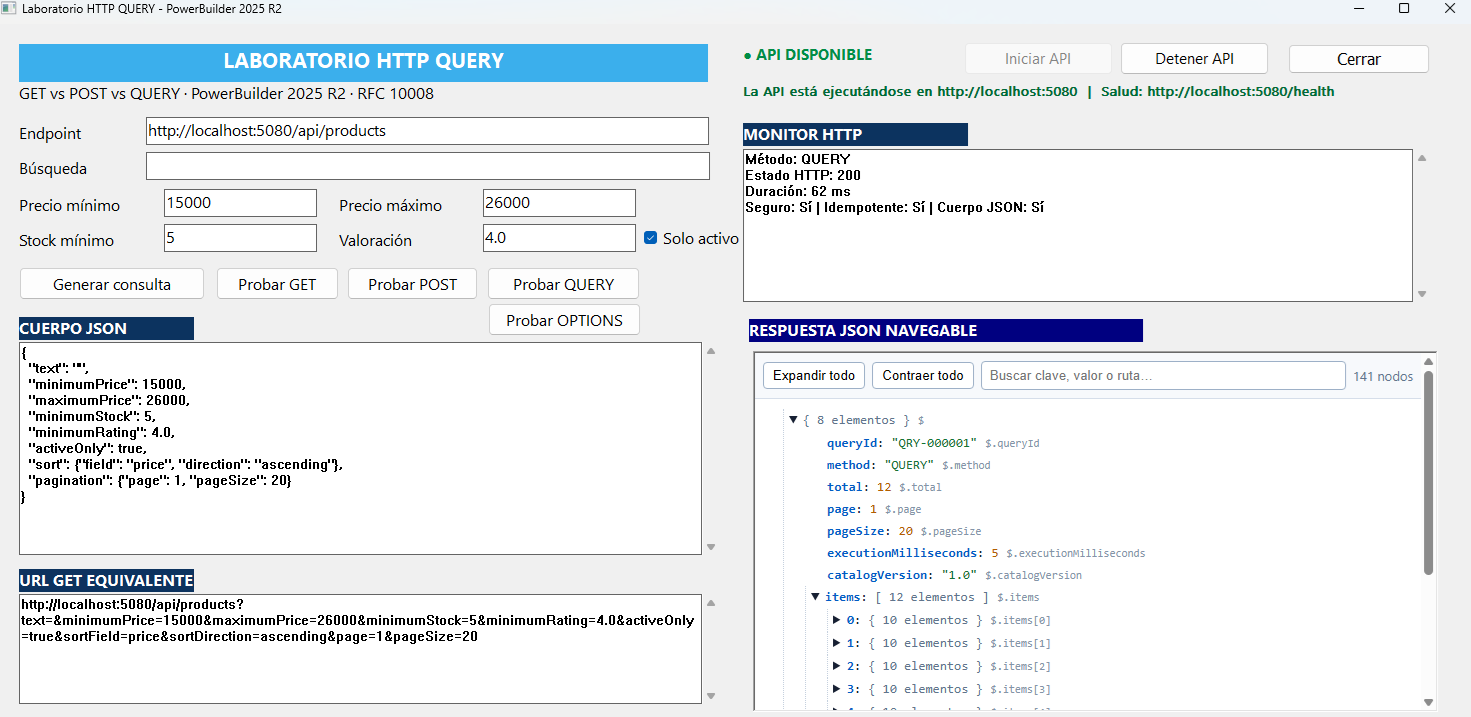
HTTP QUERY: the immediate future of API queries


HTTP QUERY: the immediate future of API queries

A new way to carry complex queries without turning the URL into a puzzle or presenting a read operation as if it were a write.

What happens when a query needs filters, rules, lists, and pagination, but must not change anything at all?

For years, the usual answer involved choosing between two imperfect paths. The first was to place every criterion in the URL of a GET request. The second was to send a request body with POST, even though the real intention was only to retrieve information. HTTP QUERY is designed to fill that gap: a query can carry structured content while explicitly declaring that it is safe and idempotent.

This is not a replacement for GET. GET remains an excellent choice for simple searches, shareable addresses, and clearly identifiable resources. QUERY is aimed at a different situation: advanced filters, configurable reports, catalog exploration, analytics, enterprise search, and requests whose criteria no longer fit comfortably in a URL.

IETF · RFC 10008 · STANDARDS TRACK · JUNE 2026
Read more

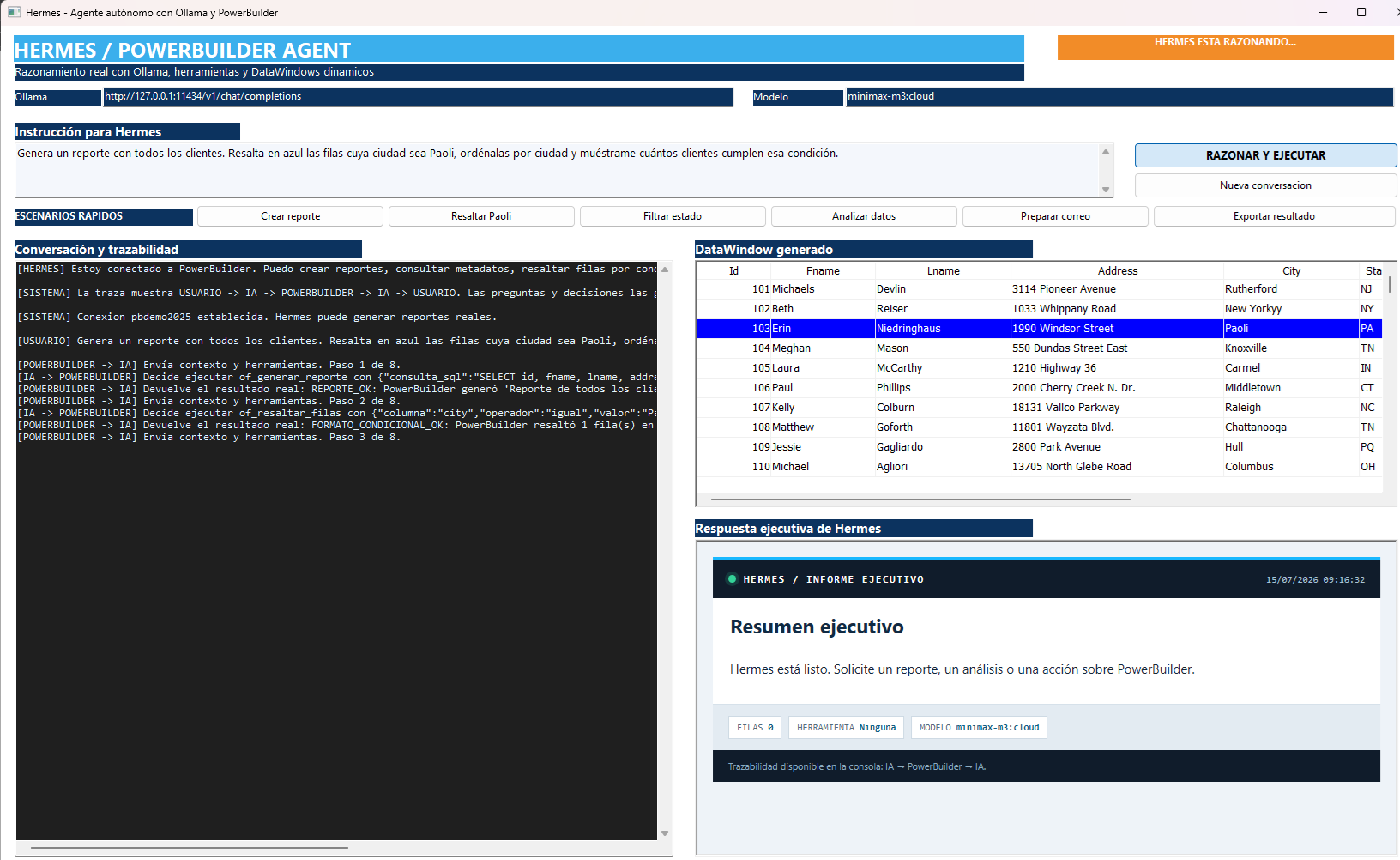
Hermes: an autonomous agent connected to PowerBuilder


Hermes: an autonomous agent connected to PowerBuilder

A technical demo where AI does more than converse: it observes the current DataWindow, selects tools, executes real PowerBuilder operations, evaluates their results, and decides what to do next.

Hermes demonstrates the difference between a chatbot and an agent: the model retains context, reasons about a goal, selects a capability published by PowerBuilder, receives the actual execution result, and can chain new decisions until the request is complete.

Introduction

Enterprise applications developed with PowerBuilder concentrate business processes, rules, and large volumes of information that are normally accessed through predefined screens and commands. Adding an artificial intelligence agent introduces a new interaction layer: the user describes the desired outcome in natural language, and the agent translates that intent into a controlled sequence of operations performed by the application.

This demo introduces Hermes, an agent connected to PowerBuilder 2025 R2 through Ollama and the minimax-m3:cloud model. Its purpose is not to replace existing application logic, but to use it: Hermes obtains report context, selects tools published by PowerBuilder, evaluates each response, and decides what to do next. A single request can therefore generate a DataWindow, apply filters or conditional formatting, calculate indicators, produce an executive summary, export the result, and prepare an email while preserving human confirmation before it is sent.

Read more

PowerBuilder 2025 R2 AES-GCM: Native Authenticated Encryption and Tamper Detection


PowerBuilder 2025 R2 AES-GCM: Native Authenticated Encryption and Tamper Detection

A technical demo of the new cryptographic capabilities in PowerBuilder 2025 R2 using CrypterObjectCoderObject, AES-256-GCM, hexadecimal payloads, and Auth Tag validation.


Introduction

PowerBuilder 2025 R2 introduces a major security improvement for business applications: native support for modern cryptographic operations through CrypterObject and CoderObject. This demo project focuses on one of the most relevant additions for enterprise systems: AES-GCM authenticated encryption.

AES-GCM is not just encryption. It is authenticated encryption, meaning the receiver can detect whether the encrypted payload was altered after it left the sender. For payment files, tax documents, ERP messages, API payloads, banking instructions, and any sensitive JSON exchange, this changes the security model: confidentiality and integrity are handled as one operation.

This article uses the demo project Demo_AES-GCM_pb, implemented in the window w_demo_security.srw. The user encrypts a fiscal JSON payload, transmits it as hexadecimal text, simulates reception, and then intentionally modifies one character to prove that tampering is rejected.
Read more

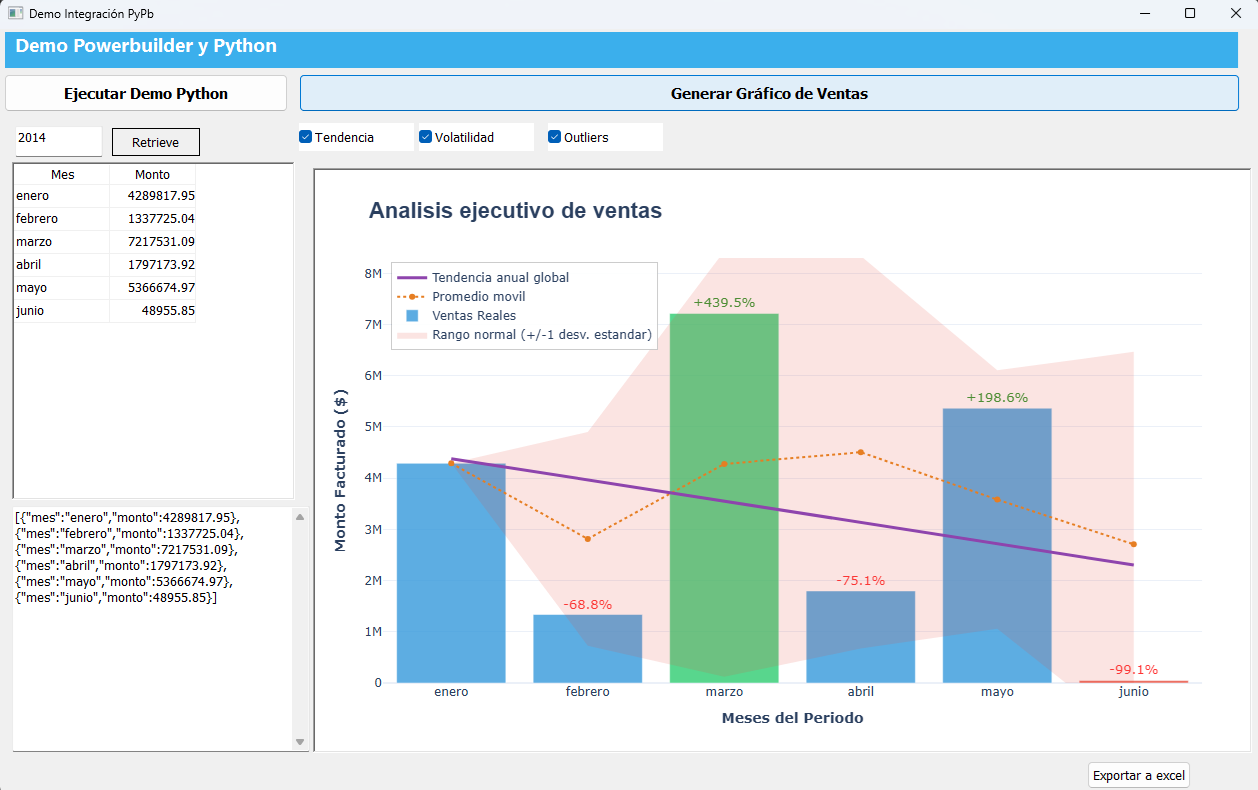
PyPb in Action: PowerBuilder and Python Building Executive Sales Charts


PyPb in Action: PowerBuilder and Python Building Executive Sales Charts

A technical demo of direct integration between PowerBuilder 2025 R2, PyPb, Python, Plotly, and Excel.

Introduction

This demo shows how a PowerBuilder window can execute Python code directly to build interactive visualizations, analyze sales data, and export reports to Excel without turning the application into a web solution or depending on an external API.

The integration is based on PyPb, the project published by Appeon at https://github.com/Appeon/PyPb. According to the official repository documentation, PyPb is a library that wraps Python.NET so PowerBuilder can interact with Python code: import modules, instantiate classes, invoke methods, read properties, and use popular libraries such as pandas, numpy, OpenCV, and openpyxl. In this demo, that concept is used to consume custom Python modules directly from PowerScript.

Demo objective: keep PowerBuilder as the business interface and use Python as the analytical engine to generate Plotly charts, detect outliers, calculate trends, display volatility bands, and produce formatted Excel files.
Read more

PowerBuilder 2025 R2: Runtime DataWindow Inspection with GetDWObject


PowerBuilder 2025 R2: Runtime DataWindow Inspection with GetDWObject

How to build a runtime metadata inspector by combining DescribeGetDWObjectDWObjectModify, a shared DataStore, and UTF-8 JSON export.


Introduction

A DataWindow is not merely a row container. Its definition contains a tree of visual and functional objects: columns, text labels, computed fields, buttons, and other controls. Each element has an identity, type, band, geometry, visibility, and specialized properties. That information is usually implicit in the DataWindow Painter, but PowerBuilder can also inspect and modify it at runtime.

The Demo_GetDWObject project turns this capability into a visible tool. Users can enumerate the objects in a DataWindow, filter them by type, select one by name, retrieve its properties, locate it through temporary highlighting, export the result to JSON, and run basic design validation. The entire demo uses local data and requires no database connection.

The technical value of the demo is not a single method call. It presents a complete pipeline: Describe("DataWindow.Objects") discovers names, GetDWObject obtains a typed object, the NVO normalizes its properties, Modify applies a reversible visual change, and FileWriteEx produces a UTF-8 JSON artifact.
Read more

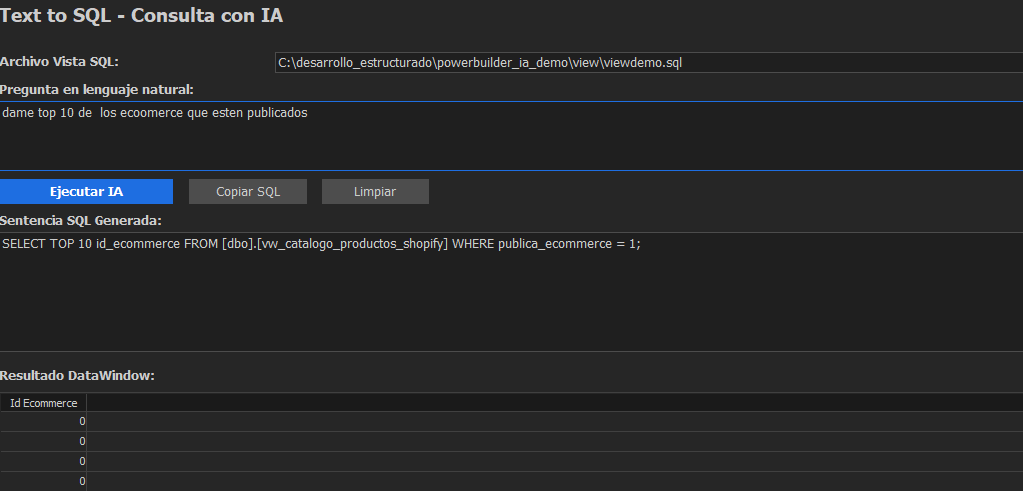
Building an AI Text-to-SQL Translator in PowerBuilder (Text to SQL)


Introduction

Artificial Intelligence can greatly facilitate access to data, allowing non-technical users to query information naturally. PowerBuilder developers can integrate "Text-to-SQL" capabilities directly into their applications, enabling a dynamic query system powered by Large Language Models (LLMs).

This article demonstrates how to build a smart client in PowerBuilder (w_text_to_sql) that allows users to select a view structure, ask a question in natural language, and receive the results in a DataWindow, interacting in real-time with Google's Gemini 2.5 Flash Lite model via its REST API.

Read more

Find Articles by Tag

Outlook Icon Installation Validation Debugger PBVM Variable Event Handler DataWindow REST JSONParser RichTextEdit Control Database Object iOS Linux OS API .NET Assembly Export Database Table Data PDFlib Script SOAP External Functions Branch & Merge UI BLOB Database Table Migration Transaction Class MessageBox Charts PowerScript (PS) Azure DevOps PBDOM Testing Stored Procedure C# ODBC UI Themes InfoMaker Authorization HTTPClient Text OAuth Oracle Database Git Database Painter WinAPI TLS/SSL Application NativePDF Authentication DLL SVN TortoiseGit Web Service Proxy Database Connection .NET Std Framework PostgreSQL ODBC driver Expression Platform Error CrypterObject Encoding SqlModelMapper Messagging Filter .NET DataStore File Trial Android License Repository Debug JSON Windows OS RESTClient Database Profile Window RibbonBar Debugging ActiveX SDK PostgreSQL Bug Elevate Conference Model Event Handling XML Open Source Interface Menu Configuration Import CI/CD 32-bit Windows 10 Icons PowerServer Mobile Encryption SQL Server Import JSON OAuth 2.0 Array DataWindow JSON Design PDF SQL Source Code PowerServer Web Data Service PowerBuilder Compiler GhostScript DragDrop PBNI SnapDevelop Mobile PFC IDE Source Control OrcaScript COM Web API UI Modernization Database Table Schema Deployment TFS Sort Jenkins JSONGenerator Visual Studio OLE Excel SqlExecutor Event CoderObject Performance Resize Graph Syntax RibbonBar Builder WebBrowser Automated Testing PowerBuilder (Appeon) 64-bit Export JSON PowerBuilder TreeView DataType SnapObjects