


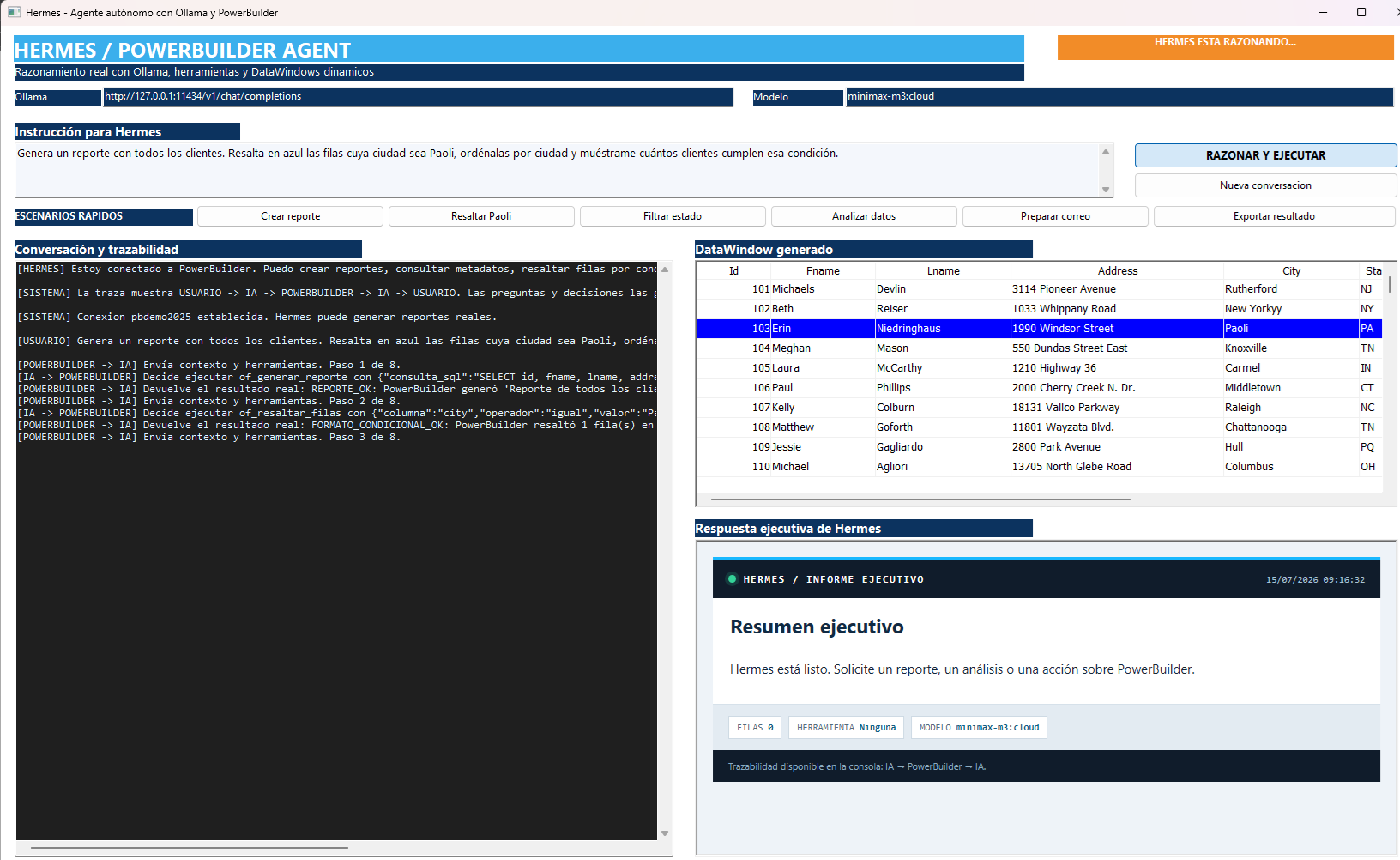
Hermes: an autonomous agent connected to PowerBuilder
A technical demo where AI does more than converse: it observes the current DataWindow, selects tools, executes real PowerBuilder operations, evaluates their results, and decides what to do next.
Hermes demonstrates the difference between a chatbot and an agent: the model retains context, reasons about a goal, selects a capability published by PowerBuilder, receives the actual execution result, and can chain new decisions until the request is complete.
Introduction
Enterprise applications developed with PowerBuilder concentrate business processes, rules, and large volumes of information that are normally accessed through predefined screens and commands. Adding an artificial intelligence agent introduces a new interaction layer: the user describes the desired outcome in natural language, and the agent translates that intent into a controlled sequence of operations performed by the application.
This demo introduces Hermes, an agent connected to PowerBuilder 2025 R2 through Ollama and the minimax-m3:cloud model. Its purpose is not to replace existing application logic, but to use it: Hermes obtains report context, selects tools published by PowerBuilder, evaluates each response, and decides what to do next. A single request can therefore generate a DataWindow, apply filters or conditional formatting, calculate indicators, produce an executive summary, export the result, and prepare an email while preserving human confirmation before it is sent.
What is an agent?
An AI agent is a software component that combines a language model, conversational memory, an explicit set of tools, and a decision loop. The user expresses a goal in natural language. The agent determines what information it needs, which tool can provide it, how to interpret the result, and whether the goal has been reached.
A traditional chatbot returns text. Hermes can return text, but it can also sort a DataWindow, highlight a condition, find a row, calculate a frequency, export a file, or prepare a Gmail draft. The model does not execute those actions directly: PowerBuilder stays in control, validates the arguments, and performs the operation.
| Chatbot | Hermes agent |
|---|---|
| Answers a question. | Pursues a goal and may execute several steps. |
| Only knows the supplied text. | Queries the real DataWindow state through tools. |
| Describes what should be done. | Asks PowerBuilder to do it and evaluates the result. |
| The exchange ends with a response. | The loop ends when the agent decides the task is complete. |
The actual demo architecture
The implementation separates responsibilities so the window does not contain complex business logic or hard-coded follow-up questions.
| Object | Technical responsibility |
|---|---|
w_agente_dinamico |
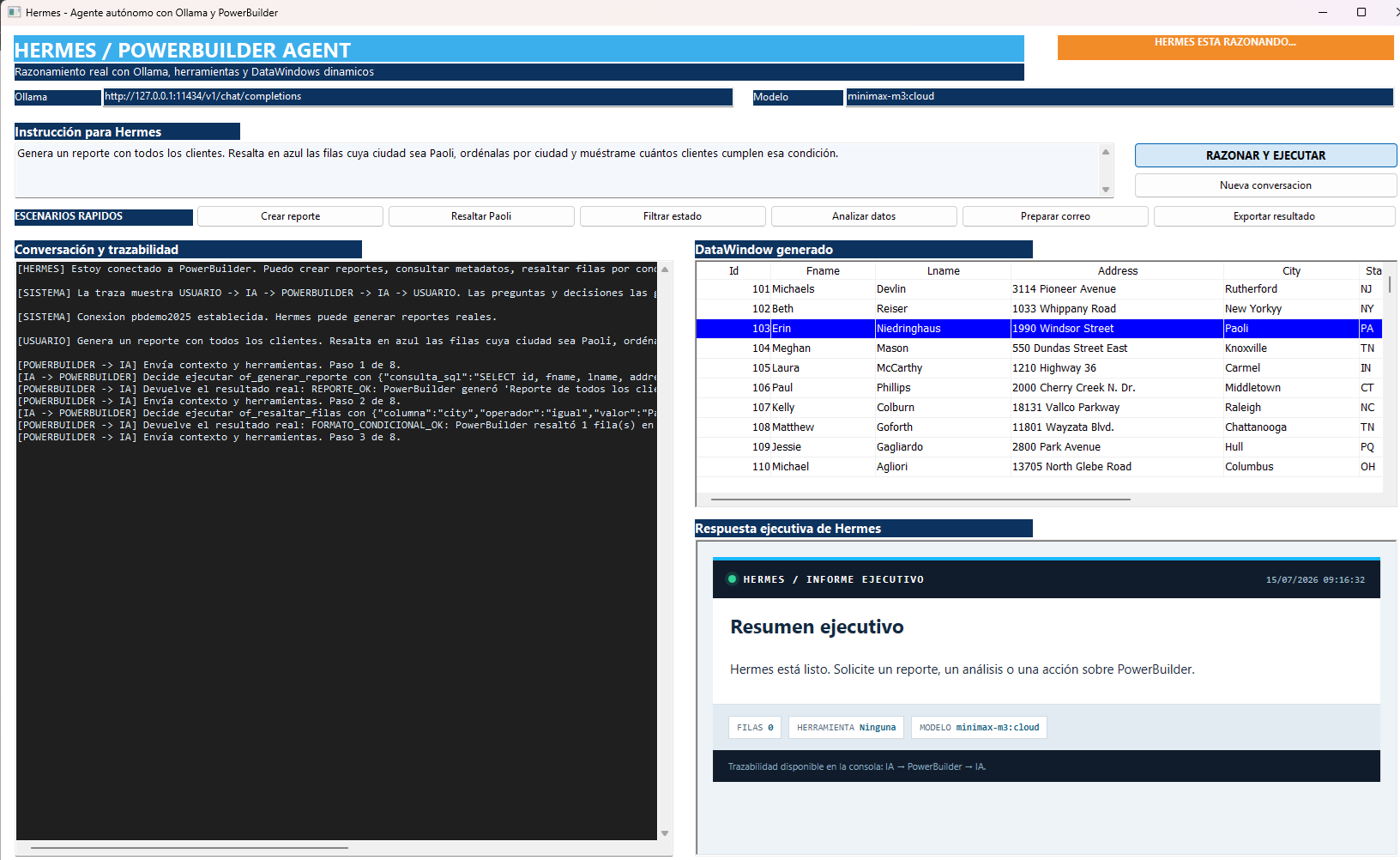
Demo interface. It receives instructions, displays traceability, hosts the DataWindow, and renders the executive response inside a WebBrowser. |
nvo_agente_hermes |
Orchestrator. It retains history, builds the OpenAI-compatible contract, invokes Ollama, interprets tool_calls, and controls a loop of up to eight decisions. |
nvo_esquema_herramientas_hermes |
Publishes the JSON tool catalog, descriptions, properties, and required parameters to the model. |
nvo_herramientas_hermes |
Executor. It validates arguments and applies real operations to the DataWindow, files, and browser. |
adjuntar_gmail_hermes.ps1 |
Controlled Microsoft Edge automation that selects the PDF in Gmail. It never presses Send. |
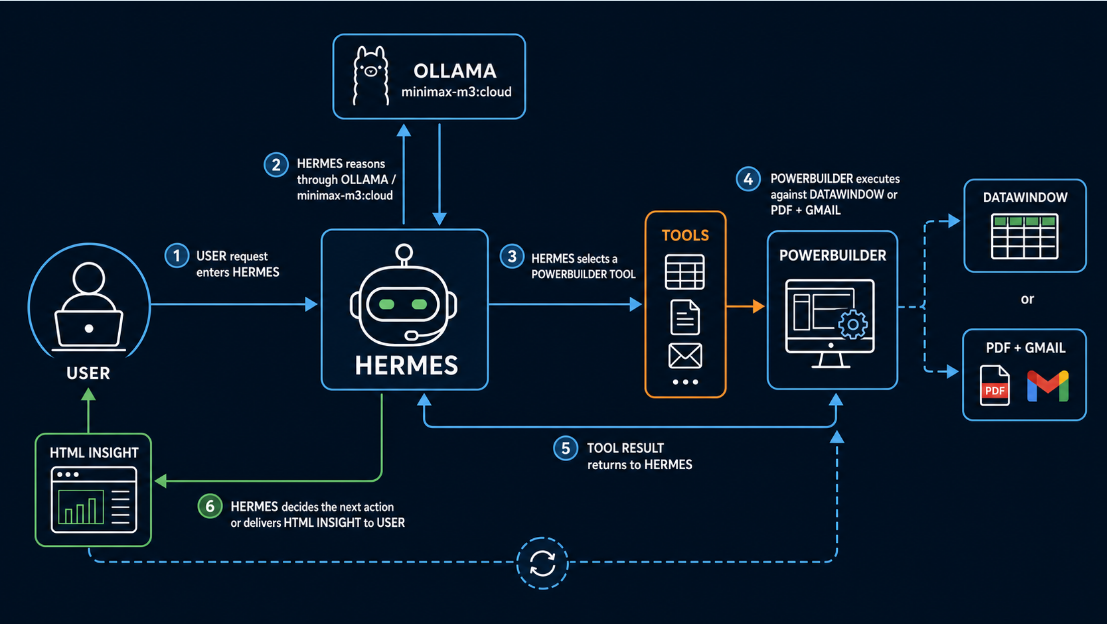
How Hermes interacts with PowerBuilder
- The user defines a goal. The window adds the instruction to history with the
userrole. - PowerBuilder builds the request.
JSONGeneratoradds the system message, history, and tool catalog. - Ollama invokes the model.
http://127.0.0.1:11434/v1/chat/completionsexposes a Chat Completions-compatible endpoint configured withminimax-m3:cloud. - Hermes decides. It may answer the user or return a
tool_callcontaining a function name and JSON arguments. - PowerBuilder validates and executes. The executor routes the function, checks columns, operators, queries, or paths, and changes the DataWindow.
- The result returns to AI. Messages such as
REPORTE_OK,FRECUENCIA_OK, orERROR_FILTROare appended with thetoolrole. - Hermes reevaluates. The model may call another tool with the value it just obtained or present a conclusion.
- The window provides two evidence levels. The console preserves the technical trace while the WebBrowser turns the final answer into readable HTML.
For li_paso = 1 To ii_maximo_pasos
   ls_solicitud_json = This.of_construir_solicitud()
   ls_estado_http = This.of_enviar_solicitud(ls_solicitud_json, ls_respuesta_json)
   ls_respuesta_agente = This.of_interpretar_respuesta( &
      ls_respuesta_json, lb_solicita_herramienta, &
      ls_identificador, ls_herramienta, ls_argumentos)

   If Not lb_solicita_herramienta Then
      Return ls_respuesta_agente
   End If

   ls_resultado_herramienta = This.of_ejecutar_herramienta( &
      ls_herramienta, ls_argumentos, adw_resultado)
   This.of_agregar_resultado_herramienta( &
      ls_identificador, ls_resultado_herramienta)
NextOllama and minimax-m3:cloud
The demo uses Ollama as the model access layer through its local OpenAI-compatible endpoint. The configured name is minimax-m3:cloud: Ollama manages the request and the cloud model performs reasoning and tool selection. PowerBuilder therefore keeps a stable HTTP contract while the model can be changed without redesigning the agent.
Requests are sent in UTF-8 with HttpClient. History uses the system, user, assistant, and tool roles. For every call, PowerBuilder retains the identifier, function name, arguments, and associated result.
Available tools
| Tool | What it executes in PowerBuilder |
|---|---|
of_generar_reporte |
Validates a SELECT, creates a dynamic DataWindow with SyntaxFromSQL, and retrieves rows through SQLCA. |
of_obtener_contexto_reporte |
Returns visible rows, filtered rows, columns, and types so Hermes does not invent the structure. |
of_aplicar_estilo |
Applies corporate, executive, minimal, or alert presentation styles. |
of_resaltar_filas |
Builds a conditional color expression and highlights matching rows. |
of_filtrar_reporte |
Validates and applies a DataWindow filter; empty values are rejected. |
of_quitar_filtro |
Restores every retrieved row. |
of_ordenar_reporte |
Sorts an existing column in ascending or descending order. |
of_buscar_registros |
Finds, selects, and scrolls to the first matching row without hiding the others. |
of_calcular_indicador |
Calculates sum, average, minimum, maximum, or visible row count. |
of_obtener_valor_mas_frecuente |
Groups a text column, obtains the most frequent value, and returns its count. |
of_resumir_reporte |
Returns verifiable metrics from the current DataWindow. |
of_exportar_reporte |
Exports the result to PDF, CSV, or XLSX. |
of_preparar_correo |
Generates a PDF, opens Gmail with an AI-written subject and body, selects the attachment, and leaves Send under human control. |
An example of chained reasoning
The request “identify the city with the most customers and filter that city” is not solved by searching for keywords. Hermes queries context, selects of_obtener_valor_mas_frecuente for city, receives a result such as value=Kansas City, count=3, and passes that exact value to of_filtrar_reporte. It then requests a summary and writes the final response.
USER → AI: identify the city with the most customers
AI → POWERBUILDER: of_obtener_valor_mas_frecuente {"columna":"city"}
POWERBUILDER → AI: FRECUENCIA_OK: valor=Kansas City, cantidad=3
AI → POWERBUILDER: of_filtrar_reporte {"columna":"city","operador":"igual","valor":"Kansas City"}
POWERBUILDER → AI: FILTRO_OK: visibles=3, filtradas=123
AI → USER: verified executive summary
Email, PDF, and human confirmation
Hermes asks only for the recipient when it is missing. The subject and body are written from PowerBuilder results as structured plain text. The executor exports the DataWindow to salida_hermes\reporte_hermes.pdf, URL-encodes accents and line breaks, and opens a Gmail compose window.
The accessibility script selects Attach files, loads the PDF, and writes a status marker. Automation stops before delivery: the user reviews the message and presses Send. This boundary prevents a model decision from becoming an irreversible external action.
Advantages of adding an agent
Natural language
Users describe the desired outcome without knowing event names, DataWindow expressions, or internal functions.
Dynamic composition
One request can combine context, query generation, formatting, sorting, filtering, calculation, export, and communication.
Less visual logic
The window coordinates the experience while the catalog and executor centralize reusable capabilities.
Verifiable decisions
Every action produces a structured result that returns to the model and remains visible in the trace.
Extensibility
Adding a capability means publishing its schema and implementing its executor; the main loop remains unchanged.
Enterprise control
PowerBuilder retains validation, permissions, data, and limits; the model never receives direct access to SQLCA or the operating system.
Three prompts for testing the demo
Generate a report with all customers. Highlight in blue the rows whose city is Paoli, sort them by city, and show me how many customers meet that condition.
Analyze the current report, identify the city with the most customers, filter the report to that city only, and generate an executive summary. If you need additional information, ask me before executing.
Prepare an email with the current report attached as a PDF. Write a professional executive summary in the body, ask me for the recipient if you do not have it, and leave Gmail completely prepared so I only need to review it and press Send.
Important controls and limits
- Dynamic queries must be read-only
SELECTstatements. - Columns are validated against the active DataWindow before filtering, sorting, or calculating.
- Empty filter values are rejected to prevent invalid loops.
- The agent has a maximum of eight decisions per instruction.
- The trace distinguishes user, AI, PowerBuilder, and tool results.
- Export and email paths remain under PowerBuilder control.
- Gmail is prepared, but the agent never sends automatically.
Conclusion
Hermes turns PowerBuilder into a goal-driven environment without surrendering execution control. Ollama and minimax-m3:cloud provide reasoning and tool selection; PowerBuilder provides data, validation, DataWindow behavior, persistence, export, and desktop integration.
The result is more than a conversation embedded in a window. It is an observable loop where AI decides, PowerBuilder executes, the result is verified, and the agent continues until it can deliver an answer or request the one value that is truly missing. This separation is the foundation for adding agents to PowerBuilder applications gradually, explainably, and safely.
See demo on CodeExchange
Luis Avilan
Comments (0)