


PowerBuilder 2025 R2: Runtime DataWindow Inspection with GetDWObject
How to build a runtime metadata inspector by combining Describe, GetDWObject, DWObject, Modify, a shared DataStore, and UTF-8 JSON export.
Introduction
A DataWindow is not merely a row container. Its definition contains a tree of visual and functional objects: columns, text labels, computed fields, buttons, and other controls. Each element has an identity, type, band, geometry, visibility, and specialized properties. That information is usually implicit in the DataWindow Painter, but PowerBuilder can also inspect and modify it at runtime.
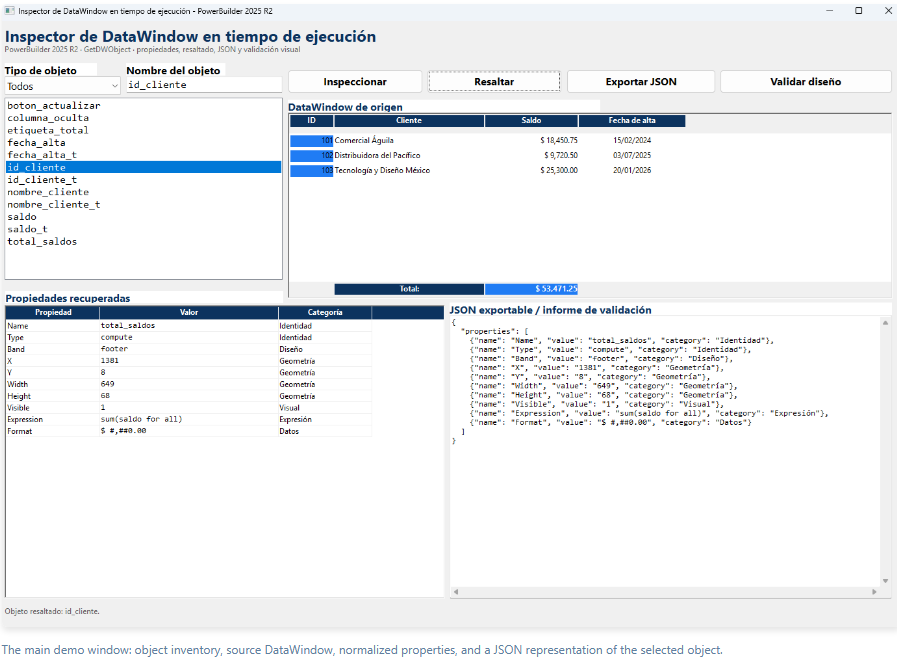
The Demo_GetDWObject project turns this capability into a visible tool. Users can enumerate the objects in a DataWindow, filter them by type, select one by name, retrieve its properties, locate it through temporary highlighting, export the result to JSON, and run basic design validation. The entire demo uses local data and requires no database connection.
The technical value of the demo is not a single method call. It presents a complete pipeline:Describe("DataWindow.Objects")discovers names,GetDWObjectobtains a typed object, the NVO normalizes its properties,Modifyapplies a reversible visual change, andFileWriteExproduces a UTF-8 JSON artifact.
The Problem: Inspecting a Definition Known Only at Runtime
A direct reference such as dw_origen.Object.saldo works when the developer knows the object name at compile time. It does not solve generic support, documentation, or auditing scenarios in which the name arrives as text, changes between DataWindows, or is selected by the user.
The demo divides the problem into three complementary operations:
| Requirement | Mechanism | Demo result |
|---|---|---|
| Discover which objects exist | Describe("DataWindow.Objects") |
A tab-delimited list of names that can be traversed and filtered. |
| Read properties for the actual type | GetDWObject(name) |
A DWObject reference used to inspect Type, geometry, format, expression, text, or action. |
| Change a property using a dynamic name | Describe + Modify |
The previous visual state is read, temporary highlighting is applied, and the state is later restored. |
Why the Dynamic Approach Matters
1. Coupled approach: hard-coded references in every window
A conventional implementation might write separate conditions for saldo, nombre_cliente, or total_saldos. This works for one DataWindow, but it requires source changes when the design evolves, duplicates logic in visual events, and makes cross-cutting development tools difficult to build.
2. Reusable approach: runtime name, type, and properties
The nvo_inspector_dw NVO accepts a DataWindow control and a name. The window does not need to know how inspecting a column differs from inspecting a computed field. The NVO determines the type and returns normalized rows with three fields: property, value, and category.
3. Architecture comparison
| Concern | Coupled UI code | Demo architecture |
|---|---|---|
| Discovery | Hard-coded list of names | Inventory read from the active definition. |
| Access | A different expression for every object | GetDWObject accepts the dynamic name. |
| Specialization | Conditions spread across the window | A type-based Choose Case centralized in the NVO. |
| Presentation | Controls filled individually | Properties normalized in a DataStore. |
| Reuse | Limited to the original DataWindow | A service that can inspect other compatible DataWindows. |
| Output | Visible only on screen | Grid, validation report, and UTF-8 JSON document. |
Demo Architecture
The project keeps responsibilities clearly separated:
| Object | Technical responsibility |
|---|---|
demo_getdwobject1.sra |
Opens w_inspector_dw_ejecucion as the main window. |
w_inspector_dw_ejecucion.srw |
Builds the UI, creates the service and DataStore, loads sample data, wires events, and presents status information. |
nvo_inspector_dw.sru |
Centralizes discovery, GetDWObject access, classification, property extraction, JSON creation, highlighting, and validation. |
d_origen_inspeccion.srd |
Sample DataWindow with five columns, headers, a sum expression, a label, a button, and a hidden column. |
d_propiedades_objeto.srd |
Database-independent external DataWindow with propiedad, valor, and categoria columns. |
The window holds two instance references: inv_inspector for the service and ids_propiedades for the DataStore. It also stores the highlighted object name, its previous color, and its previous background mode so the visual change can be safely undone.
Complete Runtime Flow
- The
openevent createsnvo_inspector_dwand aDataStore. - It assigns
d_origen_inspeccionto the source control andd_propiedades_objetoto both the result grid and DataStore. ShareDataconnects the nonvisual DataStore todw_propiedades.- The window inserts three customer rows, including names with accented characters.
- The NVO enumerates objects and applies the selected filter.
- A list selection or a click inside the DataWindow sends a name to
of_inspeccionar_objeto. - The NVO loads properties; the window updates the table, JSON, and status line.
- The user may highlight the object, export JSON, or validate the design.
- The
closeevent restores pending highlighting and destroys created objects.
Step 1: Initializing a Database-Independent Demo
The window builds its infrastructure in memory. The source DataWindow defines columns, but rows are inserted locally. The result DataStore uses an external DataWindow as its schema.
event open;
inv_inspector = Create nvo_inspector_dw
ids_propiedades = Create DataStore

dw_origen.DataObject = "d_origen_inspeccion"
dw_propiedades.DataObject = "d_propiedades_objeto"
ids_propiedades.DataObject = "d_propiedades_objeto"
ids_propiedades.ShareData(dw_propiedades)

ddlb_tipo_objeto.SelectItem(1)
of_cargar_datos_demostracion()
of_actualizar_lista_objetos()
of_inspeccionar_objeto()
end eventShareData lets the NVO work against a nonvisual DataStore while the grid reflects the same rows. The service therefore does not depend on the particular UI control used to display its result.Step 2: Discovering Objects in the Active Definition
DataWindow.Objects returns tab-delimited names. of_obtener_nombres walks the string without assuming how many objects it contains, retrieves each DWObject, reads its type, and adds only those that match the active filter.
ls_objetos = adw_origen.Describe("DataWindow.Objects")

Do While Len(ls_objetos) > 0
   ll_posicion = Pos(ls_objetos, "~t")
   If ll_posicion > 0 Then
      ls_nombre = Left(ls_objetos, ll_posicion - 1)
      ls_objetos = Mid(ls_objetos, ll_posicion + 1)
   Else
      ls_nombre = ls_objetos
      ls_objetos = ""
   End If

   ldwo_objeto = of_obtener_objeto(adw_origen, ls_nombre)
   If Not IsNull(ldwo_objeto) Then
      If of_coincide_tipo(of_obtener_tipo(ldwo_objeto), as_filtro) Then
         ll_total++
         as_nombres[ll_total] = ls_nombre
      End If
      Destroy ldwo_objeto
   End If
Loop
The Spanish UI filters map to technical object types: columns to column, computed fields to compute, and labels to text. The controls option accepts types outside these three groups; in the sample DataWindow, this includes boton_actualizar.
Step 3: Obtaining and Validating the DWObject
Access is centralized in of_obtener_objeto. Before invoking GetDWObject, it validates the control, trims the name, and rejects empty strings. Callers always check IsNull before reading properties.
public function dwobject of_obtener_objeto (datawindow adw_origen, string as_nombre);
DWObject ldwo_objeto
String ls_nombre

If Not IsValid(adw_origen) Then Return ldwo_objeto
ls_nombre = Trim(as_nombre)
If Len(ls_nombre) = 0 Then Return ldwo_objeto

ldwo_objeto = adw_origen.GetDWObject(ls_nombre)
Return ldwo_objeto
end functionadwo_objeto.Type or any other property. In the demo, of_cargar_propiedades returns -1, and the window reports which name could not be found.Step 4: Normalizing Common and Type-Specific Properties
Every inspected object contributes a common core: Name, Type, Band, X, Y, Width, Height, and Visible. The actual type then determines which additional properties are valid.
| DWObject type | Additional properties | Result categories |
|---|---|---|
column |
ColType, Format, TabSequence |
Data and interaction |
compute |
Expression, Format |
Expression and data |
text |
Text, Alignment |
Content and visual |
button |
Text, Action |
Content and interaction |
ls_tipo = of_obtener_tipo(ldwo_objeto)
ll_total = of_agregar_propiedad(ads_propiedades, "Name", String(ldwo_objeto.Name), "Identidad")
ll_total = of_agregar_propiedad(ads_propiedades, "Type", String(ldwo_objeto.Type), "Identidad")
ll_total = of_agregar_propiedad(ads_propiedades, "X", String(ldwo_objeto.X), "Geometría")
ll_total = of_agregar_propiedad(ads_propiedades, "Visible", String(ldwo_objeto.Visible), "Visual")

Choose Case ls_tipo
   Case "column"
      ll_total = of_agregar_propiedad(ads_propiedades, "ColType", String(ldwo_objeto.ColType), "Datos")
      ll_total = of_agregar_propiedad(ads_propiedades, "Format", String(ldwo_objeto.Format), "Datos")
   Case "compute"
      ll_total = of_agregar_propiedad(ads_propiedades, "Expression", String(ldwo_objeto.Expression), "Expresión")
   Case "text"
      ll_total = of_agregar_propiedad(ads_propiedades, "Text", String(ldwo_objeto.Text), "Contenido")
End Choose
The source DataWindow provides verifiable cases: saldo exposes a currency format, total_saldos contains the sum(saldo for all) expression, etiqueta_total provides text and alignment, and boton_actualizar exposes its caption and action.
Step 5: Selecting Objects Directly in the DataWindow
In addition to the object list, users can click a visible element. The clicked event receives dwo, checks that it is not null, copies dwo.Name into the search field, and runs the same inspection path.
event clicked;
If Not IsNull(dwo) Then
   sle_nombre_objeto.Text = String(dwo.Name)
   of_inspeccionar_objeto()
End If
end event
This pattern preserves a single functional implementation: typing a name, selecting it from the list, double-clicking it, or clicking inside the DataWindow all end at of_inspeccionar_objeto.
Step 6: Applying and Reverting Dynamic Highlighting
Before changing the background, the NVO retrieves the current color and mode with Describe. It then uses Modify with the dynamic object name. An empty return string from Modify is treated as success; returned text is treated as an error.
as_color_anterior = adw_origen.Describe(as_nombre + ".Background.Color")
as_modo_anterior = adw_origen.Describe(as_nombre + ".Background.Mode")

ls_resultado = adw_origen.Modify( &
   as_nombre + ".Background.Mode='2' " + &
   as_nombre + ".Background.Color='16022560'")

If Len(ls_resultado) > 0 Then Return -1
Return 1
The window restores the object before highlighting another one and also during close. This symmetry matters: a diagnostic tool should leave the DataWindow in the same visual state in which it found it.
Step 7: Producing Valid JSON and Writing UTF-8
of_exportar_json traverses the DataStore and builds a properties array. The implementation escapes backslashes, quotation marks, carriage returns, line feeds, and tabs before inserting values into the document.
{
  "properties": [
    {"name": "Name", "value": "total_saldos", "category": "Identidad"},
    {"name": "Type", "value": "compute", "category": "Identidad"},
    {"name": "Expression", "value": "sum(saldo for all)", "category": "Expresión"}
  ]
}
When saving, the string is explicitly converted with EncodingUTF8!. This preserves values such as “Comercial Águila,” “Distribuidora del Pacífico,” and “Tecnología y Diseño México.”
lblb_contenido = Blob(as_contenido, EncodingUTF8!)
ll_archivo = FileOpen(as_ruta, StreamMode!, Write!, LockWrite!, Replace!)
If ll_archivo < 1 Then Return -1

ll_escritos = FileWriteEx(ll_archivo, lblb_contenido)
FileClose(ll_archivo)GetFileSaveName; the NVO generates the document and performs the UTF-8 write. The dialog belongs to user interaction, while serialization and persistence remain centralized.Step 8: Validating the Design with the Same Inventory
The Validate design action demonstrates how inspection can become an automated rule. For every name, the NVO reads Visible, X, Y, Width, and Height, and reports:
- hidden objects;
- positions with negative coordinates;
- widths or heights less than or equal to zero.
d_origen_inspeccion deliberately contains columna_oculta with visible="0". The validator therefore has at least one controlled condition it can detect without a database or extra preparation.
If String(ldwo_objeto.Visible) = "0" Then
   ll_hallazgos++
   ls_informe += "[Oculto] " + ls_nombre + "~r~n"
End If
If ll_x < 0 Or ll_y < 0 Then
   ll_hallazgos++
   ls_informe += "[Posición] " + ls_nombre + " está fuera del origen visible.~r~n"
End If
If ll_ancho <= 0 Or ll_alto <= 0 Then
   ll_hallazgos++
   ls_informe += "[Dimensión] " + ls_nombre + " tiene ancho o alto no válido.~r~n"
End If
Lifecycle Management
Each temporary DWObject reference is destroyed after inspection. The window also destroys its DataStore and NVO during shutdown, after first restoring any pending highlight.
event close;
of_restaurar_resaltado_actual()
If IsValid(ids_propiedades) Then Destroy ids_propiedades
If IsValid(inv_inspector) Then Destroy inv_inspector
end event
This order prevents a temporary visual modification from being abandoned and makes ownership of objects created with Create explicit.
Practical Applications
- Support: internal inspectors that expose name, type, band, and geometry without opening the Painter.
- Documentation: JSON inventories for technical catalogs or automated documentation.
- Quality control: rules for hidden objects, inconsistent formats, invalid sizes, or tab sequences.
- Migration: comparing properties before and after converting an application.
- Testing: locating objects by type or name without coupling tests to static references.
- Developer tooling: runtime highlighting, navigation, and diagnosis of complex DataWindows.
Recommended Production Enhancements
- Add explicit
Describeerror handling and validate responses that begin with!. - Expand the property matrix for graphs, lines, ovals, nested reports, and other types used by the application.
- Move JSON serialization into a dedicated component or use a JSON generator as the contract grows.
- Include the DataObject name, version, timestamp, and runtime context in exported metadata.
- Use configurable rules instead of hard-coding every validation inside the NVO.
- Process large inventories without freezing the UI and add a technical error log.
- Do not export expressions or sensitive metadata without access controls and diagnostic-data policies.
- Add tests for unknown names, special characters, and object types that are not yet mapped.
Conclusion
GetDWObject becomes most useful as part of a complete introspection architecture. Describe discovers the active definition, GetDWObject interprets each element according to its runtime type, an NVO transforms heterogeneous properties into uniform rows, and Modify adds reversible visual interaction.
Demo_GetDWObject carries this pattern from initialization to a reusable result: it runs without a database, supports several selection paths, preserves international characters in UTF-8, exports JSON, and shows how the same properties can feed automated validation. It is compact, but technically sound, and provides a practical foundation for DataWindow inspectors, documentation tools, and auditing utilities in PowerBuilder 2025 R2.
View the demo on CodeXchange.
Comments (0)