


-
 Sandeep D
- PowerBuilder
- Wednesday, 24 December 2025 11:41 AM UTC
Hi,
I am working on a PowerBuilder Ribbon Bar using PowerBuilder R3 2022 (build 3391).
We have a requirement to enhance the Ribbon Bar tooltip behavior, specifically the PowerTip and PowerDescription.
The Ribbon Bar is configured using an XML-based definition file.
1. Bullet Points in Tooltip Description
Is it possible to display multi-line tooltips with bullet points?
standard bullet symbols (•, -, or numbered lists) supported natively, or would this require manual formatting (for example, using special characters or line breaks)?
If supported, is there a recommended approach or sample implementation?
2. Bold Formatting for Specific Characters
Can we apply bold formatting to specific parts of the PowerTipDescription text (for example, shortcut keys or important keywords)?
Does the tooltip control support any rich text, HTML, or markup-based formatting? Similar to below image "Tell me more"
If native bold formatting is not supported, are there any suggested workarounds?
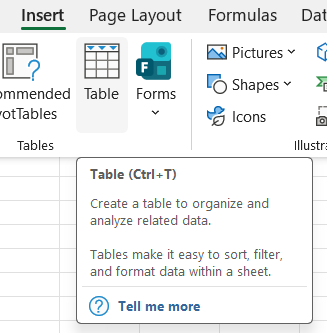
3. Right Alignment of Shortcut Keys - For Large RibbonBarButton and Small RibbonBarButton
Is it possible to right-align shortcut keys within a PowerTipText (for example, PowerTipText on the left and shortcut key aligned to the right)?
Does the tooltip layout support alignment properties, tab spacing, or fixed-width formatting?
Are there any UI components or alternative controls that could support this requirement?
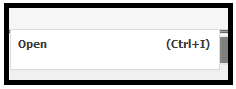
4. Why tool tip is not available for RibbonMenuItem control? Is there a plan to introduce in future builds of PowerBuilder?
Find Questions by Tag
Helpful?
If a reply or comment is helpful for you, please don’t hesitate to click the Helpful button. This action is further confirmation of their invaluable contribution to the Appeon Community.