


Introduction
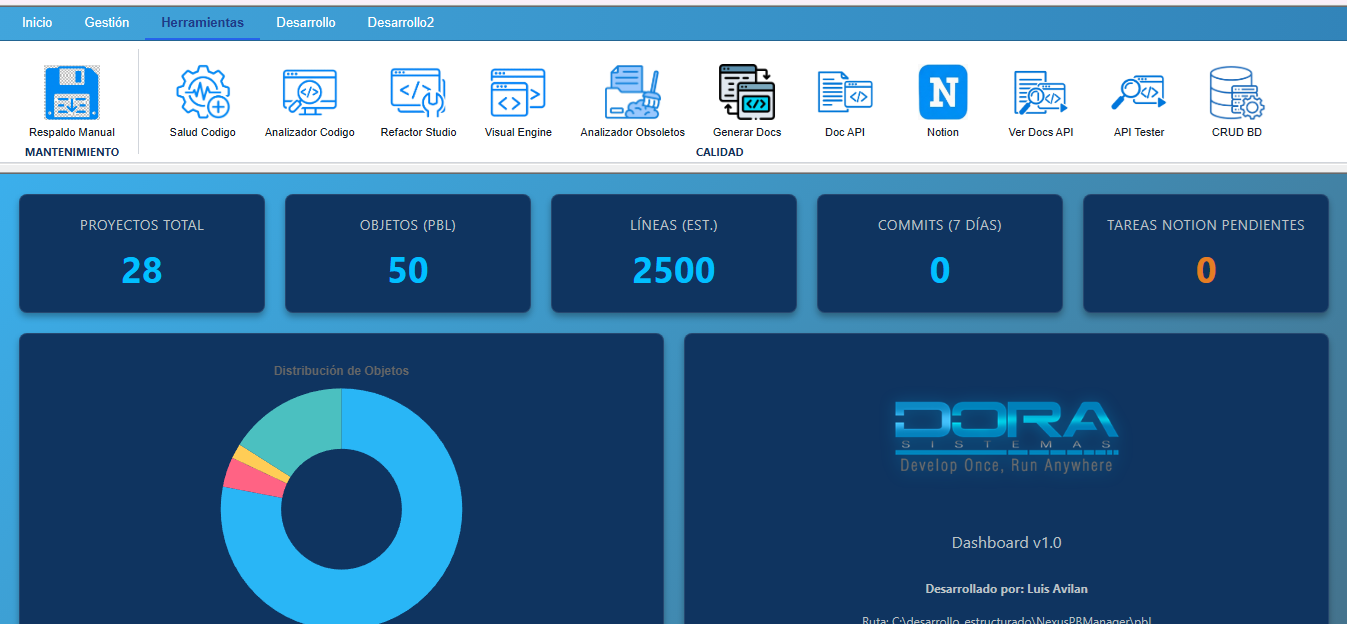
The native RibbonBar control in PowerBuilder, although functional, presents significant limitations regarding visual customization, dynamic themes, and extensibility. With the arrival of the Chromium WebBrowser (WebView2) control in PowerBuilder 2019 R3+, the possibility opens up to build a Ribbon-type toolbar completely rendered in HTML/CSS/JavaScript, achieving a modern, responsive, and fully customizable appearance.
This article demonstrates how to build a reusable Web RibbonBar encapsulated in a User Object (u_wb_ribbon) that inherits from webbrowser. The component allows defining Tabs, Groups, and Buttons from pure PowerScript, serializing the structure to JSON, injecting it into the web DOM, and receiving back user click events — all using the native bidirectional communication of WebView2.
General Architecture
The system is composed of three layers that collaborate to simulate the behavior of a classic RibbonBar inside an embedded web page:
┌──────────────────────────────────────────────────────────────┐
│              Main Window (w_main)                             │
│  ┌──────────────────────────────────────────────────────┐    │
│  │  wb_ribbon : u_wb_ribbon  (Inherited WebBrowser)     │    │
│  │  ┌──────────────────────────────────────────────┐    │    │
│  │  │     ribbon_template.html  (Static DOM)         │    │    │
│  │  │     + renderizarRibbon() Dynamic JS          │    │    │
│  │  └──────────────────────────────────────────────┘    │    │
│  └──────────────────────────────────────────────────────┘    │
│                          │                                    │
│     PB → JS:  EvaluateJavascriptAsync("renderizarRibbon(...)") │
│     JS → PB:  window.chrome.webview.postMessage(actionId)    │
│                          │                                    │
│  ┌──────────────────────────────────────────────────────┐    │
│  │  ue_ribbon_action(as_action) event                   │    │
│  │  Choose Case → Open(target_window)                   │    │
│  └──────────────────────────────────────────────────────┘    │
└──────────────────────────────────────────────────────────────┘
Main Components:
u_wb_ribbon— User Object inherited fromwebbrowserthat encapsulates the Ribbon construction logic: it stores Tabs, Groups, and Buttons in internal arrays, serializes them to JSON, and injects them into the HTML.ribbon_template.html— Static HTML template containing the Ribbon's CSS and therenderizarRibbon()JavaScript function that receives the JSON and builds the DOM dynamically.w_main— Main window that instantiateswb_ribbon, defines the Ribbon structure by invokingof_AddTab,of_AddGroup,of_AddButton, and handles the action events inue_ribbon_action.
Prerequisites
Before starting, make sure you have:
- PowerBuilder 2022 R3 or later (with native support for the Chromium WebBrowser / WebView2 control).
- The
ribbon_template.htmlfile accessible in the executable path or in thesrc\folder. - Images for the button icons in PNG format (recommended 56×56 px).
Implementation
Step 1: The HTML Template — ribbon_template.html
The starting point is a static HTML file that defines the visual structure of the Ribbon and exposes a global JavaScript function renderizarRibbon() that PowerBuilder will invoke.
Ribbon CSS Structure:
 lang="es">

     charset="UTF-8">


     id="ribbon-container">
EvaluateJavascriptAsync.Step 2: The JavaScript Function — renderizarRibbon()
The heart of the web side is the renderizarRibbon() function that receives a JSON array with the complete hierarchical structure and builds the DOM:
/**
 * Función principal que recibe el JSON desde PowerBuilder
 * y dibuja el DOM del Ribbon completo.
 * @param {string|object} jsonInput - Cadena JSON o array de objetos
 */
function renderizarRibbon(jsonInput) {
    try {
        const data = typeof jsonInput === 'string'
            ? JSON.parse(jsonInput) : jsonInput;

        const container = document.getElementById('ribbon-container');
        container.innerHTML = ''; // Limpiar previo

        const tabsDiv = document.createElement('div');
        tabsDiv.className = 'ribbon-tabs';

        const contentAreaDiv = document.createElement('div');
        contentAreaDiv.className = 'ribbon-content-area';

        data.forEach((tab, index) => {
            const tabBtn = document.createElement('button');
            tabBtn.className = `tab-btn ${index === 0 ? 'active' : ''}`;
            tabBtn.innerText = tab.text;
            tabBtn.onclick = () => switchTab(tab.id);
            tabBtn.dataset.tabId = tab.id;
            tabsDiv.appendChild(tabBtn);

            const tabContent = document.createElement('div');
            tabContent.className = `tab-content ${index === 0 ? 'active' : ''}`;
            tabContent.id = `content-${tab.id}`;

            if (tab.groups) {
                tab.groups.forEach(group => {
                    const groupDiv = document.createElement('div');
                    groupDiv.className = 'ribbon-group';

                    if (group.buttons) {
                        group.buttons.forEach(btn => {
                            const btnEl = document.createElement('button');
                            btnEl.className = 'ribbon-btn';
                            // VINCULAR EVENTO DE SALIDA HACIA PB
                            btnEl.onclick = () => enviarAccionPB(btn.id);

                            if (btn.image_url && btn.image_url.trim() !== "") {
                                const img = document.createElement('img');
                                img.src = btn.image_url;
                                img.className = 'btn-icon';
                                btnEl.appendChild(img);
                            }

                            const textSpan = document.createElement('span');
                            textSpan.className = 'btn-text';
                            textSpan.innerText = btn.text;
                            btnEl.appendChild(textSpan);
                            groupDiv.appendChild(btnEl);
                        });
                    }

                    const groupTitle = document.createElement('div');
                    groupTitle.className = 'group-title';
                    groupTitle.innerText = group.text;
                    groupDiv.appendChild(groupTitle);
                    tabContent.appendChild(groupDiv);
                });
            }
            contentAreaDiv.appendChild(tabContent);
        });

        container.appendChild(tabsDiv);
        container.appendChild(contentAreaDiv);
    } catch (error) {
        document.getElementById('ribbon-container').innerHTML =
            `
`;
    }
}
Step 3: The JavaScript → PowerBuilder Bidirectional Bridge
The enviarAccionPB() function uses the native WebView2 API to send the identifier of the pressed button back to PowerBuilder:
/**
 * Emisión hacia PowerBuilder (Puente Bidireccional)
 * Usa la API nativa de WebView2 para comunicar acciones.
 */
function enviarAccionPB(actionId) {
    if (window.chrome && window.chrome.webview) {
        // postMessage envía asíncronamente al evento
        // WebMessageReceived del control WebBrowser en PB
        window.chrome.webview.postMessage(actionId);
    } else {
        console.warn(`[Modo Debug] Acción solicitada: ${actionId}`);
    }
}
window.chrome.webview.postMessage(actionId) is the official WebView2 mechanism to communicate data from JavaScript to the host (PowerBuilder). The sent value is received in the WebMessageReceived event of the webbrowser control, specifically in the webmessage parameter.Step 4: The User Object — u_wb_ribbon
This is the central reusable component. It is a User Object that inherits from webbrowser and encapsulates all the Ribbon construction logic.
Object and custom event definition:
global type u_wb_ribbon from webbrowser
integer width = 4500
integer height = 500
event ue_ribbon_action ( string as_action )
end type
Instance variables (structure memory):
Private:
    String is_json_payload = "[]"  // JSON acumulado final

    // Arrays de Tabs
    String is_tab_id[]
    String is_tab_text[]
    Integer ii_tab_count = 0

    // Arrays de Grupos
    String is_group_tab_id[]
    String is_group_id[]
    String is_group_text[]
    Integer ii_group_count = 0

    // Arrays de Botones
    String is_btn_group_id[]
    String is_btn_id[]
    String is_btn_text[]
    String is_btn_image[]
    Integer ii_btn_count = 0

    // Bandera de inicialización web
    Boolean ib_web_ready = false
Function of_AddTab — Add a tab
public subroutine of_addtab (string as_tab_id, string as_text);
// -------------------------------------------------------------
// FUNCIÓN: of_AddTab
// AUTOR: Luis Avilan
// DESCRIPCIÓN: Agrega temporalmente un Tab al ribbon web.
// -------------------------------------------------------------
ii_tab_count++
is_tab_id[ii_tab_count] = as_tab_id
is_tab_text[ii_tab_count] = as_text
end subroutine
Function of_AddGroup — Add a group inside a Tab
public subroutine of_addgroup (string as_tab_id, string as_group_id, string as_text);
// -------------------------------------------------------------
// FUNCIÓN: of_AddGroup
// AUTOR: Luis Avilan
// DESCRIPCIÓN: Asocia un nuevo grupo a un Tab existente.
// -------------------------------------------------------------
ii_group_count++
is_group_tab_id[ii_group_count] = as_tab_id
is_group_id[ii_group_count] = as_group_id
is_group_text[ii_group_count] = as_text
end subroutine
Function of_AddButton — Add a button inside a group
public subroutine of_addbutton (string as_group_id, string as_btn_id, string as_text, string as_image_url);
// -------------------------------------------------------------
// FUNCIÓN: of_AddButton
// AUTOR: Luis Avilan
// DESCRIPCIÓN: Agrega un botón (acción) asociado a un Grupo.
// -------------------------------------------------------------
ii_btn_count++
is_btn_group_id[ii_btn_count] = as_group_id
is_btn_id[ii_btn_count] = as_btn_id
is_btn_text[ii_btn_count] = as_text
is_btn_image[ii_btn_count] = as_image_url
end subroutine
Step 5: The Key Function — of_Render()
This.EvaluateJavascriptAsync() is the fundamental method that allows PowerBuilder to execute JavaScript code inside the WebBrowser control asynchronously. Without this function, PB → Web communication would not be possible.The of_Render() function takes all the accumulated structure in the internal arrays, serializes it to JSON using JSONGenerator, and dynamically injects it into the web DOM by invoking renderizarRibbon() through This.EvaluateJavascriptAsync():
public subroutine of_render ();
// -------------------------------------------------------------
// FUNCIÓN: of_Render
// AUTOR: Luis Avilan
// DESCRIPCIÓN: Toma la estructura array acumulada, la convierte
// en un string JSON puro, e invoca dinámicamente el JavaScript
// de renderizarRibbon en la plantilla web "de golpe".
// -------------------------------------------------------------

JSONGenerator lnv_json
lnv_json = Create JSONGenerator

Long ll_root_arr, ll_tab_obj, ll_groups_arr, ll_group_obj
Long ll_btns_arr, ll_btn_obj
Integer i, j, k
String ls_json_temp

// Crear array raiz
ll_root_arr = lnv_json.CreateJsonArray()

// Iterar memoria y armar estructura jerárquica
For i = 1 To ii_tab_count
    ll_tab_obj = lnv_json.AddItemObject(ll_root_arr)
    lnv_json.AddItemString(ll_tab_obj, "id", is_tab_id[i])
    lnv_json.AddItemString(ll_tab_obj, "text", is_tab_text[i])

    ll_groups_arr = lnv_json.AddItemArray(ll_tab_obj, "groups")

    For j = 1 To ii_group_count
        If is_group_tab_id[j] = is_tab_id[i] Then
            ll_group_obj = lnv_json.AddItemObject(ll_groups_arr)
            lnv_json.AddItemString(ll_group_obj, "id", is_group_id[j])
            lnv_json.AddItemString(ll_group_obj, "text", is_group_text[j])

            ll_btns_arr = lnv_json.AddItemArray(ll_group_obj, "buttons")

            For k = 1 To ii_btn_count
                If is_btn_group_id[k] = is_group_id[j] Then
                    ll_btn_obj = lnv_json.AddItemObject(ll_btns_arr)
                    lnv_json.AddItemString(ll_btn_obj, "id", is_btn_id[k])
                    lnv_json.AddItemString(ll_btn_obj, "text", is_btn_text[k])
                    lnv_json.AddItemString(ll_btn_obj, "image_url", is_btn_image[k])
                End If
            Next
        End If
    Next
Next

ls_json_temp = lnv_json.GetJsonString()
Destroy lnv_json

If ls_json_temp <> "" Then
    is_json_payload = ls_json_temp
End If

// ═══════════════════════════════════════════════════════════
// ★ LÍNEA CLAVE: Inyectar el JSON al DOM web
// ═══════════════════════════════════════════════════════════
If ib_web_ready Then
    This.EvaluateJavascriptAsync("renderizarRibbon(" + is_json_payload + ");")
End If
end subroutine
This.EvaluateJavascriptAsync() receives a string that is valid JavaScript code. In this case, the renderizarRibbon() function is invoked, passing the serialized JSON directly as a literal argument, without the need for additional quotes since JSONGenerator produces a valid JSON string that JavaScript interprets as a native object/array.Step 6: The Constructor and the NavigationCompleted Event
The u_wb_ribbon constructor loads the HTML template and registers the custom event:
event constructor;
/*------------------------------------------------------------------------
Nombre de la función: constructor
Descripción: Carga el DOM estático vacío base (HTML) del ribbon
Parámetros de entrada: Parámetros del evento
Parámetros de salida: Retorno del evento
Fecha: 25 de May de 2026
Realizado por: Luis Avilan
------------------------------------------------------------------------*/
// -------------------------------------------------------------
// EVENTO: Constructor
// DESCRIPCIÓN: Carga el DOM estático vacío base (HTML)
// -------------------------------------------------------------
String ls_path
String ls_current
ls_current = GetCurrentDirectory()

If FileExists(ls_current + "\ribbon_template.html") Then
    ls_path = ls_current + "\ribbon_template.html"
ElseIf FileExists(ls_current + "\src\ribbon_template.html") Then
    ls_path = ls_current + "\src\ribbon_template.html"
End If

// Registrar el evento personalizado para el puente de mensajes
This.RegisterEvent("ue_ribbon_action")

If FileExists(ls_path) Then
    nvo_utilidadespb lnv_util
    lnv_util = Create nvo_utilidadespb
    ls_path = "file:///" + lnv_util.of_ReemplazarTodo(ls_path, "\", "/")
    Destroy lnv_util
    This.Navigate(ls_path)
Else
    This.NavigateToString("
Error: ribbon_template.html no encontrada
")
End If
end event
The NavigationCompleted event sets the ib_web_ready flag and, if the render was invoked before the DOM was ready, retries the injection:
event navigationcompleted;
/*------------------------------------------------------------------------
Nombre de la función: navigationcompleted
Descripción: Notifica que el DOM web nativo está listo para inyectar datos
Parámetros de entrada: Parámetros del evento
Parámetros de salida: Retorno del evento
Fecha: 25 de May de 2026
Realizado por: Luis Avilan
------------------------------------------------------------------------*/
call super::navigationcompleted;
// -------------------------------------------------------------
// EVENTO: NavigationCompleted
// DESCRIPCIÓN: Notifica que el DOM web nativo está listo para inyectar datos
// -------------------------------------------------------------

ib_web_ready = True

// Si of_Render se lanzó ANTES de que el DOM cargara, reinyectar
If ii_tab_count > 0 And is_json_payload <> "[]" Then
    This.EvaluateJavascriptAsync("renderizarRibbon(" + is_json_payload + ");")
End If
end event
NavigationCompleted) before executing EvaluateJavascriptAsync(). The ib_web_ready flag and the re-injection in NavigationCompleted solve the race condition between the Ribbon construction and the DOM loading.Step 7: The WebMessageReceived Event — Receiving User Actions
This event is the receiver of the bidirectional bridge. When the user clicks on a button in the web Ribbon, JavaScript executes window.chrome.webview.postMessage(actionId), and PowerBuilder receives it here:
event webmessagereceived;
/*------------------------------------------------------------------------
Nombre de la función: webmessagereceived
Descripción: Captura los postMessage enviados desde JavaScript
Parámetros de entrada: Parámetros del evento
Parámetros de salida: Retorno del evento
Fecha: 25 de May de 2026
Realizado por: Luis Avilan
------------------------------------------------------------------------*/
call super::webmessagereceived;
// -------------------------------------------------------------
// EVENTO: WebMessageReceived (FASE 4 - Puente de Eventos)
// PROPÓSITO: Captura los postMessage enviados desde JavaScript (e.g. botón click)
// P.ej window.chrome.webview.postMessage("btn_guardar");
// -------------------------------------------------------------

String ls_action, ls_clean_action

// La carga útil viene en el parámetro webmessage del evento base
ls_action = webmessage

// WebView2 puede envolver con comillas dobles el payload
If Left(ls_action, 1) = '"' Then
    ls_clean_action = Mid(ls_action, 2)
Else
    ls_clean_action = ls_action
End If

If Right(ls_clean_action, 1) = '"' Then
    ls_clean_action = Left(ls_clean_action, Len(ls_clean_action) - 1)
End If

// Disparar evento personalizado para mapeo desde la ventana
This.Event ue_ribbon_action(ls_clean_action)
end event
Step 8: Usage from the Window — w_main
The main window instantiates u_wb_ribbon, builds the Ribbon structure in the open event, and handles actions in the ue_ribbon_action event.
Window definition with the control:
global type w_main from window
    wb_ribbon wb_ribbon        // Instancia del Web Ribbon
    wb_dashboard wb_dashboard  // WebBrowser para el area de contenido
end type
open event — Programmatic construction of the Ribbon (simplified example with 2 Tabs, 2 Groups, 4 Buttons):
event open;
/*------------------------------------------------------------------------
Nombre de la función: open
Descripcion: Construcción Programática del Web Ribbon (u_wb_ribbon)
Parámetros de entrada: Parámetros del evento
Parámetros de salida: Retorno del evento
Fecha: 25 de May de 2026
Realizado por: Luis Avilan
------------------------------------------------------------------------*/
// ══════════════════════════════════════════
// Construcción Programática del Web Ribbon
// ══════════════════════════════════════════

// --- TAB 1: INICIO ---
wb_ribbon.of_AddTab("Home", "Inicio")

// Grupo: Proyecto
wb_ribbon.of_AddGroup("Home", "ProjectPanel", "Proyecto")

// Botón 1: Nuevo Proyecto
wb_ribbon.of_AddButton("ProjectPanel", "NewProject",  "Nuevo Proyecto",  ls_img_nuevo)

// Botón 2: Abrir Proyecto
wb_ribbon.of_AddButton("ProjectPanel", "OpenProject", "Abrir Proyecto",  ls_img_abrir)

// --- TAB 2: HERRAMIENTAS ---
wb_ribbon.of_AddTab("Tools", "Herramientas")

// Grupo: Calidad
wb_ribbon.of_AddGroup("Tools", "QualityPanel", "Calidad")

// Botón 3: Salud del Código
wb_ribbon.of_AddButton("QualityPanel", "CodeHealth", "Salud Codigo",     ls_img_salud)

// Botón 4: Analizador de Código
wb_ribbon.of_AddButton("QualityPanel", "AnalizadorCodigo", "Analizador", ls_img_analizar)

// ══════════════════════════════════════════
// RENDER FINAL — Inyecta todo al WebBrowser
// ══════════════════════════════════════════
wb_ribbon.of_Render()
end event
data:image/png;base64,...) to avoid path and CORS issues in WebView2. Each image is read with FileOpen/FileRead in StreamMode! and encoded with CoderObject.Base64Encode().Step 9: The ue_ribbon_action Event — Action Mapping
ue_ribbon_action event in the wb_ribbon instance within w_main is where each button identifier is mapped to an actual PowerBuilder action. This is the point where the full PB → HTML → JS → PB cycle is closed.event ue_ribbon_action; /*------------------------------------------------------------------------ Nombre de la función: ue_ribbon_action Descripción: Evento disparado por el HTML del WebBrowser cuando el usuario hace clic en un botón del Ribbon web. Parámetros de entrada: string as_action Parámetros de salida: Retorno del evento Fecha: 25 de May de 2026 Realizado por: Luis Avilan ------------------------------------------------------------------------*/ // Disparado por el HTML del WebBrowser cuando el usuario // hace clic en un botón del Ribbon. // Funciona igual que el antiguo RibbonBar nativo pero // interceptando mensajes JavaScript. String ls_tag ls_tag = as_action Choose Case ls_tag Case "NewProject" Open(w_nuevo_proyecto) Parent.Event ue_refresh_dashboard() Case "OpenProject" Open(w_proyectos_lista) Case "CodeHealth" Open(w_code_health) Case "AnalizadorCodigo" Open(w_main_analizador) // ... Agregar más Cases según los botones definidos End Choose end event
Generated JSON Structure
The JSON that of_Render() generates and sends to JavaScript has the following hierarchical structure:
[
  {
    "id": "Home",
    "text": "Inicio",
    "groups": [
      {
        "id": "ProjectPanel",
        "text": "Proyecto",
        "buttons": [
          { "id": "NewProject",  "text": "Nuevo Proyecto",  "image_url": "data:image/png;base64,iVBOR..." },
          { "id": "OpenProject", "text": "Abrir Proyecto",  "image_url": "data:image/png;base64,iVBOR..." }
        ]
      }
    ]
  },
  {
    "id": "Tools",
    "text": "Herramientas",
    "groups": [
      {
        "id": "QualityPanel",
        "text": "Calidad",
        "buttons": [
          { "id": "CodeHealth",        "text": "Salud Codigo", "image_url": "data:image/png;base64,iVBOR..." },
          { "id": "AnalizadorCodigo", "text": "Analizador",   "image_url": "data:image/png;base64,iVBOR..." }
        ]
      }
    ]
  }
]
Complete Communication Flow
The complete lifecycle of the Web RibbonBar follows these steps:
1. CONSTRUCTOR (u_wb_ribbon)
   └─→ This.Navigate("file:///ribbon_template.html")
       └─→ Carga la plantilla HTML vacia en WebView2

2. NAVIGATION COMPLETED (u_wb_ribbon)
   └─→ ib_web_ready = True
       └─→ Si hay datos pendientes → EvaluateJavascriptAsync()

3. EVENTO OPEN (w_main)
   └─→ wb_ribbon.of_AddTab("Home", "Inicio")
   └─→ wb_ribbon.of_AddGroup("Home", "ProjectPanel", "Proyecto")
   └─→ wb_ribbon.of_AddButton("ProjectPanel", "NewProject", ...)
   └─→ wb_ribbon.of_Render()
       └─→ JSONGenerator → Serializa arrays a JSON
       └─→ This.EvaluateJavascriptAsync("renderizarRibbon({JSON});")
           └─→ JavaScript construye el DOM (tabs, grupos, botones)

4. USUARIO HACE CLIC EN BOTÓN (JavaScript)
   └─→ enviarAccionPB("NewProject")
       └─→ window.chrome.webview.postMessage("NewProject")

5. WEB MESSAGE RECEIVED (u_wb_ribbon)
   └─→ Limpia comillas del payload
   └─→ This.Event ue_ribbon_action("NewProject")

6. UE_RIBBON_ACTION (wb_ribbon en w_main)
   └─→ Choose Case "NewProject"
       └─→ Open(w_nuevo_proyecto)
Key Functions of u_wb_ribbon — Summary
| Function | Description | Parameters |
|---|---|---|
of_AddTab |
Registers a new Tab in internal memory | as_tab_id, as_text |
of_AddGroup |
Associates a Group to an existing Tab | as_tab_id, as_group_id, as_text |
of_AddButton |
Adds a button to an existing Group | as_group_id, as_btn_id, as_text, as_image_url |
of_Render |
Serializes the structure to JSON and invokes EvaluateJavascriptAsync to inject into the DOM |
(no parameters) |
Key Methods of EvaluateJavascriptAsync
This.EvaluateJavascriptAsync() is the PowerBuilder webbrowser control method that allows executing arbitrary JavaScript code within the context of the loaded web page. It is asynchronous, which means it does not block the main PowerBuilder thread. All data injection from PB into the web Ribbon depends on this function.Syntax used in the project:
// Inyectar el Ribbon completo
This.EvaluateJavascriptAsync("renderizarRibbon(" + is_json_payload + ");")
Key patterns:
- The JSON is passed directly as an argument to the JavaScript function, without additional enclosing quotes.
- The
JSONGeneratorproduces a JSON string that JavaScript interprets as a valid object/array literal. - The Async version is used to avoid blocking the user interface.
Conclusion
This Web RibbonBar pattern demonstrates the power of combining PowerBuilder with modern web technologies through the WebView2 control. The main advantages include:
- Total customization: CSS allows any design, theme, or animation.
- Visual independence: It does not depend on native operating system controls.
- Bidirectional communication:
EvaluateJavascriptAsync()(PB → JS) andpostMessage(JS → PB) form a complete bridge. - Reusability:
u_wb_ribbonis an encapsulated component that can be used in any window. - Extensibility: Adding new tabs, groups, or buttons requires only one line of PowerScript code per element.
This approach opens the door to building fully modern user interfaces in PowerBuilder, maintaining all business logic in PowerScript and delegating only the visual presentation to the embedded Chromium engine.
For demo, please refer to Building a Web RibbonBar with the WebBrowser Control in PowerBuilder.
Comments (0)