


Introduction
Artificial Intelligence is transforming enterprise software development. PowerBuilder developers can now integrate Retrieval-Augmented Generation (RAG) capabilities directly into their applications, enabling an intelligent question-and-answer system based on documents, powered by Large Language Models (LLMs).
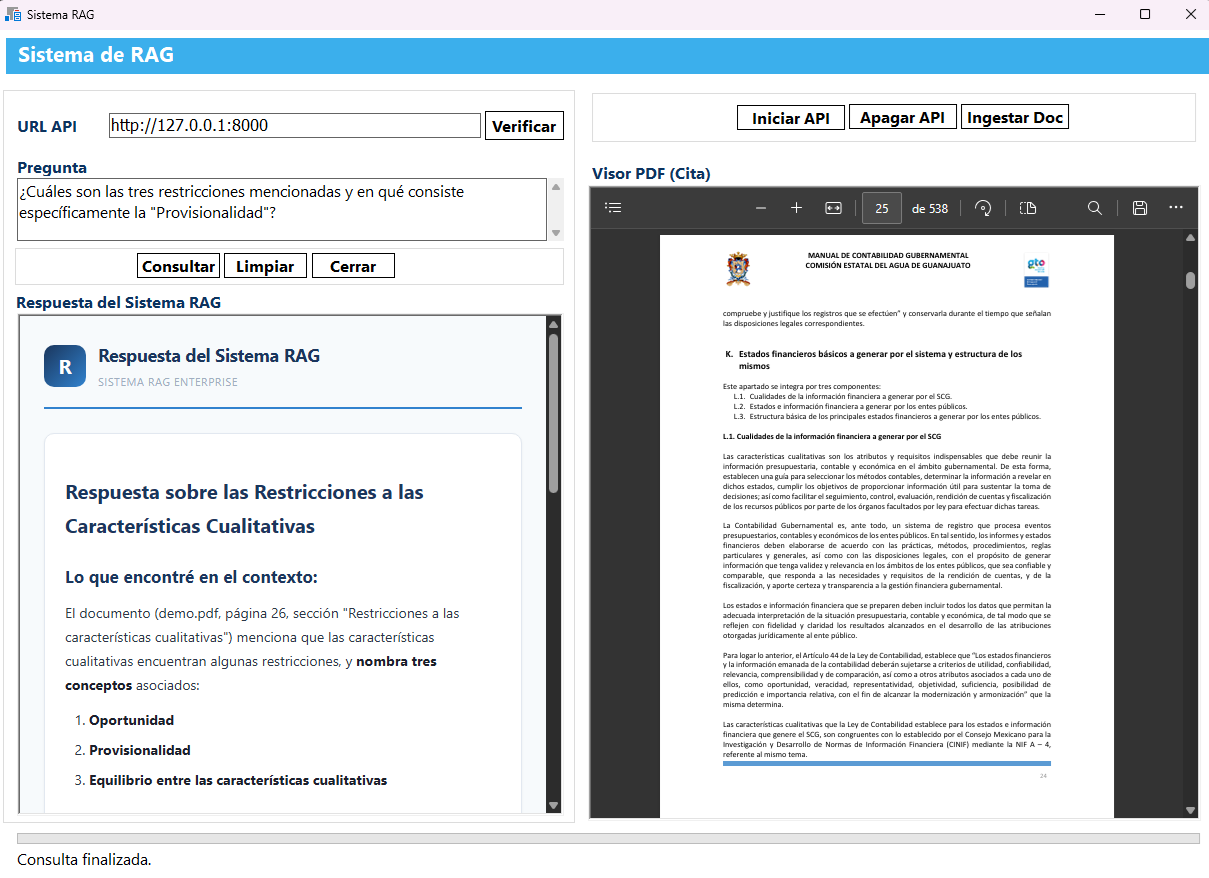
This article demonstrates how to build a complete RAG client in PowerBuilder that connects to a Python-based backend with FastAPI. The system allows users to ingest documents, query them using natural language, and receive AI-generated responses with citations to the sources — all rendered in a professional HTML interface using the Chromium WebBrowser control.
What is RAG?
RAG (Retrieval-Augmented Generation) is an AI pattern that combines two powerful techniques:
- Retrieval: Searching a knowledge base (indexed documents) to find relevant snippets of information.
- Generation: Using an LLM to synthesize a natural language response grounded in the retrieved context.
This approach drastically reduces "hallucinations" (the AI inventing information) because the model is constrained to answer based on real documents.
General Architecture
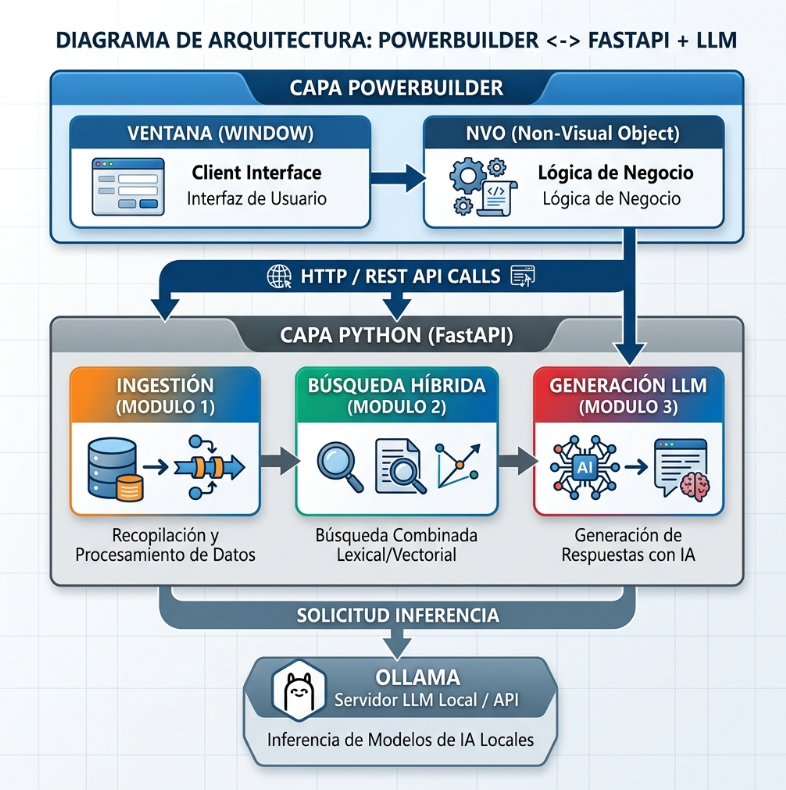
The system consists of two main layers:
┌───────────────────────────────────────────────────────┐
│              PowerBuilder Client (PB 2022+)           │
│  ┌──────────────┐  ┌───────────────────────────────┐  │
│  │ w_prueba_rag │  │      nvo_cliente_rag           │  │
│  │  (Window)    │──│  (Non-Visual Object)           │  │
│  │  WebBrowser  │  │  HTTPClient + JSON Parser      │  │
│  └──────────────┘  └───────────────────────────────┘  │
│         │                       │                     │
│         │                                     │
└─────────│─────────────────────────────────────│───────────────┘
          │ HTML Rendering      │ HTTP REST
          ▼                     ▼
┌──────────────────────────────────────────────────────┐
│          Python Backend (FastAPI + Uvicorn)           │
│  ┌───────────┐  ┌────────────┐  ┌─────────────────┐  │
│  │ Document  │  │ Search     │  │   Generation    │  │
│  │ Ingestion │  │ (BM25 +    │  │   (Ollama LLM)  │  │
│  │           │  │ Semantics) │  │                 │  │
│  └───────────┘  └────────────┘  └─────────────────┘  │
└──────────────────────────────────────────────────────┘
Main Components:
w_prueba_rag— Main window with controls for URL configuration, question input, and dual WebBrowser panels (results + PDF viewer).nvo_cliente_rag— Non-visual object that encapsulates all API communication, JSON parsing, and HTML rendering.- Python Backend — FastAPI service that handles document ingestion, hybrid search (BM25 + semantic), and response generation via LLM.
Prerequisites
Before starting, make sure you have the following components installed:
- PowerBuilder 2022 R3 or later (with support for the Chromium WebBrowser control).
- Python 3.10+ with the following packages:
fastapi,uvicorn— API Server.langchain,chromadb— Document processing and vector storage.rank-bm25— BM25 keyword search.- Ollama (optional) — For local LLM inference without cloud APIs.
Implementation
Step 1: The RAG Client NVO (nvo_cliente_rag)
The core of the PowerBuilder client is a non-visual object that manages all communication with the RAG backend. It provides a clean API for the window to consume.
Instance variables:
// ── Configuración del servicio RAG ──
string is_url_base = "http://127.0.0.1:8000"

// ── Configuración de consulta directa al LLM ──
long il_max_tokens = 2048
string is_temperatura = "0.7"

// ── Configuración de Ollama ──
string is_url_ollama = "http://localhost:11434"
string is_modelo_ollama = "minimax-m3:cloud"
Step 2: Service Verification — Health Check
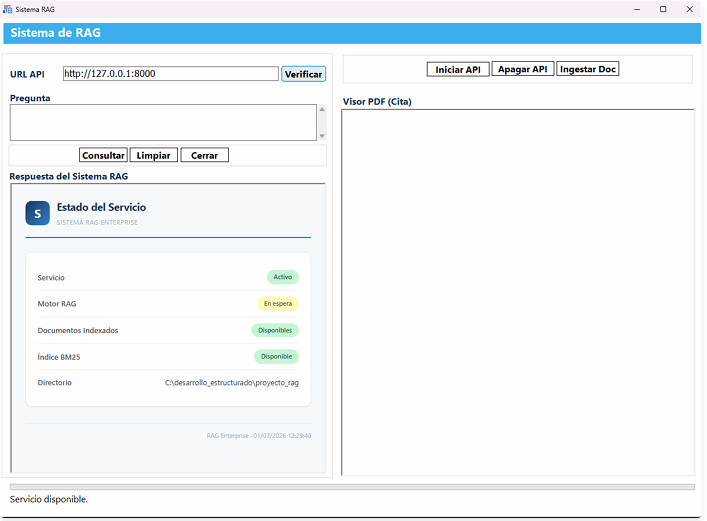
The first function verifies that the Python backend API is active. It uses HTTPClient to query the /salud endpoint:
public function integer of_verificar_servicio (string as_url_base, ref string as_estado, ref string as_mensaje_error);
/*------------------------------------------------------------------------
Nombre de la funcion: of_verificar_servicio
Descripcion: Verifica que la API del sistema RAG este activa.
             Se utiliza HTTPClient para consultar el endpoint /salud.
Parametros de entrada: string as_url_base, ref string as_estado, ref string as_mensaje_error
Parametros de salida: integer codigo de resultado, cero indica ejecucion correcta
Fecha: 2026-06-29
Realizado por: Luis Avilan
------------------------------------------------------------------------*/
HTTPClient lnv_http
integer li_resultado
integer li_status
string ls_url
string ls_respuesta_http

as_estado = ""
as_mensaje_error = ""

ls_url = of_normalizar_url(as_url_base) + "/salud"

lnv_http = create HTTPClient
li_resultado = lnv_http.SendRequest("GET", ls_url)

if li_resultado <> 1 then
    as_mensaje_error = of_describir_error_http(li_resultado, 0)
    destroy lnv_http
    return -1
end if

li_status = lnv_http.GetResponseStatusCode()
lnv_http.GetResponseBody(ls_respuesta_http)

if li_status <> 200 then
    as_mensaje_error = of_describir_error_http(1, li_status) + "~r~n" + Left(ls_respuesta_http, 500)
    destroy lnv_http
    return -1
end if

as_estado = ls_respuesta_http
destroy lnv_http
return 0
end function
Key Patterns: - Always use create and destroy for the HTTPClient to prevent resource leaks. - Use a helper function for URL normalization to remove trailing slashes. - Provide readable error descriptions using of_describir_error_http().
Step 3: Querying the RAG System
The main function sends the user's question to the /consultar endpoint via POST and then parses the structured JSON response:
public function integer of_consultar_sistema (string as_url_base, string as_pregunta, ref string as_respuesta, ref string as_html_respuesta, ref string as_fuentes, ref string as_mensaje_error);
/*------------------------------------------------------------------------
Nombre de la funcion: of_consultar_sistema
Descripcion: Envia una pregunta a la API del sistema RAG y obtiene la respuesta.
             Se utiliza HTTPClient hacia el endpoint POST /consultar.
Parametros de entrada: string as_url_base, string as_pregunta, ref string as_respuesta, ref string as_html_respuesta, ref string as_fuentes, ref string as_mensaje_error
Parametros de salida: integer codigo de resultado, cero indica ejecucion correcta
Fecha: 2026-06-29
Realizado por: Luis Avilan
------------------------------------------------------------------------*/
HTTPClient lnv_http
integer li_resultado
integer li_status
string ls_url
string ls_cuerpo
string ls_respuesta_http
string ls_pregunta

as_respuesta = ""
as_html_respuesta = ""
as_fuentes = ""
as_mensaje_error = ""
ls_pregunta = Trim(as_pregunta)

if Len(ls_pregunta) = 0 then
    as_mensaje_error = "Debe indicar una pregunta para consultar el sistema RAG."
    return -1
end if

ls_url = of_normalizar_url(as_url_base) + "/consultar"
ls_cuerpo = "{~"pregunta~":~"" + of_escapar_json(ls_pregunta) + "~"}"

lnv_http = create HTTPClient
lnv_http.SetRequestHeader("Content-Type", "application/json; charset=utf-8")
lnv_http.SetRequestHeader("Accept", "application/json; charset=utf-8")

// Timeout un poco mayor por si el LLM tarda
lnv_http.TimeOut = 300

li_resultado = lnv_http.SendRequest("POST", ls_url, ls_cuerpo)

if li_resultado <> 1 then
    as_mensaje_error = of_describir_error_http(li_resultado, 0)
    destroy lnv_http
    return -1
end if

li_status = lnv_http.GetResponseStatusCode()
lnv_http.GetResponseBody(ls_respuesta_http)

if li_status <> 200 then
    as_mensaje_error = of_describir_error_http(1, li_status) + "~r~n" + Left(ls_respuesta_http, 500)
    destroy lnv_http
    return -1
end if

// Parsear el JSON devuelto por el API
as_respuesta = of_obtener_valor_json(ls_respuesta_http, "respuesta")
as_html_respuesta = of_obtener_valor_json(ls_respuesta_http, "html_respuesta")
as_fuentes = of_obtener_fuentes_json(ls_respuesta_http)

// Aplicar unescape de secuencias literales (doble-escape de APIs)
as_respuesta = of_unescape_json_string(as_respuesta)
as_html_respuesta = of_unescape_json_string(as_html_respuesta)

if Len(as_respuesta) = 0 then
    as_mensaje_error = "La API no devolvio el campo respuesta. Respuesta recibida: " + Left(ls_respuesta_http, 500)
    destroy lnv_http
    return -1
end if

destroy lnv_http
return 0
end function
Important Note: The TimeOut is set to 300 seconds because LLM inference can take significantly longer than typical HTTP requests.
// En el evento clicked del botón cb_consultar:
event clicked;
/*------------------------------------------------------------------------
Nombre de la funcion: clicked
Descripcion: Verifica la disponibilidad de la API del sistema RAG.
Parametros de entrada: sin parametros
Parametros de salida: sin valor devuelto
Fecha: 2026-06-24
Realizado por: Luis Avilan
------------------------------------------------------------------------*/
w_prueba_rag lw_ventana
integer li_resultado
string ls_estado
string ls_error
string ls_html
string ls_contenido
string ls_directorio
boolean lb_listo
boolean lb_parents
boolean lb_bm25

lw_ventana = Parent
if not IsValid(lw_ventana.inv_cliente) then
    lw_ventana.inv_cliente = create nvo_cliente_rag
end if

li_resultado = lw_ventana.inv_cliente.of_verificar_servicio(lw_ventana.sle_url.text, ls_estado, ls_error)
if li_resultado = 0 then
    lw_ventana.st_estado.text = "Servicio disponible."

    lb_listo = (Pos(ls_estado, "~"listo~": true") > 0 or Pos(ls_estado, "~"listo~":true") > 0)
    lb_parents = (Pos(ls_estado, "~"parents_disponibles~": true") > 0 or Pos(ls_estado, "~"parents_disponibles~":true") > 0)
    lb_bm25 = (Pos(ls_estado, "~"bm25_disponible~": true") > 0 or Pos(ls_estado, "~"bm25_disponible~":true") > 0)
    ls_directorio = lw_ventana.inv_cliente.of_obtener_valor_json(ls_estado, "directorio_base")

    ls_contenido = "
"
ls_html = lw_ventana.inv_cliente.of_construir_html_pagina("Estado del Servicio", "S", ls_contenido)
lw_ventana.wb_respuesta.NavigateToString(ls_html)
else
lw_ventana.st_estado.text = "No disponible."
MessageBox("Sistema RAG", ls_error)
end if
end event
Step 4: JSON Parsing without External Libraries
One of the most interesting aspects of this project is the JSON parser built entirely in PowerScript. Instead of relying on external libraries, we parse the JSON values character by character, correctly handling escape sequences:
public function string of_obtener_valor_json (string as_json, string as_clave);
/*------------------------------------------------------------------------
Nombre de la funcion: of_obtener_valor_json
Descripcion: Extrae un valor de texto simple desde una respuesta JSON.
             Maneja secuencias de escape JSON correctamente.
Parametros de entrada: string as_json, string as_clave
Parametros de salida: string valor obtenido para la clave indicada
Fecha: 2026-06-24
Realizado por: Luis Avilan
------------------------------------------------------------------------*/
long ll_posicion
long ll_inicio
long ll_indice
long ll_longitud
string ls_patron
string ls_caracter
string ls_resultado
boolean lb_escape

ls_resultado = ""
ls_patron = "~"" + as_clave + "~":"
ll_posicion = Pos(as_json, ls_patron)
if ll_posicion = 0 then return ""

ll_inicio = ll_posicion + Len(ls_patron)
ll_longitud = Len(as_json)

do while ll_inicio <= ll_longitud and Mid(as_json, ll_inicio, 1) = " "
    ll_inicio = ll_inicio + 1
loop

if Mid(as_json, ll_inicio, 1) <> "~"" then return ""

ll_inicio = ll_inicio + 1
lb_escape = false

for ll_indice = ll_inicio to ll_longitud
    ls_caracter = Mid(as_json, ll_indice, 1)
    if lb_escape then
        choose case ls_caracter
            case "n"
                ls_resultado += "~r~n"
            case "r"
                ls_resultado += "~r"
            case "t"
                ls_resultado += "~t"
            case "~""
                ls_resultado += "~""
            case "\"
                ls_resultado += "\"
            case else
                ls_resultado += ls_caracter
        end choose
        lb_escape = false
    elseif ls_caracter = "\" then
        lb_escape = true
    elseif ls_caracter = "~"" then
        return ls_resultado
    else
        ls_resultado += ls_caracter
    end if
next

return ls_resultado
end function
public function string of_unescape_json_string (string as_input);
/*------------------------------------------------------------------------
Nombre de la funcion: of_unescape_json_string
Descripcion: Convierte escape sequences literales de JSON a caracteres reales.
             Maneja doble-escape que puede venir de APIs como Gemini.
             Basado en json_parsing/unescape_logic.md
Parametros de entrada: string as_input
Parametros de salida: string con caracteres interpretados
Fecha: 2026-06-25
Realizado por: Luis Avilan
------------------------------------------------------------------------*/
string ls_result
string ls_backslash

ls_result = as_input
ls_backslash = Char(92)

// 1. \r\n -> ~r~n (CRLF)
ls_result = of_replace_all(ls_result, ls_backslash + "r" + ls_backslash + "n", "~r~n")

// 2. \n -> ~r~n (LF a CRLF para Windows)
ls_result = of_replace_all(ls_result, ls_backslash + "n", "~r~n")

// 3. \r -> ~r (CR individual)
ls_result = of_replace_all(ls_result, ls_backslash + "r", "~r")

// 4. \t -> ~t (Tab)
ls_result = of_replace_all(ls_result, ls_backslash + "t", "~t")

// 5. \" -> " (Comilla doble)
ls_result = of_replace_all(ls_result, ls_backslash + "~"", "~"")

// 6. \\ -> \ (Backslash, al final para no afectar las anteriores)
ls_result = of_replace_all(ls_result, ls_backslash + ls_backslash, ls_backslash)

return ls_result
end function
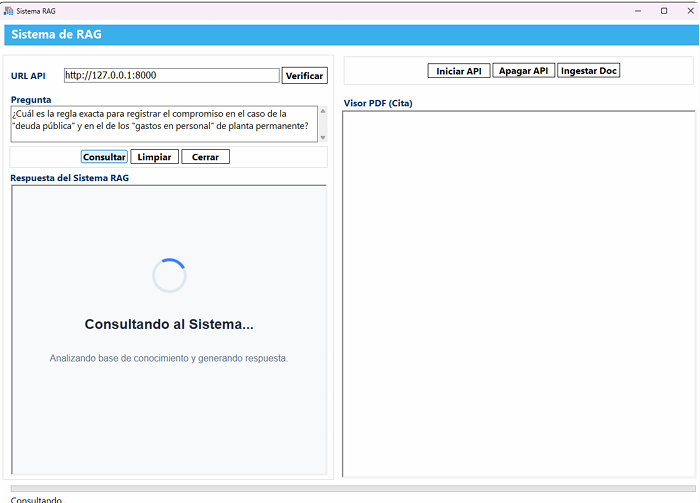
Why the Timer Pattern? The Chromium WebBrowser control needs at least one paint cycle to render the spinner's HTML. If
NavigateToString()is called immediately followed by a blockingSendRequest(), the spinner never appears. The 500ms Timer gives Chromium enough time to render before the UI thread is blocked.
// En el evento timer de w_prueba_rag:
event timer;
// Detenemos el timer para que no se repita
Timer(0, this)

if this.is_pending_action = "consultar" then
    this.is_pending_action = ""
    integer li_resultado
    string ls_respuesta
    string ls_html_respuesta
    string ls_fuentes
    string ls_error

    if not IsValid(this.inv_cliente) then
        this.inv_cliente = create nvo_cliente_rag
    end if

    li_resultado = this.inv_cliente.of_consultar_sistema(this.sle_url.text, this.mle_pregunta.text, ls_respuesta, ls_html_respuesta, ls_fuentes, ls_error)
    if li_resultado = 0 then
        this.wb_respuesta.NavigateToString(ls_html_respuesta)
        this.st_estado.text = "Consulta finalizada."
    else
        this.st_estado.text = "Error en consulta."
        MessageBox("Sistema RAG", ls_error)
    end if

elseif this.is_pending_action = "ingestar" then
    this.is_pending_action = ""
    integer li_res
    string ls_resp
    string ls_err
    string ls_det
    string ls_htm

    if not IsValid(this.inv_cliente) then
        this.inv_cliente = create nvo_cliente_rag
    end if

    li_res = this.inv_cliente.of_ingestar_documentos(this.sle_url.text, ls_resp, ls_err)
    if li_res = 0 then
        this.hpb_progreso.position = 100
        this.st_estado.text = "Ingestión completada con Éxito."

        ls_det = this.inv_cliente.of_obtener_valor_json(ls_resp, "detalle")
        ls_det = this.inv_cliente.of_unescape_json_string(ls_det)

        ls_htm = "
" + ls_det + "
"
        ls_htm = this.inv_cliente.of_construir_html_pagina("Resultado de la Ingestión", "I", ls_htm)
        this.wb_respuesta.NavigateToString(ls_htm)
        MessageBox("Sistema RAG", "La ingesta de documentos se completo correctamente.")
    else
        this.hpb_progreso.position = 0
        this.st_estado.text = "Error en la ingesta."
        MessageBox("Sistema RAG", "Error en ingesta: " + ls_err)
    end if

elseif this.is_pending_action = "pdf_refresh" then
    this.is_pending_action = ""
    this.wb_pdf.Navigate(this.is_pending_uri)
    end if
end event
Step 9: PDF Viewer with Navigation Interception
The window includes a dual-panel design: results on the left, PDF viewer on the right. When the AI response includes citations to sources as clickable links, clicking a PDF link opens it in the right viewer instead of navigating within the results control:
// Evento navigationstart de wb_respuesta:
event navigationstart(boolean isredirected, string requestheaders, string uri);
/*------------------------------------------------------------------------
Nombre de la funcion: navigationstart
Descripcion: Intercepta clics en los enlaces de fuentes (PDF) para cargarlos
             en el visor de la derecha en lugar de navegar en este control.
             Nota: Se usa el signature de Chromium WebBrowser.
------------------------------------------------------------------------*/
w_prueba_rag lw_ventana
if Pos(Lower(uri), ".pdf") > 0 then
    // Detenemos la navegacion en el visor de resultados
    this.StopNavigation()

    // Forzar refresco para anclajes PDF
    lw_ventana = Parent
    wb_pdf.Navigate("about:blank")
    lw_ventana.is_pending_action = "pdf_refresh"
    lw_ventana.is_pending_uri = uri
    Timer(0.4, lw_ventana)
end if
end event
Step 10: Direct Queries to the LLM (Without Backend)
The system also supports querying an Ollama LLM directly from PowerBuilder, bypassing the Python backend. This is useful for general AI queries that do not require document search:
public function integer of_consultar_ollama_directo (string as_pregunta, ref string as_respuesta, ref string as_mensaje_error);
/*------------------------------------------------------------------------
Nombre de la funcion: of_consultar_ollama_directo
Descripcion: Consulta directa a la API de Ollama local sin backend Python.
             Usa el SYSTEM_PROMPT anti-alucinaciones migrado de Python.
Parametros de entrada: string as_pregunta
Parametros de salida: ref string as_respuesta, ref string as_mensaje_error
Retorno: integer 0=exito, -1=error
Fecha: 2026-06-25
Realizado por: Luis Avilan
------------------------------------------------------------------------*/
HTTPClient lnv_http
integer li_resultado
integer li_status
string ls_url
string ls_cuerpo
string ls_respuesta_http
string ls_pregunta
string ls_system_prompt
string ls_error_api

as_respuesta = ""
as_mensaje_error = ""
ls_pregunta = Trim(as_pregunta)

if Len(ls_pregunta) = 0 then
    as_mensaje_error = "Debe indicar una pregunta."
    return -1
end if

// Construir URL de la API de Ollama
ls_url = of_normalizar_url(is_url_ollama) + "/api/chat"

// Construir system prompt (migrado de generation/llm.py → SYSTEM_PROMPT)
ls_system_prompt = of_construir_prompt_sistema()

// Construir JSON del request body en formato Ollama /api/chat sin streaming
ls_cuerpo = "{~"model~":~"" + is_modelo_ollama + "~",~"messages~":["
ls_cuerpo += "{~"role~":~"system~",~"content~":~"" + of_escapar_json(ls_system_prompt) + "~"},"
ls_cuerpo += "{~"role~":~"user~",~"content~":~"" + of_escapar_json(ls_pregunta) + "~"}],"
ls_cuerpo += "~"options~":{~"temperature~":" + is_temperatura + ",~"num_predict~":" + String(il_max_tokens) + "},"
ls_cuerpo += "~"stream~":false}"

// Enviar request HTTP a Ollama
lnv_http = create HTTPClient
lnv_http.SetRequestHeader("Content-Type", "application/json; charset=utf-8")
lnv_http.SetRequestHeader("Accept", "application/json; charset=utf-8")

li_resultado = lnv_http.SendRequest("POST", ls_url, ls_cuerpo)
if li_resultado <> 1 then
    as_mensaje_error = "Error de conexion con Ollama. " + of_describir_error_http(li_resultado, 0)
    destroy lnv_http
    return -1
end if

li_status = lnv_http.GetResponseStatusCode()
lnv_http.GetResponseBody(ls_respuesta_http)

if li_status <> 200 then
    ls_error_api = of_obtener_valor_json(ls_respuesta_http, "error")
    if Len(ls_error_api) = 0 then
        ls_error_api = Left(ls_respuesta_http, 500)
    end if
    as_mensaje_error = of_describir_error_http(1, li_status) + "~r~n" + ls_error_api
    destroy lnv_http
    return -1
end if

// Extraer el texto de la respuesta de Ollama: {"message": {"content": "RESPUESTA"}}
as_respuesta = of_obtener_valor_json(ls_respuesta_http, "content")

// Aplicar unescape de secuencias literales
as_respuesta = of_unescape_json_string(as_respuesta)

if Len(as_respuesta) = 0 then
    as_mensaje_error = "Ollama no devolvio texto. Respuesta: " + Left(ls_respuesta_http, 500)
    destroy lnv_http
    return -1
end if

destroy lnv_http
return 0
end function
The system prompt includes strict anti-hallucination rules to keep the AI grounded:
private function string of_construir_prompt_sistema ();
/*------------------------------------------------------------------------
Nombre de la funcion: of_construir_prompt_sistema
Descripcion: Construye el prompt del sistema anti-alucinaciones.
             Migrado directamente de generation/llm.py → SYSTEM_PROMPT
Parametros de entrada: sin parametros
Parametros de salida: string prompt del sistema
Fecha: 2026-06-25
Realizado por: Luis Avilan
------------------------------------------------------------------------*/
string ls_prompt

ls_prompt = "Eres un asistente tecnico preciso y confiable.~r~n"
ls_prompt += "~r~n"
ls_prompt += "REGLAS ESTRICTAS:~r~n"
ls_prompt += "1. Responde de forma clara, precisa y fundamentada.~r~n"
ls_prompt += "2. Si no tienes informacion suficiente, indicalo claramente.~r~n"
ls_prompt += "3. NUNCA inventes, supongas ni extrapoles informacion.~r~n"
ls_prompt += "4. Responde en el mismo idioma en que se hace la pregunta.~r~n"
ls_prompt += "5. Usa formato estructurado con listas y secciones cuando sea apropiado.~r~n"
ls_prompt += "~r~n"
ls_prompt += "FORMATO DE RESPUESTA:~r~n"
ls_prompt += "- Responde de forma clara y estructurada.~r~n"
ls_prompt += "- Usa listas y negritas para organizar la informacion.~r~n"
ls_prompt += "- Si la pregunta es compleja, divide la respuesta en secciones.~r~n"

return ls_prompt
end function
The Python Backend: FastAPI and the RAG Pipeline
To support the advanced search and generation capabilities of the PowerBuilder application, the system uses a robust backend written in Python. This backend processes documents, vectorizes them, and answers queries via a REST API using FastAPI.
1. The REST API with FastAPI
The rag_service.py file acts as the HTTP gateway. This is where the RagEngine class is defined, responsible for keeping AI models in memory (avoiding expensive reloads on each request) and orchestrating the RAG flow.
Three main endpoints are exposed for the PowerBuilder application to consume: - /salud: Performs the fast Health Check without loading heavy models. - /consultar: Receives the question, executes hybrid search and the LLM, and renders the HTML response with its sources. - /ingestar: Runs a subprocess to index new uploaded documents.
# Extracto representativo de rag_service.py
@app.post("/consultar", response_model=QueryResponse)
def consultar(request: QueryRequest) -> QueryResponse:
    """Consulta el sistema RAG y devuelve respuesta con fuentes."""
    try:
        return engine.query(request.pregunta.strip(), request.top_k)
    except RuntimeError as exc:
        raise HTTPException(status_code=503, detail=str(exc)) from exc
    except ValueError as exc:
        raise HTTPException(status_code=400, detail=str(exc)) from exc

@app.post("/ingestar")
def ingestar() -> Dict[str, Any]:
    """Inicia la ingesta de documentos en la carpeta /documents."""
    # Se ejecuta python main.py ingest como subproceso
    cmd = [sys.executable, "-X", "utf8", "main.py", "ingest"]
    result = subprocess.run(
        cmd, capture_output=True, text=True, check=True, cwd=str(BASE_DIR)
    )
    return {
        "status": "success",
        "mensaje": "Ingestión completada con éxito.",
        "detalle": result.stdout
    }
2. Intelligent Document Ingestion
The ingestion process is fundamental for an industrial RAG system. In ingestion/parser.py, the system automatically determines how to extract text from PDFs. It attempts to use Marker OCR (neural networks capable of understanding tables, formulas, and hierarchies) and has a fallback to PyMuPDF for lightweight PDFs with natively embedded text.
# Extracto representativo de ingestion/parser.py
def _parse_pdf(self, filepath: Path) -> Optional[ParsedDocument]:
    # Intentar Marker OCR primero (Redes neuronales)
    if self._has_marker:
        try:
            return self._parse_with_marker(filepath)
        except Exception as e:
            print(f"  ⚠ Marker falló para {filepath.name}: {e}")
            print("  → Intentando con PyMuPDF...")

    # Fallback a PyMuPDF (rápido y ligero)
    if self._has_pymupdf:
        return self._parse_with_pymupdf(filepath)
    return None
3. Hybrid Search with Reciprocal Rank Fusion (RRF)
The heart of retrieval is in retrieval/hybrid_search.py. The system doesn't solely rely on semantic search (vector embeddings in Qdrant), but combines it with traditional lexical search by keywords (BM25). Both results are merged using a mathematical algorithm called Reciprocal Rank Fusion (RRF). This ensures finding relevant context both by meaning similarity and by exact term match.
# Extracto representativo de retrieval/hybrid_search.py
def search(self, query: str, qdrant_top_k: int = None, bm25_top_k: int = None) -> List[Dict]:
    # ── Búsqueda semántica (Qdrant) ──
    query_embedding = self.embedder.embed_query(query)
    qdrant_results = self.vector_store.search(query_embedding, top_k=qdrant_top_k)

    # ── Búsqueda léxica (BM25) ──
    bm25_results = self.bm25.search(query, top_k=bm25_top_k)

    # ── Fusión con RRF ──
    fused = self._reciprocal_rank_fusion(qdrant_results, bm25_results)

    # ── Resolver parent chunks (contexto amplio) ──
    if self.parent_chunks:
        fused = self._resolve_parents(fused)

    return fused
By resolving the parent chunk at the end, the RAG system uses the Small-to-Big Retrieval technique: it searches in very small and precise fragments, but hands a larger block of text (the parent document) to the LLM so it has enough surrounding context, maximizing the quality of the generated response.
Key Patterns and Lessons Learned
| Pattern | Description |
|---|---|
| HTTPClient Lifecycle | Always create and destroy to prevent resource leaks. |
| Manual JSON Parsing | Character-by-character extraction correctly handles escape sequences. |
| Double Unescape | LLM APIs frequently perform double escaping; process \\ at the end. |
| Timer Pattern | Defer blocking calls to allow Chromium to render loading states. |
| Navigation Interception | Use StopNavigation() to redirect PDF links to a separate viewer. |
| Error Mapping | Translate both transport and HTTP errors into user-readable messages. |
| Anti-Hallucination Prompts | Constrain LLM responses with strict system prompts. |
| JSON Escaping for Submission | The of_escapar_json() function protects quotes, slashes, and line breaks when building the JSON body. |
Source Code Structure
proyecto_rag_pb/
├── proyecto_rag.pbt             # Target File
├── proyecto_rag.pbw             # Workspace File
├── proyecto_rag.pbl             # Main Library
Further Reading
- Ollama Documentation: https://ollama.com — Run LLMs locally.
- LangChain Documentation: https://python.langchain.com — Framework for LLM applications.
- PowerBuilder HTTPClient: Appeon Documentation — Official HTTPClient reference.
- PowerBuilder WebBrowser Control: Appeon Documentation — Chromium WebBrowser reference.
Conclusion
This project demonstrates that PowerBuilder remains a powerful platform for building modern enterprise applications integrated with Artificial Intelligence. By combining PowerBuilder's HTTPClient for REST communication, the Chromium WebBrowser control for rich HTML rendering, and a Python backend for RAG processing, developers can offer intelligent document query capabilities without abandoning their existing investment in PowerBuilder.
The key to success is the clean separation of concerns: the Python backend handles the heavy AI lifting (embeddings, vector search, LLM inference), while PowerBuilder provides the enterprise-grade desktop interface, including robust error handling, professional design, and responsive user interactions using the Timer pattern.
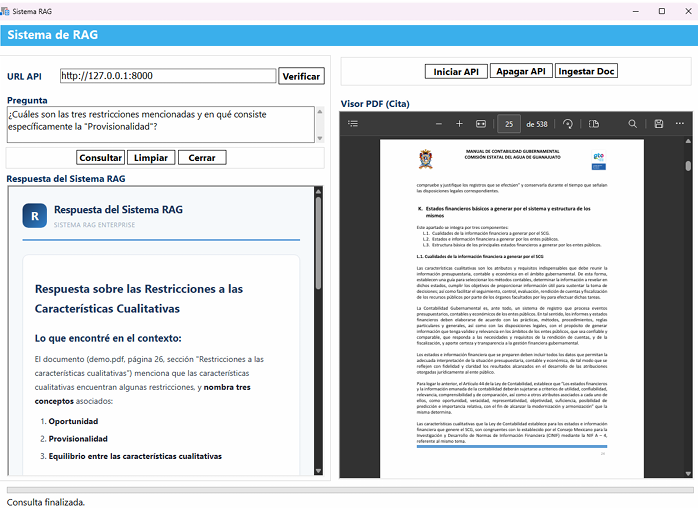
For demo, please refer to Building a RAG (Retrieval-Augmented Generation) A more robust version optimized.
Comments (2)
Your account does not have privileges to view attachments in the comment