


-
 Richard Hartman
- PowerBuilder
- Tuesday, 12 May 2026 12:05 AM UTC
I am trying to alter the Y position of a control. I am working with an inherited project. If I am missing something "obvious" it's because I have been picking powerbuilder up on the fly. Also ... the people who created it had a number of ... questionable architectural decisions which make dealing with what should be a simple matter quite difficult (more on those choices later).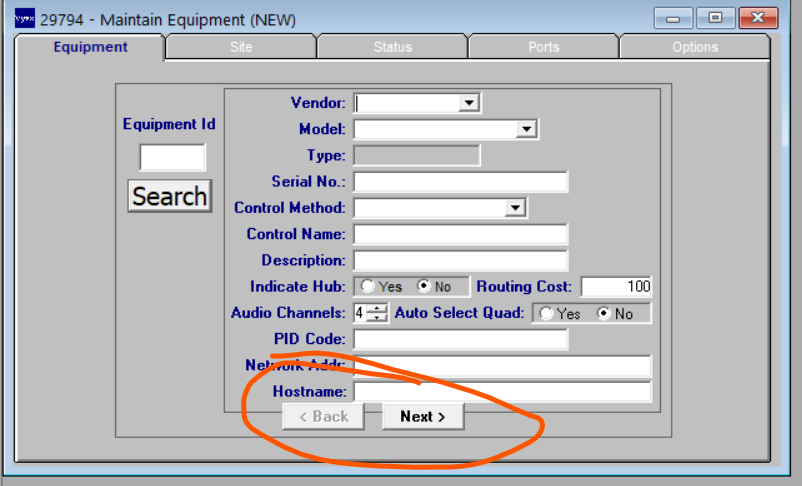
The controls are named "cb_next" and "cb_back". I will just be referring to "cb_next" for the rest of this question.
The source file at issue is: w_equipment_maint_inst.srw
So, in the painter, the controls do not exist. They are dynamically created in the create handler:
on w_equipment_maint_inst.create
int iCurrent
call super::create
if this.MenuName = "m_detail_maint" then this.MenuID = create m_detail_maint
this.dw_folder=create dw_folder
this.cb_back=create cb_back
this.cb_next=create cb_next
iCurrent=UpperBound(this.Control)
this.Control[iCurrent+1]=this.dw_folder
this.Control[iCurrent+2]=this.cb_back
this.Control[iCurrent+3]=this.cb_next
end on
Note that the Y position is not set at create time. Nooooo. That would be too easy. First: they are declared here:
global type w_equipment_maint_inst from w_main_std
integer x = 23
integer y = 288
integer width = 2848
integer height = 1568
string title = "Maintain Equipment"
string menuname = "m_detail_maint"
event ue_postopen pbm_custom03
event ue_open_busyout_equip pbm_custom01
event ue_open_equip_port_assign pbm_custom02
event ue_refresh_status pbm_custom04
event ue_disable pbm_custom05
event ue_update_success pbm_custom06
event ue_copy_equipment pbm_custom07
dw_folder dw_folder
cb_back cb_back
cb_next cb_next
end type
Please note that the absolute walnuts that created this code liked to use the same symbol for the class as for the instance. That doesn't make figuring things out more difficult now, does it?
Anyway, so we have object cb_next being declared of type cb_next. Which is defined here:
type cb_next from uo_cb_fc_next within w_equipment_maint_inst
    boolean visible = false
    integer x = 1353
    integer y = 1184
    integer height = 88
    integer taborder = 10
end type
And now we see where the Y position is set. In the SUB CLASS DEFINITION. Not in the painter. Not in the create handler. All of the code snippets I have pasted here come from the same .srw source file. But editing this position in the source file outside of the IDE would not be the correct way of handling things. There must be some way of getting to the innards of the cb_next TYPE (as opposed to the cb_next INSTANCE) ... but I do not know how to call that up in the painter.
Does anybody know how I can get at that Y position "the right way" (as opposed to just editing the .srw file outside of the IDE) ?
Or ... do you need me to provide more information that I have? Feel free to ask questions.
Oh, my summary of the questionable choices I see in this particular problem:
1) reusing the same symbol for a type name and an instance name
2) setting the position in the type definitions instead of in the painter for a control or (worst case) in the code after creating the control dynamically.
But maybe that's just me....
Find Questions by Tag
Helpful?
If a reply or comment is helpful for you, please don’t hesitate to click the Helpful button. This action is further confirmation of their invaluable contribution to the Appeon Community.