


-
 Benjamin Hübner
- PowerBuilder
- Tuesday, 24 March 2026 01:39 PM UTC
Hi,
our customers reported a problem while generating PDFs (with the PB native PDF method) after we released the application with a newer runtime (runtime 3711 to 3726). If you use specific fonts (i.e. “avenir-lt-std-35-light.otf”) in the document, the resulting PDF file will now look different.
The problem seems to be the pbdwe.dll. If we replace the 25.0.0.3726 version of pbdwe.dll with the old 25.0.0.3711 version everything works as expected.
When using the 3726 runtime:
ads_Print.Object.DataWindow.Export.PDF.Method = NativePDF!
ads_Print.Object.DataWindow.Export.PDF.NativePDF.ImageFormat = '1'       // 'jpg'
ads_Print.Object.DataWindow.Export.PDF.NativePDF.UsePrintSpec = 'Yes'
ads_Print.Object.DataWindow.Export.PDF.NativePDF.PDFStandard = 0
li_rc = ads_Print.SaveAs( “demo.pdf”, PDF!, FALSE )
We have turned on the border around the objects so that you can see that they are the same size, but the text is now displayed differently.
The output is different (control has the same length but the letters are a little bit broader - the end of the text is no longer displayed, as the space constraints have changed and no longer fit):
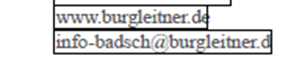
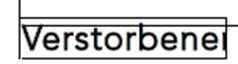
Things are still looking good with runtime 3711:
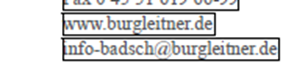
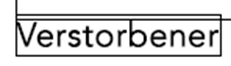
It is interesting to note that generating the PDF via the "Microsoft Print to PDF" printer does not reveal the problem and always produces the same output.
ads_Print.Object.DataWindow.Print.PrinterName = “Microsoft Print to PDF”
ads_Print.Object.DataWindow.Print.FileName = "demo.pdf"
li_rc = ads_Print.Print( FALSE )
Also Good to know: The PB 2025 R2 beta 25.0.1.6324 has the same issue in the same way like the 25.0.0.3726 version (same code migrated to PB 2025R2 beta).
Any ideas or does this need to be fixed??
Thx
Find Questions by Tag
Helpful?
If a reply or comment is helpful for you, please don’t hesitate to click the Helpful button. This action is further confirmation of their invaluable contribution to the Appeon Community.