


-
 Mukesh Kumar
- PowerBuilder
- Wednesday, 18 November 2026 12:48 PM UTC
In our organization, the .NET 8 SDK has been replaced with the .NET 10 SDK, so we upgraded our PowerBuilder source code from 2025 to 2025 R2
Our current .NET SDK environment is:
Version: 10.0.100
Commit: b0f34d51fc
Workload version: 10.0.100-manifests.4c0ca8ba
MSBuild version: 18.0.2+b0f34d51f
The new PowerBuilder 2025 R2 package provides the following SDKs:
dotnet-sdk-10.0.302-win-x86
dotnet-sdk-10.0.302-win-x64
With this setup, we are not able to launch the PowerBuilder IDE. We are getting below error:
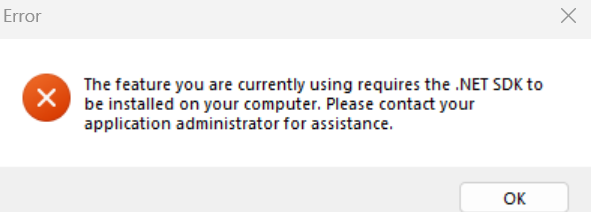
How can we make PowerBuilder use the already installed .NET 10.0.100 SDK as part of the PowerBuilder IDE installation, without installing another .NET SDK (10.0.302) on the same machine?
Find Questions by Tag
Helpful?
If a reply or comment is helpful for you, please don’t hesitate to click the Helpful button. This action is further confirmation of their invaluable contribution to the Appeon Community.