


-
 Brett Weaver
- PowerBuilder
- Tuesday, 7 April 2026 03:44 AM UTC
I will show the issue ticket: I have just updated the application from PB2022 to PB2025 - It's still a workspace application but deployed as a powerclient. PB Build is 3711. Is there something I can do to stop PB2025 scaling fonts? Is it fixed in the beta?
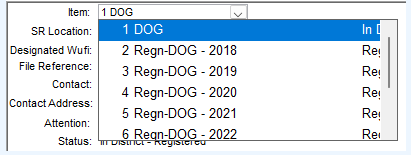
When opening the item dropdown from an SR, the item's number, type and status are been enlarged. This causes the item's status to only be partially visible. Please note that the dropdown window is the correct size, and was not changed due to the update.
When opening the item dropdown from the Service Request Key Window, the same elements are enlarged but the dropdown menu itself is also enlarged.
Please note that my Scale has been set to 125%, which may be causing this specific issue. The setting may be accessed via Windows 11's Display settings, and is found under "Scale & layout".
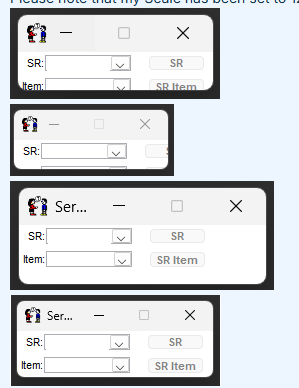
The second issue appears to affect all elements of Teamwork, where elements change size depending on:
The aspect ratio of the display the element was opened in.
The aspect ratio of the display the element is currently on.
This can be seen in the above four screenshots of the Service Request Key Window, which show the element when it was:
Opened in a display with a 16:10 aspect ratio, and is currently on a display with a 16:10 aspect ratio.
Opened in a display with a 16:10 aspect ratio, and is currently on a display with a 16:9 aspect ratio.
Opened in a display with a 16:9 aspect ratio, and is currently on a display with a 16:10 aspect ratio.
Opened in a display with a 16:9 aspect ratio, and is currently on a display with a 16:9 aspect ratio.
The correct size for this window is shown in screenshot 4.
Find Questions by Tag
Helpful?
If a reply or comment is helpful for you, please don’t hesitate to click the Helpful button. This action is further confirmation of their invaluable contribution to the Appeon Community.