


Detail Band height per row
- How-to
-
 Robert Sawyer
- PowerBuilder
- Friday, 30 January 2026 05:25 PM UTC
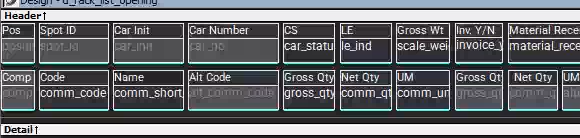
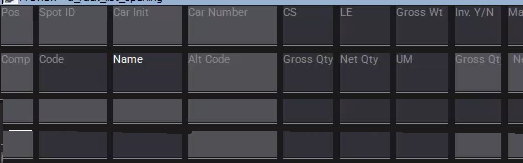
I have a datawindow where I have (text) labels above each column. It is really busy and tall when there are many rows. The text above the column gives the appearance that it is one 'square'. What I want to do, is only display the text above the column when the row is selected. Looking below is what I want - It is actually two rows - the second row of data has the labels removed and the detail band is not as high. I was going to make the labels invisible on a non-current row and 'squish things together' but I can't seem to do it for an individual row. The detail band doesn't have an expression for the height.
Any ideas would be appreciated.
Design mode
Preview example of what I want
Find Questions by Tag
Helpful?
If a reply or comment is helpful for you, please don’t hesitate to click the Helpful button. This action is further confirmation of their invaluable contribution to the Appeon Community.