


PowerBuilder 2025 R2 AES-GCM: Native Authenticated Encryption and Tamper Detection
A technical demo of the new cryptographic capabilities in PowerBuilder 2025 R2 using CrypterObject, CoderObject, AES-256-GCM, hexadecimal payloads, and Auth Tag validation.
Introduction
PowerBuilder 2025 R2 introduces a major security improvement for business applications: native support for modern cryptographic operations through CrypterObject and CoderObject. This demo project focuses on one of the most relevant additions for enterprise systems: AES-GCM authenticated encryption.
AES-GCM is not just encryption. It is authenticated encryption, meaning the receiver can detect whether the encrypted payload was altered after it left the sender. For payment files, tax documents, ERP messages, API payloads, banking instructions, and any sensitive JSON exchange, this changes the security model: confidentiality and integrity are handled as one operation.
This article uses the demo project Demo_AES-GCM_pb, implemented in the window w_demo_security.srw. The user encrypts a fiscal JSON payload, transmits it as hexadecimal text, simulates reception, and then intentionally modifies one character to prove that tampering is rejected.
Why AES-GCM Matters
Legacy symmetric encryption patterns often relied on AES-CBC or AES-ECB plus a separate HMAC process. That model works only when every step is implemented correctly: IV management, padding handling, MAC calculation, MAC verification, and error behavior. AES-GCM simplifies the design by producing an authentication tag as part of the encryption process.
| Security concern | Legacy approach | PowerBuilder 2025 R2 demo approach |
|---|---|---|
| Confidentiality | AES-CBC or custom wrappers | SymmetricEncrypt(AES_GCM!, ...) |
| Integrity | Separate HMAC validation | Auth Tag generated by GCM |
| Transport format | Binary handling or custom encoding | CoderObject.HexEncode() |
| Character handling | Risk of accent or encoding corruption | Blob(text, EncodingUTF8!) and String(blob, EncodingUTF8!) |
| Tamper detection | Manual comparison logic | Authenticated decryption plus payload validation |
Advantage of the New Method in PowerBuilder 2025 R2
1. Retrospective analysis: the vulnerable approach in earlier versions
Historically, symmetric encryption in PowerBuilder environments was commonly implemented with algorithms such as AES in CBC (Cipher Block Chaining) mode or ECB (Electronic Codebook) mode, usually through standard CrypterObject functions. Although this protected basic confidentiality, it still exposed well-known critical vulnerabilities.
- Ciphertext malleability (bit-flipping): in CBC mode, an attacker with access to the data stream can alter specific bits of an encrypted block. When the destination decrypts the payload, that alteration can predictably change the resulting plaintext, such as modifying a digit in an amount, without the algorithm itself detecting that the message was manipulated.
- Padding oracle attacks: older block modes require padding, such as PKCS#7. If the receiver exposes different errors for invalid padding, an incorrect key, or other failures, an attacker can submit automated message variations and use those responses as an oracle to recover sensitive information.
2. The modern solution: AEAD authenticated encryption
PowerBuilder 2025 R2 mitigates these risks by adding native support for AES-GCM (Galois/Counter Mode) and modern asymmetric signing algorithms such as RSA-PSS. AES-GCM belongs to the AEAD family: Authenticated Encryption with Associated Data. This means encryption protects not only message confidentiality, but also produces an authentication label, or Auth Tag, that allows the receiver to verify integrity.
If a single bit of the ciphertext, Auth Tag, or protected data is altered, validation no longer matches and the receiver must reject the payload. In practical terms, AES-GCM combines confidentiality and integrity in one cryptographic operation, reducing the need to manually build and maintain a separate HMAC layer.
3. Secure architecture comparison
| Security mechanism | Legacy approach (PB 2019/2022) | Advanced approach (PB 2025 R2) |
|---|---|---|
| Symmetric encryption | AES-CBC / AES-ECB, vulnerable to manipulation when not paired with robust authentication | AES-GCM, authenticated and tamper-resistant encryption through Auth Tag |
| Integrity validation | Manual and complex; requires separate HMAC hashing and strict verification | Native and automatic through a 128-bit Auth Tag |
| Asymmetric digital signature | RSA-PKCS1v1.5, inherited deterministic scheme | RSA-PSS, probabilistic scheme with a different signature per execution |
| Memory exploit mitigation | External manual configuration or post-build review | ASLR, DEP, and SafeSEH available from the project's security configuration |
Demo Architecture
The demo is intentionally compact. It keeps the whole security workflow visible inside one PowerBuilder window so developers can understand each transition from plain JSON to encrypted payload and back to recovered JSON.
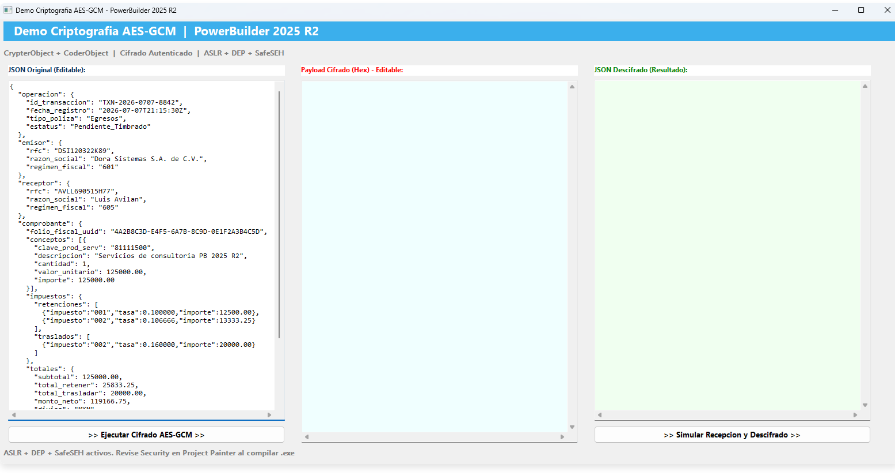
The three panels represent a realistic message exchange:
- JSON Original: the business message created by the sender. The sample uses a fiscal and banking-style JSON document.
- Payload Cifrado (Hex): the transport channel. It contains
data_encriptada_hex,auth_tag_hex, and the algorithm name. - JSON Descifrado: the receiver output after authenticated decryption.
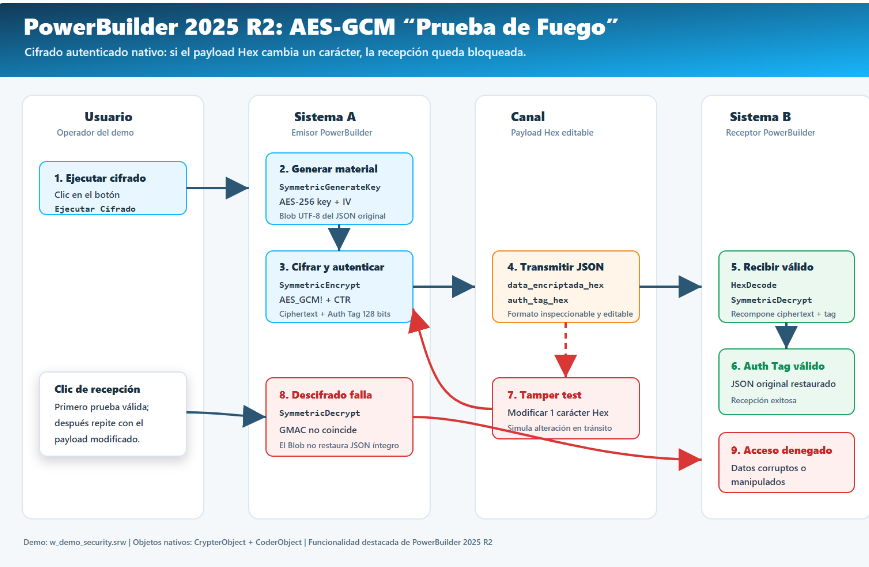
The “Fire Test” Flow
The most important part of the demo is the tamper test. The user changes a single hexadecimal character in the encrypted payload and runs the receiver again. This simulates a corrupted message, a broken integration, or a man-in-the-middle modification.
Step 1: Loading the Business JSON
When the window opens, the demo loads a JSON payload into the left panel. The text includes fiscal metadata, issuer and receiver data, tax values, bank information, and a payment method. This matters because encryption demos are more useful when the payload resembles business data instead of a short test string.
event open;
String ls_json

ls_json = '{~r~n' + &
   '  "operacion": {~r~n' + &
   '    "id_transaccion": "TXN-2026-0707-8842",~r~n' + &
   '    "fecha_registro": "2026-07-07T21:15:30Z",~r~n' + &
   '    "tipo_poliza": "Egresos",~r~n' + &
   '    "estatus": "Pendiente_Timbrado"~r~n' + &
   '  }~r~n' + &
   '}'

mle_json_original.Text = ls_json
end event
In the encryption event, the text is converted to a UTF-8 blob:
lb_plain_data = Blob(ls_json_input, EncodingUTF8!)This detail is important for Spanish and Latin American enterprise applications. Names, descriptions, tax concepts, and addresses may contain accents and special characters. The demo explicitly uses UTF-8 conversion to avoid character corruption during encryption and decryption.
Step 2: Generating Key and IV
The sender generates cryptographic material using CrypterObject. In this demo, the key and IV are stored as instance variables to simulate a shared secret between System A and System B during the same runtime session.
li_rtn = lnv_crypt.SymmetricGenerateKey(AES!, 32, ib_secret_key)
li_rtn = lnv_crypt.SymmetricGenerateKey(AES!, 16, ib_iv)| Variable | Purpose | Size in the demo |
|---|---|---|
ib_secret_key |
Symmetric AES key shared by sender and receiver | 32 bytes, equivalent to 256 bits |
ib_iv |
Initialization value used by the GCM/CTR operation | 16 bytes in the demo |
Step 3: Encrypting with AES-GCM
The central operation is the native PowerBuilder 2025 R2 encryption call. The demo uses AES_GCM! and OperationModeCTR! as required by the implementation used in the project.
lb_encrypted = lnv_crypt.SymmetricEncrypt( &
   AES_GCM!, &
   lb_plain_data, &
   ib_secret_key, &
   OperationModeCTR!, &
   ib_iv)
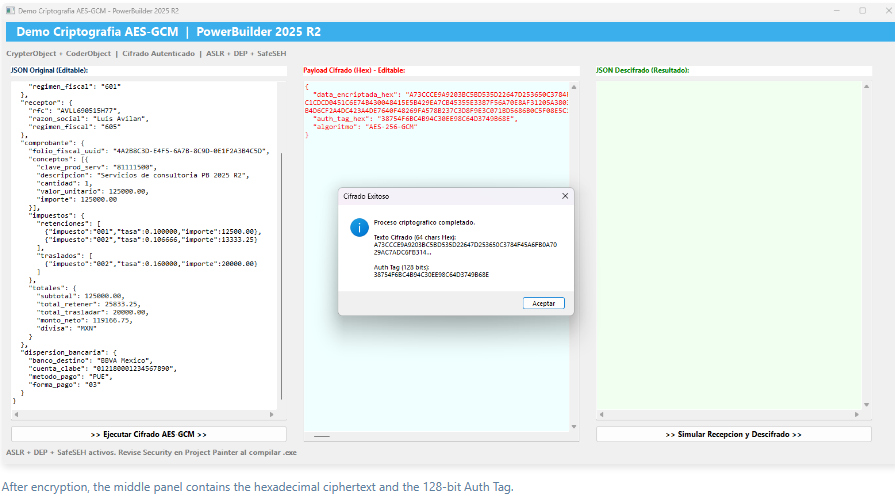
The encrypted blob returned by the operation contains the encrypted data plus the authentication tag. The demo separates the last 16 bytes as the Auth Tag and keeps the remaining bytes as the ciphertext.
lb_auth_tag = BlobMid(lb_encrypted, Len(lb_encrypted) - 15, 16)
lb_cipher_only = BlobMid(lb_encrypted, 1, Len(lb_encrypted) - 16)

ls_cipher_hex = lnv_coder.HexEncode(lb_cipher_only)
ls_tag_hex    = lnv_coder.HexEncode(lb_auth_tag)
Step 4: Building the Transport Payload
The demo deliberately uses JSON as the envelope and hexadecimal text as the payload format. This makes the encrypted data easy to inspect, copy, log in a controlled environment, or transmit through text-oriented channels.
{
  "data_encriptada_hex": "A73CCCE9A9203BC5...",
  "auth_tag_hex": "38754F6BC4B94C30EE98C64D3749B68E",
  "algoritmo": "AES-256-GCM"
}
From an integration perspective, this is a clean contract. System A sends encrypted bytes as hexadecimal, sends the Auth Tag separately, and declares the algorithm. System B can then decode, reassemble, and validate the payload.
Step 5: Receiving, Decoding, and Reassembling
The receiver extracts the two hexadecimal values from the payload, decodes them into blobs, and then rebuilds the full encrypted payload expected by the decrypt operation.
lb_encrypted = lnv_coder.HexDecode(ls_payload_hex)
lb_auth_tag  = lnv_coder.HexDecode(ls_tag_hex)

lb_full_payload = lb_encrypted + lb_auth_tag
lb_decrypted = lnv_crypt.SymmetricDecrypt( &
   AES_GCM!, &
   lb_full_payload, &
   ib_secret_key, &
   OperationModeCTR!, &
   ib_iv)
If the encrypted data and the Auth Tag match, the receiver restores the original UTF-8 JSON.
ls_json_recuperado = String(lb_decrypted, EncodingUTF8!)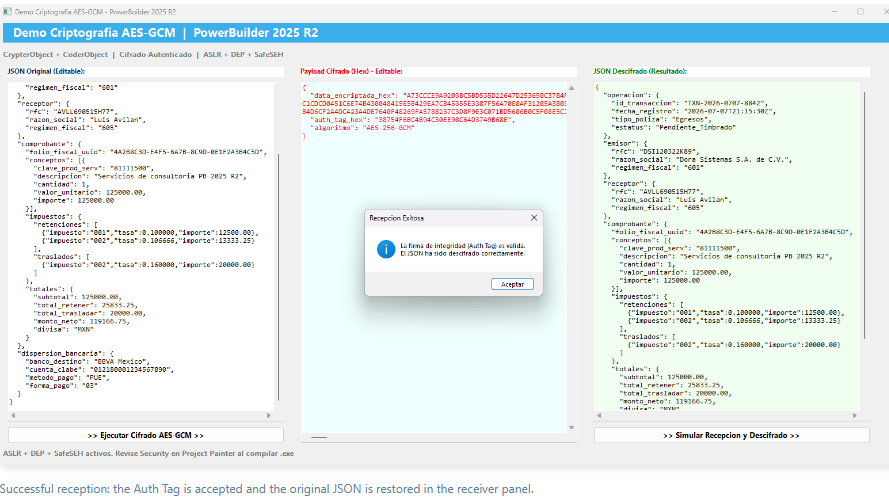
Step 6: Tamper Detection
The fire test is simple and powerful: change one character in data_encriptada_hex and click Simular Recepcion y Descifrado again. A single hexadecimal character represents four bits. That small change is enough to invalidate the relationship between ciphertext and Auth Tag.
ACCESO DENEGADO - DATOS CORRUPTOS O MANIPULADOS.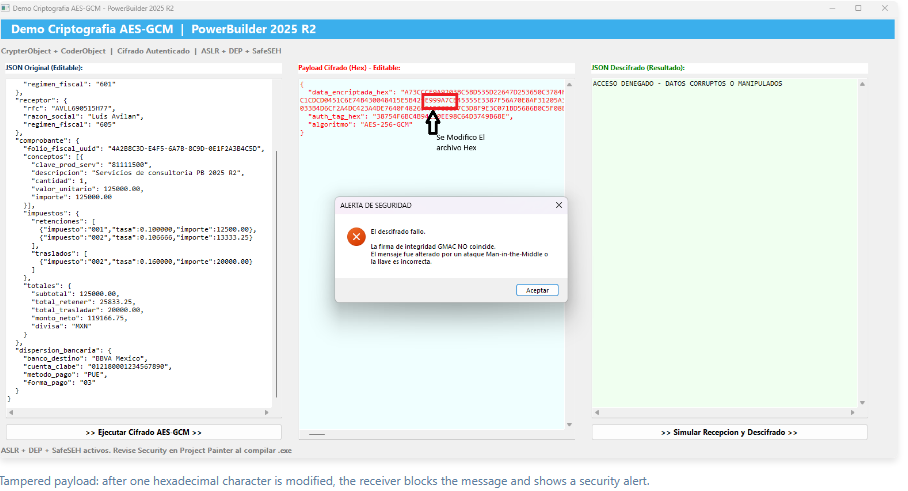
Implementation Detail: Demo-Level Validation
The demo code converts the decrypted blob back to UTF-8 and verifies that the restored content still looks like the expected JSON payload. If the result is empty or malformed, it blocks the reception.
If Len(lb_decrypted) > 0 And Right(Trim(ls_json_recuperado), 1) = "}" Then
   mle_json_descifrado.Text = ls_json_recuperado
   MessageBox("Recepcion Exitosa", &
      "La firma de integridad (Auth Tag) es valida." + &
      "~r~nEl JSON ha sido descifrado correctamente.", Information!)
Else
   mle_json_descifrado.Text = "ACCESO DENEGADO - DATOS CORRUPTOS O MANIPULADOS"
   MessageBox("ALERTA DE SEGURIDAD", &
      "El descifrado fallo." + &
      "~r~n~r~nLa firma de integridad GMAC NO coincide.", StopSign!)
End If
For production systems, the same principle should be enforced with strict error handling around authenticated decryption, schema validation, structured JSON parsing, and security logging. The rule is absolute: if authentication fails, the application must reject the payload.
Operating System Protections
The demo also calls attention to platform hardening. When running inside the PowerBuilder IDE, the code executes under the IDE process. For production executables, the Project Painter security settings should be reviewed so generated applications benefit from mitigations such as ASLR, DEP, and SafeSEH where applicable.
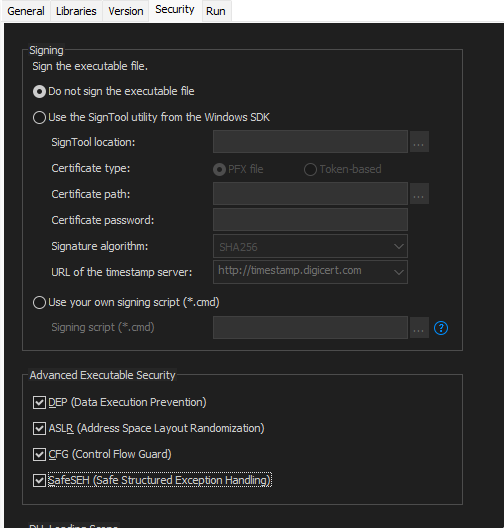
The screenshot shows exactly where these options are reviewed in the deployment project. In the Project Painter, the Security tab contains two relevant areas: executable signing and Advanced Executable Security. For this demo, the key area is the second one, where modern operating system mitigations can be enabled before generating the executable.
| Option | What it protects | Practical value |
|---|---|---|
DEP Data Execution Prevention |
Prevents memory regions marked as data from being executed as code. | Reduces the risk of injection or execution attacks from non-executable memory. |
ASLR Address Space Layout Randomization |
Randomizes process memory addresses. | Makes it harder for an exploit to rely on predictable addresses or reuse internal routines. |
CFG Control Flow Guard |
Validates indirect execution targets. | Helps block abnormal control-flow redirection used in memory exploitation. |
SafeSEH Safe Structured Exception Handling |
Restricts the valid handlers for structured exceptions. | Mitigates attacks that try to hijack execution through fake SEH handlers. It mainly applies to 32-bit executables. |
The recommended workflow is straightforward: open the deployment project, go to Security, select these options under Advanced Executable Security, build the application, and then verify the generated executable with tools such as PESecurity, dumpbin, WinDbg, or Process Explorer. In 64-bit projects, SafeSEH may not appear or may not apply because Windows uses a different exception-handling mechanism.
Recommended Production Enhancements
- Use a secure key-management strategy instead of generating demo keys inside the window.
- Store or transmit the IV/nonce according to the protocol design and never reuse an unsafe nonce with the same key.
- Validate JSON with a parser rather than string positions when moving from demo code to production code.
- Centralize cryptographic helper functions in a non-visual object so visual events remain thin.
- Log authentication failures without exposing plaintext, keys, or sensitive payloads.
- Keep all text conversions explicit with
EncodingUTF8!.
Conclusion
This demo shows why AES-GCM support in PowerBuilder 2025 R2 is a meaningful new capability. A PowerBuilder application can now encrypt business payloads, encode them for transport, recover them as UTF-8 JSON, and reject tampered data using native objects.
The “fire test” is the best part: modify one character in the hexadecimal channel and the receiver denies access. That is the practical value of authenticated encryption: the application does not merely hide the data, it also proves whether the data arrived intact.
Luis Avilan
Comments (0)