


Visual Exploration of PowerServer SQL, Transaction, and Session Logs with PowerB

Visual Exploration of PowerServer SQL, Transaction, and Session Logs with PowerBuilder 2025 R2
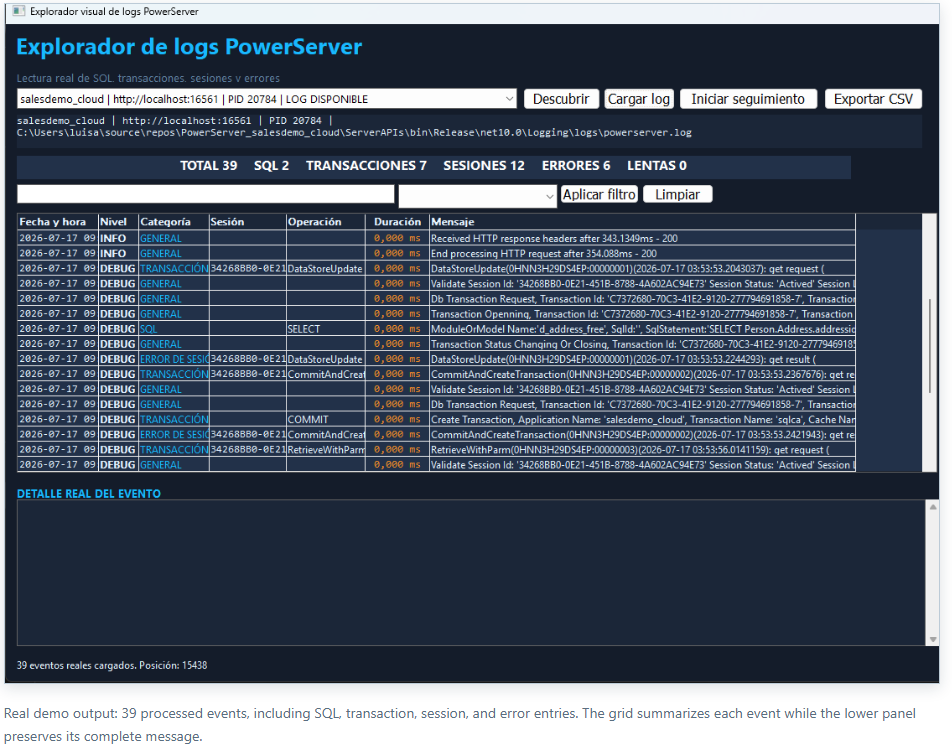
This article explains the architecture and internal flow of a PowerBuilder console that discovers active PowerServer instances, resolves their effective log file, and turns multiline traces into an operational view with filters, metrics, full detail, and live follow mode.
PB SQLServer V2025R2 DSN. The design is not tied to salesdemo_cloud; it can observe any running local project whose logging configuration is accessible.The problem: a log file is not an operations console
PowerServer records controller calls, session creation and destruction, transaction lifecycles, SQL statements, results, and exceptions. The information is real and valuable, but it arrives as chronological text containing multiline JSON blocks. A single operation may span dozens of lines and share identifiers with later operations.
Reading powerserver.log manually means solving several questions at once: Which process belongs to the project? Which port is it listening on? Which file did log4net actually configure? Where does event begin and end? Which session and transaction participated? Is a line a distinct failure or a duplicate summary?
Demo architecture
The window is deliberately thin. Discovery, incremental reading, parsing, and DataWindow management are implemented in separate nonvisual objects.
| Object | Technical responsibility |
|---|---|
nvo_descubridor_logs_ps |
Runs the PowerShell discovery script, loads its UTF-8 output, and exposes application, URL, PID, publish directory, and actual log path. |
nvo_lector_logs_ps |
Configures the source, retains a logical position, and returns only content found after the previous read. |
nvo_analizador_logs_ps |
Detects event boundaries, parses headers and JSON, classifies entries, extracts identifiers, and rejects duplicate summaries. |
nvo_gestor_logs_ps |
Coordinates reader and parser, inserts rows, calculates metrics, applies filters, and builds logging diagnostics. |
w_explorador_logs_ps |
Orchestrates instance selection, loading, timer behavior, pause/resume, filtering, detail, and CSV export. |
d_eventos_logs_ps |
Displays normalized date, level, category, session, operation, duration, and message fields. |
Discovering a real instance
descubrir_logs_powerserver.ps1 does not maintain a catalog of test projects. It queries active processes through CIM, identifies their listening TCP port, and derives the publish directory from the command line. It then inspects two configuration sources:
AppConfig/Applications.json, which identifies the published PowerServer application.Logging/log4net.xml, which resolves the effectiveRollingFileAppenderpath.
The result is serialized as UTF-8 TSV. This avoids an extra dependency for a small exchange between PowerShell and PowerBuilder while preserving accented and special characters.
Application | local URL | PID | publish directory | log file
salesdemo_cloud | localhost:16561 | 20784 | ...\ServerAPIs | ...\Logging\logs\powerserver.log
The visual label adds LOG AVAILABLE only when the resolved file exists. Selecting a process therefore does not imply that events are available; the diagnostic area shows the path and explains missing configuration or files.
Configuration required to expose SQL, sessions, and transactions
In the inspected instance, Logging.Development.json enables EnableFileServer, EnableSqlLog, EnableSessionLog, and EnableTransactionLog. The PowerServer level is also set to Debug. Log4net writes UTF-8, appends to the existing file, uses minimal locking, rotates at 5 MB, and retains as many as 100 backups.
"PowerServer": "Debug"
"EnableSqlLog": true
"EnableSessionLog": true
"EnableTransactionLog": trueDebug level and detailed SQL increase I/O volume and may expose functional values. They are suitable for development and controlled diagnostics; production use requires retention controls, restricted permissions, sensitive-data review, and a defined time window.Incremental UTF-8 reading
The reader retains il_posicion. The initial load can start at zero; later follow operations obtain the content and return the segment beginning at the stored position. If the file becomes smaller because it was truncated or replaced, the position resets rather than remaining out of range.
ls_contenido = of_leer_archivo_utf8(is_ruta_archivo)
If Len(ls_contenido) < il_posicion Then il_posicion = 0
ls_novedades = Mid(ls_contenido, il_posicion + 1)
il_posicion = Len(ls_contenido)
Binary reading followed by EncodingUTF8! conversion avoids reliance on the Windows code page. Parsing accepts both CRLF and LF. This matters because a remaining carriage return may prevent a visually empty line from being treated as empty.
From multiline text to structured events
A timestamp-based start rule separates consecutive events. Following JSON lines remain attached to the header until the next timestamp is found. A RetrieveWithParm result is therefore not split into unrelated rows.
nvo_analizador_logs_ps builds a str_evento_log_ps structure containing date, level, category, session, operation, duration, message, and the original block. The original block is retained because the grid is a summary, while the detail panel must support a complete investigation.
Header
Provides date, level, and controller method. The real method takes precedence over generic labels found in the body.
JSON body
Provides SessionId, TransactionId, ErrorCode, duration, SQL, and the functional message.
Classification
Evaluates errors first, followed by SQL, transaction, session, warning, and finally general activity.
Deduplication
Rejects generic session-error summaries when the corresponding operational event already carries the same failure.
Why “everything is an error” was the wrong interpretation
An early trace repeatedly displayed “The session does not respond (The session does not exist).” The first parser treated the failure block and its summary as equivalent events, and could use result text as though it were the primary operation. The correction separated three concepts:
- Level: comes from the header and represents the emitted severity.
- Category: is derived from the content; a failure in
CommitAndCreateTransactionstill belongs to the transaction domain. - Operation: comes from the actual controller method, not from a later generic message.
A row can consequently have level ERROR, category TRANSACTION, and operation CommitAndCreateTransaction. The failure remains visible without losing its technical context.
Correlating a real operation
Validation used activity generated by the running Sales CRM application. The log captured a RetrieveWithParm call for d_address_free with al_addressid=466, followed by a SELECT against Person.Address. The result reported one affected row and ErrorCode = 0.
The same flow later included successful CommitAndCreateTransaction, Disconnect, and DestroySession operations. Session 34268BB0-0E21-451B-8788-4A602AC94E73 and transaction 3CFBC7DD-3AC4-4B41-ACFE-663E35D4C4F0-8 make it possible to follow the sequence without relying only on timestamp proximity.
DataWindow metrics and live follow mode
nvo_gestor_logs_ps inserts every normalized event into d_eventos_logs_ps. The same data set supplies total, SQL, transaction, session, error, and slow-operation counts. Text and category filters operate on loaded data without reparsing the file.
The window's Timer event refreshes every two seconds while follow mode is active. “Pause follow” stops visual ingestion; it does not alter PowerServer logging. Resuming processes the pending segment from the known position. The lower detail pane displays the original block, while CSV export creates an interoperable copy for external analysis.
Reproducible test procedure
- Start a local PowerServer project and confirm that its Server APIs process is listening on a port.
- Enable the required categories and file logging in the effective environment configuration.
- Open the explorer, select Discover, and choose the instance marked as available.
- Run a query, a persisted update, and navigation that creates or closes a session in the client application.
- Verify SQL, method, identifiers, and error code in the complete detail block.
- Pause, generate more activity, and resume to validate incremental delivery.
- Rotate or truncate the log under controlled conditions and verify position reset before adopting the pattern in production.
Build validation
The final ORCA import reported OK for all nine demo artifacts: two structures, the DataWindow, four NVOs, the window, and the application. That validates PowerBuilder syntax and dependencies. The screenshot and the live-log walkthrough provide behavioral evidence, which is separate from a successful compile.
Limits and natural extensions
- Discovery currently targets local processes; remote hosts would require an authenticated agent or API.
- The active file is processed. Numbered log4net backups are not yet merged into a single historical timeline.
- Duration depends on fields emitted by the event; it is not fabricated from unrelated timestamps.
- Future provider formats may require adapting header detection or JSON field names.
- The console is a diagnostic tool, not a replacement for centralized observability, alerting, or retention.
Natural extensions include true byte-offset reading, rotated-file traversal, session aggregates, duration percentiles, alert rules, and authenticated remote collection. The existing separation among discovery, reader, parser, and manager allows those features to be added without turning the window into a monolithic script.
Conclusion
The demo's value is not merely colorizing text. It reconstructs PowerServer's operational context: process, application, method, session, transaction, SQL, result, and error. The console retains traceability to the original block, states its limitations, and works exclusively from events emitted by active projects. This makes it a practical foundation for diagnosing modern PowerBuilder applications without simulated data.
Luis Avilan
This message has an attachment file.
Please log in or register to see it.
Please Log in or Create an account to join the conversation.