


Loading DataWindows from External PBD Files in PowerServer 2025 R2

Loading DataWindows from External PBD Files in PowerServer 2025 R2
A practical pattern for distributing reports, queries, and DataWindow layouts independently, loading them at runtime, and updating them without rebuilding the entire PowerBuilder application.
Analyzed demo: Demo_PS_External_Datawindow_Library · Implementation and validation: Luis Avilan · PowerBuilder 2025 R2
The problem this pattern solves
In enterprise applications, reports often change more frequently than the core business logic. Finance requests one more column, operations needs a different filter, a customer requires a branded header, or a regulatory change forces a new layout. If every report adjustment requires rebuilding, publishing, and updating the full application, a small change inherits the complete release cycle.
PowerServer 2025 R2 can load DataWindow objects from external PBL or PBD libraries at runtime. This makes it possible to separate part of the presentation and data-retrieval layer from the main application. Appeon's documentation highlights customized InfoMaker reports, but the same pattern is valuable for query catalogs, customer-specific layouts, regional reports, and optional reporting modules.
What the demo proves
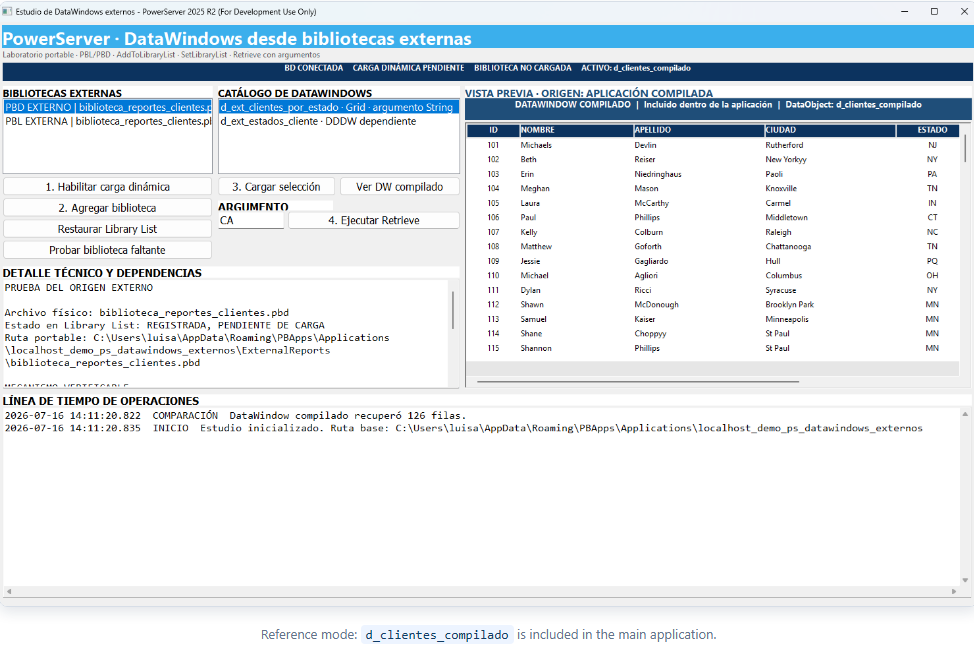
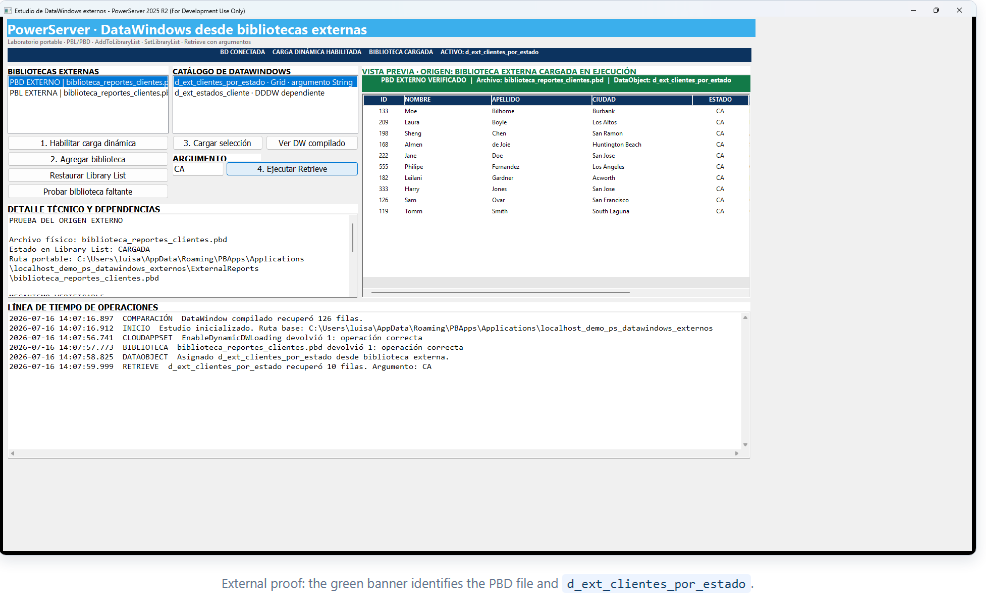
The demo displays one compiled DataWindow and two external DataWindows from ExternalReports\biblioteca_reportes_clientes.pbd in the same window. The user can enable dynamic loading, add the library to the runtime Library List, select an external object, run Retrieve, switch back to the compiled object, and restore the original library list.
The UI also addresses a practical question: how can a user verify that the displayed object really came from a PBD? A blue banner identifies the compiled DataWindow, while a green banner identifies the external object and displays the physical library name and active DataObject.
Demo architecture
| Component | Responsibility |
|---|---|
demo_ps_external_datawindow_library.sra |
Enables dynamic loading, connects SQLCA, and opens the main window. |
w_estudio_datawindows_externos |
Coordinates the visual lab, changes the DataObject, executes Retrieve, and presents origin evidence. |
nvo_gestor_bibliotecas_externas |
Centralizes portable paths, file validation, CloudAppSet, AddToLibraryList, SetLibraryList, and LibraryDirectory. |
nvo_registro_carga_dinamica |
Writes a UTF-8 audit trail with timestamp, category, and operation result. |
d_clientes_compilado |
Internal DataWindow used as the comparison baseline. |
d_ext_clientes_por_estado |
External DataWindow that retrieves customers filtered by state. |
d_ext_estados_cliente |
Second external object included to illustrate a catalog with dependencies. |
p_proyecto_powerserver_datawindows_externos |
PowerServer project that publishes the client, API, and external files. |
Database used by the demo
| Item | Demo configuration |
|---|---|
| Database engine | Microsoft SQL Server |
| Database name | PBDemoDB2025 |
| Port | 1433 |
| PowerBuilder ODBC DSN | PB SQLServer V2025R2 |
| PowerServer connection cache | demo, mapped to SQLCA |
| Queried table | customer |
The PowerBuilder application connects through the ODBC DSN, while the generated PowerServer API uses a SqlServer connection to PBDemoDB2025. Both compiled and external DataWindows query the same customer table. Therefore, the demo isolates the DataWindow object's origin rather than comparing different data sources.
Runtime loading sequence
1. Enable dynamic loading before changing the Library List
Return CloudAppSet("EnableDynamicDWLoading", "true")The option must be enabled before calling AddToLibraryList or SetLibraryList. Appeon documents that externally loaded DataWindows use the dynamic DataWindow mechanism and do not rely on compiled C# models.
2. Resolve paths without depending on one workstation
ls_actual = of_quitar_separador_final(GetCurrentDirectory())
If of_archivo_existe(ls_actual + "\demo_ps_external_datawindow_library.pbt") Then
Return ls_actual
End If

Return of_obtener_ruta_base() + "\ExternalReports"
The PBD is resolved relative to the demo or installed PowerServer application. The project can therefore be moved, extracted on another PC, or packaged as a ZIP without editing hard-coded paths.
3. Validate the library before loading it
If Not of_extension_valida(as_ruta) Then Return -10
If Not of_archivo_existe(as_ruta) Then Return -11
Return AddToLibraryList(as_ruta)
The service rejects unsupported extensions and missing files. It then uses LibraryDirectory to enumerate DataWindows and confirm that the selected object is physically present in the library.
4. Assign the DataObject before associating the transaction
dw_vista_previa.Reset()
dw_vista_previa.DataObject = as_datawindow
If Lower(dw_vista_previa.DataObject) <> Lower(as_datawindow) Then Return -14

li_resultado = dw_vista_previa.SetTransObject(SQLCA)
If li_resultado <> 1 Then Return -13
The order matters. The control must own a valid DataObject before the transaction is associated. This prevents the “Database transaction information not available” error and avoids running Retrieve against an empty control.
5. Apply compatible dynamic SQL and retrieve the data
ls_sql = "SELECT customer.id, customer.fname, customer.lname, " + &
"customer.city, customer.state, customer.company_name " + &
"FROM customer WHERE customer.state = '" + ls_estado + "' " + &
"ORDER BY customer.lname"

li_resultado = dw_vista_previa.SetSQLSelect(ls_sql)
If li_resultado <> 1 Then Return -3
ll_filas = dw_vista_previa.Retrieve()
The demo applies SetSQLSelect before the external Retrieve. This keeps the query explicit and controlled and avoids depending on a PBSELECT expression that may not be parsed correctly by the dynamic server-side flow.
PowerServer and the .NET API
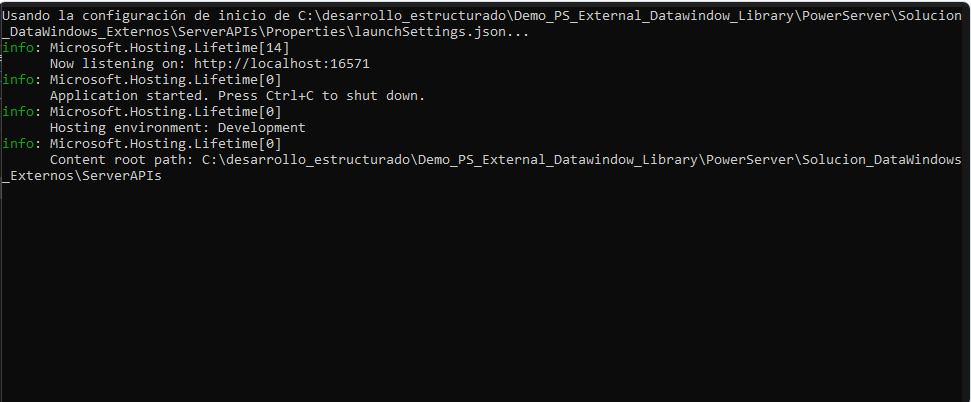
The client does not run in isolation. PowerServer generates a .NET solution with ServerAPIs, configures the database cache, and publishes the Installable Cloud App files. The external PBD and bibliotecas.ini are included as external project files.
Real-world use cases
| Scenario | Practical application |
|---|---|
| Customer-specific reports | Deliver a different PBD per company without maintaining separate executables. |
| Regulatory changes | Update tax, labor, or financial layouts without waiting for a full release. |
| InfoMaker reports | Allow authorized users to customize reports and deploy them as external libraries. |
| Country or branch operations | Select a DataWindow package according to region, language, or local rules. |
| Optional modules | Load only the reports licensed or enabled for a specific installation. |
| Urgent corrections | Distribute a corrected PBD while keeping the main executable unchanged. |
Advantages
- Reduces deployment scope when only a DataWindow changes.
- Enables an extensible catalog of reports and queries.
- Supports customer-specific variants without forking the entire application.
- Keeps loading logic in an NVO and visual events short.
- Verifies library contents through
LibraryDirectory. - Provides traceability through UTF-8 logs and visible status indicators.
- Supports portable packaging with the Installable Cloud App.
Production considerations
- Version every library and keep the previous file available for rollback.
- Validate names, columns, data types, arguments, tables, and permissions before release.
- Do not break contracts consumed by the main window scripts without coordinating an application update.
- Test dependencies such as Child DataWindows, Composite, Report, and DropDownDataWindows.
- Record the hash, version, date, and owner of every deployed PBD.
- Use HTTPS, secure database configuration, and least-privilege access in production.
- Remember that the documented enhancement supports external DataWindow objects; it does not turn every external PowerBuilder object into a supported dynamic plug-in.
How to test the demo
- Extract the complete project and keep
ExternalReportsnext to the application. - Verify that Microsoft SQL Server exposes the
PBDemoDB2025database on port1433and that thecustomertable exists. - Create the
PB SQLServer V2025R2ODBC DSN and point it to that database. - Open
Demo_PS_External_Datawindow_Library.pbwin PowerBuilder 2025 R2. - Run
PowerServer\generar_proyecto_powerserver.ps1, followed byPowerServer\compilar_powerserver.ps1. - Start the PowerServer API and launch the Installable Cloud App.
- Observe the blue banner for
d_clientes_compilado. - Click 1. Habilitar carga dinámica.
- Select PBD EXTERNO and click 2. Agregar biblioteca.
- Select
d_ext_clientes_por_estadoand click 3. Cargar selección. - Enter
CAand execute Retrieve. The grid should show 10 rows and the banner should turn green. - Use Ver DW compilado to return to the 126-row baseline.
- Use Restaurar Library List to remove the external library and complete the loading lifecycle.
Recommended independence test
To prove that the PBD is not merely a copied asset, perform a second controlled test: change the title, color, or one column in d_ext_clientes_por_estado inside the external PBL, regenerate only biblioteca_reportes_clientes.pbd, replace the file, and load it again. If the visual change appears without rebuilding the main PBL, the independent deployment model has been demonstrated directly.
Conclusion
Loading DataWindows from external PBD files turns reports into deployable and versionable resources. The value is not limited to calling AddToLibraryList. A production-ready approach also requires portable paths, content validation, correct transaction association, SQL compatible with the dynamic mechanism, auditing, visible evidence, and a rollback strategy.
This demo brings those pieces together in a reproducible PowerServer 2025 R2 laboratory and provides a concrete path toward smaller deployments, controlled customization, and a more modular PowerBuilder application.
Luis Avilan
This message has an attachment file.
Please log in or register to see it.
Please Log in or Create an account to join the conversation.