


Managing Active Sessions Across Multiple PowerServer Projects

Managing Active Sessions Across Multiple PowerServer Projects
This demo turns a desktop PowerBuilder application into an operational console that queries, classifies, audits, and terminates sessions through the PowerServer Management APIs. An operator can register several projects, select the instance to inspect, and keep every administrative action bound to the correct server.
Demo: Demo_PS_Active_Sesion_Manager · Implementation: Luis Avilan · PowerBuilder 2025 R2
The operational problem
A PowerServer solution may keep sessions open after a user stops interacting with the client application. Development, support, and operations teams need to know how many sessions exist, when they started, how long they have been idle, and which session should be terminated. A single hard-coded URL is also insufficient when several projects or environments are running.
The demo addresses this scenario with a console that is independent from the managed applications. It does not share a client session and it does not query the application's database directly. All communication goes through the Management API of the selected PowerServer instance.
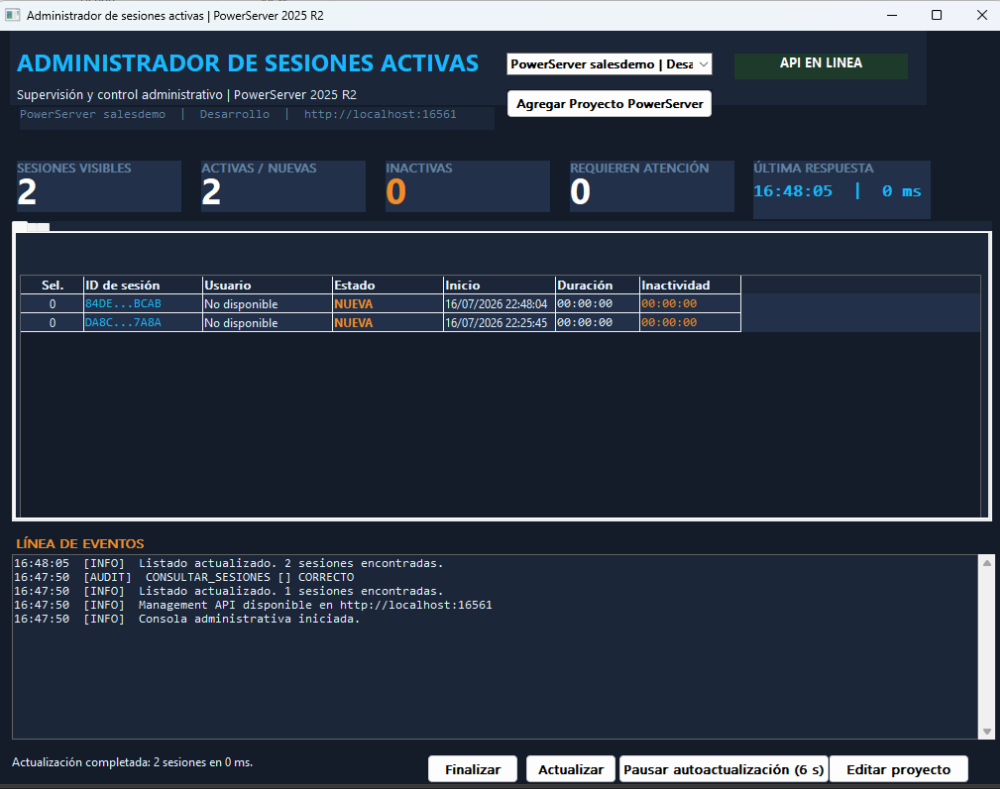
What detecting an active PowerServer project means
In this version, detection does not mean blindly scanning every process or folder on the machine. The application maintains a catalog of configured projects and tests the selected project with a real request to /api/Session/GetSessionCount. When the server returns an HTTP 2xx response, the project is considered administrable and the console proceeds with LoadAll.
This design supports local and remote instances as long as their URLs are reachable. Project selection prevents cross-contamination: the window pauses refresh, clears the previous DataWindows and metrics, switches the HTTP URL and authorization, tests the new API, and only then loads its sessions.
w_ps_active_session_manager.of_cambiar_proyecto → n_cst_ps_server_manager.of_seleccionar_proyecto → configure URL and Bearer token → GET /api/Session/GetSessionCount → GET /api/Session/LoadAll → JSONParser transforms the response → DataWindow, metrics, event timeline, and auditDemo architecture
| Object | Technical responsibility |
|---|---|
demo_ps_active_sesion_manager |
Application entry point that opens the main console. |
w_ps_active_session_manager |
Coordinates project selection, loading, metrics, navigation, refresh, audit, and termination. |
w_ps_server_config |
Captures project name, environment, base URL, and optional Bearer token. |
n_cst_ps_server_manager |
Owns the project catalog and activates the selected connection context. |
n_cst_ps_management_api_client |
Centralizes HTTP GET/POST operations, headers, timeout, status, and error messages. |
n_cst_ps_session_admin |
Calls LoadAll, parses JSON, fills the DataWindow, and executes KillById. |
n_cst_ps_session_classifier |
Computes duration and inactivity and classifies new, active, idle, critical, and long-running sessions. |
n_cst_ps_refresh_manager |
Controls refresh intervals, countdown, pause, and resume behavior. |
n_cst_ps_session_audit_service |
Stores structured audit records in a DataStore and copies them to the audit view. |
n_cst_ps_admin_logger |
Creates the visible chronological timeline of INFO, ERROR, and AUDIT messages. |
d_ps_active_sessions |
Displays the operational session list. |
d_ps_session_summary |
Displays consolidated metrics for the selected project. |
d_ps_session_audit |
Displays queries and administrative actions. |
Project catalog and selection
n_cst_ps_server_manager uses parallel arrays for project names, environments, URLs, and tokens. of_agregar_proyecto prevents duplicate URLs, of_actualizar_proyecto edits an entry, and of_seleccionar_proyecto disconnects the previous context before configuring the HTTP client for the new instance.
The selector displays the three values an operator needs to avoid targeting the wrong server:
Project name | Environment | Base URLThe configuration window accepts an optional Bearer token. If the user enters a token without the scheme, the manager automatically prefixes it with Bearer before creating the Authorization header.
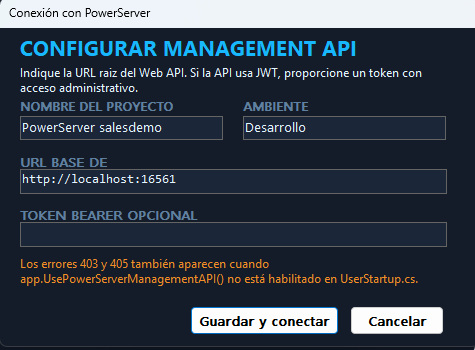
Communicating with the Management APIs
The HTTP client creates every route from the base URL and the /api/Session prefix. Each request sets Accept: application/json, UTF-8 content, a timeout, and Bearer authorization when required.
| Method | Endpoint | Purpose in the demo |
|---|---|---|
| GET | /api/Session/GetSessionCount |
Verifies administrative API access and retrieves the current count. |
| GET | /api/Session/LoadAll |
Returns the JSON array containing all active sessions. |
| POST | /api/Session/KillById/{sessionId} |
Terminates one session after explicit confirmation. |
Every response is captured in str_ps_api_result: operation, endpoint, success flag, HTTP status, body, user-facing error, technical detail, and duration. The window uses the same structure for visual status and auditing.
Server-side enablement
The PowerServer solution being administered must register the Management API middleware in UserStartup.cs:
app.UsePowerServerManagementAPI();From JSON to a DataWindow
n_cst_ps_session_admin.of_cargar_todas_sesiones calls LoadAll and passes the body to JSONParser. PowerServer 2025 R2 returns fields such as sessionid, application, sessionstate, ipaddress, serveripaddress, createtime, and lastvisittime. The parser maps them into an array of str_ps_active_session structures.
of_actualizar_sesiones then resets the DataWindow and inserts one row per JSON item. The full Session ID remains available for administrative operations, while a shortened value improves readability.
istr_sesiones[i].session_id = lnv_json.GetItemString(ll_item, "sessionid")
istr_sesiones[i].application_name = lnv_json.GetItemString(ll_item, "application")
istr_sesiones[i].start_datetime = ldt_start
istr_sesiones[i].last_activity_datetime = ldt_last
Classification and metrics
The API supplies state and timestamps, but the console calculates its own operational classification. Thresholds come from n_cst_ps_session_config and are applied in this order:
- NEW: total duration is below the initial threshold.
- LONG-RUNNING: duration exceeds the configured hour limit.
- CRITICAL: inactivity exceeds the critical threshold.
- IDLE: inactivity exceeds the warning threshold.
- ACTIVE: any other session with normal activity.
The window scans the DataWindow to update visible sessions, active or new sessions, idle sessions, and sessions requiring attention. It also inserts a consolidated row into d_ps_session_summary with latency, last refresh time, and server status.
Automatic refresh without overlapping requests
n_cst_ps_refresh_manager owns the interval and triggers refresh processing in the window. The ib_cargando flag prevents a manual refresh and a timer refresh from modifying the DataWindow simultaneously. Sensitive buttons are disabled during the request; metrics, status, audit, and the event timeline are updated when it completes.
When the operator changes projects, refresh is paused and the previous project's data is cleared. Countdown processing resumes only after the new connection has been completed. Sessions from one instance therefore cannot remain visible under another project's label.
Controlled session termination
The destructive operation does not execute directly from a row click. The window requires a selected session, opens w_ps_kill_confirmation, and requires a reason. Only then does it send POST KillById/{sessionId}.
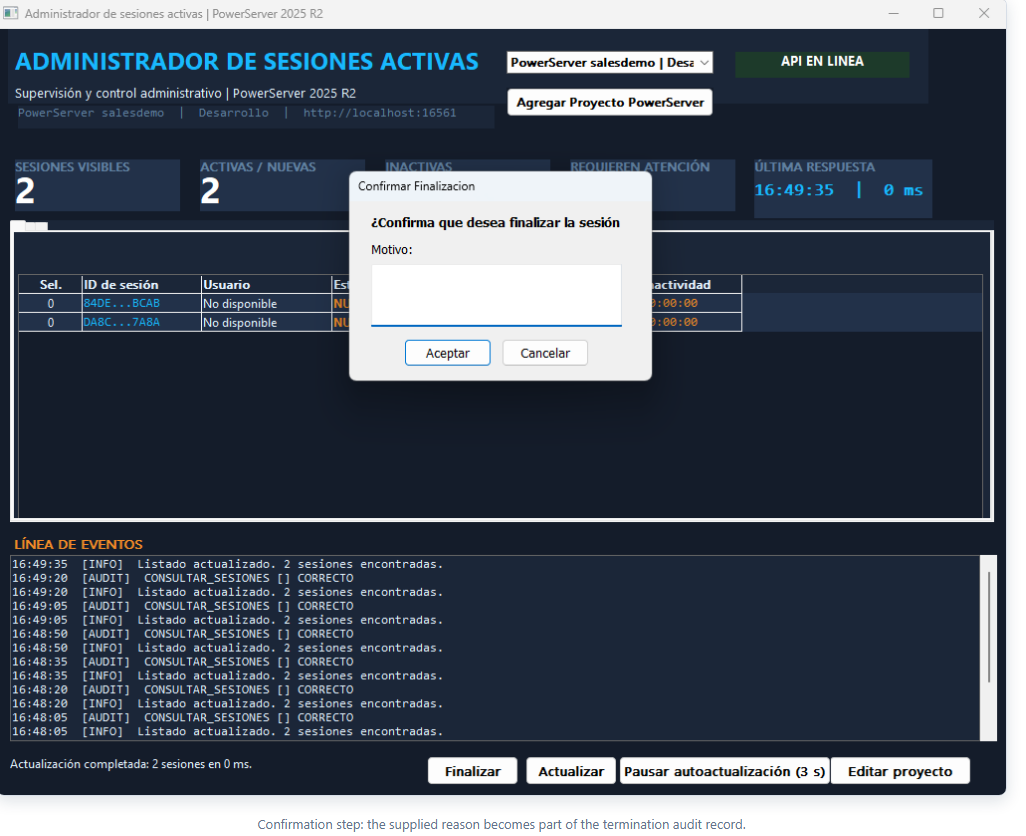
KillById/{sessionId} → validate HTTP and isSuccess → register FINALIZAR_SESION → display the result → run LoadAll againIf the terminated session still belongs to a running client, that client's next server request fails because the server no longer recognizes its context. The following screenshot proves that the operation was not merely a visual change in the administration console.
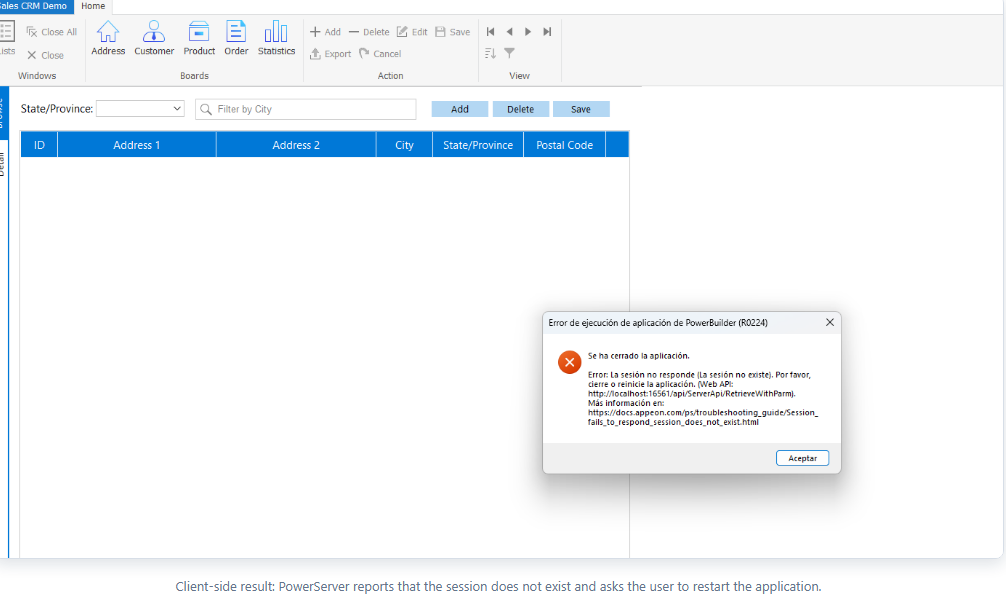
Audit and traceability
Every query and termination creates a row in the internal DataStore managed by n_cst_ps_session_audit_service. A record includes timestamp, administrator, operation, Session ID, server, environment, reason, HTTP status, result, error, and response time. The event timeline summarizes the same workflow chronologically.
The separation is intentional: the logger supports immediate troubleshooting, while the DataStore preserves structured fields for the administrative view and future persistence or export features.
End-to-end demo procedure
- Enable
app.UsePowerServerManagementAPI()in the PowerServer solution, rebuild it, and startServerAPIs. - Start a PowerServer client application to create at least one session.
- Run
Demo_PS_Active_Sesion_Manager. - Add or edit the project name, environment, URL, and token when required.
- Select the project and confirm the API ONLINE state.
- Verify that
GetSessionCountmatches the number of rows returned byLoadAll. - Test manual and automatic refresh.
- Review the technical summary and audit views.
- Select a session, click Terminate, enter a reason, and confirm.
- Verify that the session disappears from the console and that the client reports a missing session.
Error handling
| Result | Meaning | Recommended action |
|---|---|---|
| HTTP 401 | Credentials are missing or invalid. | Review the token and authentication configuration. |
| HTTP 403 | Administrative access is denied or middleware is disabled. | Review authorization and UsePowerServerManagementAPI. |
| HTTP 404 | The route or API version is incorrect. | Validate the base URL and inspect the Swagger document. |
| HTTP 405 | The HTTP verb is wrong or the Management API is unavailable. | Use GET for queries and POST for KillById. |
| HTTP 503 | The server is unavailable. | Check the ServerAPIs process and listening port. |
| No response | Network, DNS, port, or timeout failure. | Keep the last list visible and disable destructive operations. |
Production considerations
- Expose the Management API only through controlled administrative networks.
- Use HTTPS and short-lived tokens or an identity provider.
- Authorize operations separately; reading sessions and terminating them should not necessarily require the same role.
- Persist audit records outside memory when regulatory traceability is required.
- Never write tokens or secrets to messages, files, or screenshots.
- Convert UTC timestamps to the operator's time zone.
- Allow different classification thresholds per project and environment.
- Protect
KillByIdagainst selection mistakes and accidental bulk termination.
GetSessionCount and LoadAll, loaded real salesdemo_cloud sessions, compiled its objects through ORCA, and confirmed termination through the error displayed by the PowerServer client.Conclusion
The demo provides much more than a list of Session IDs. It establishes an administrative context per project, verifies that the selected API is actually available, transforms JSON into PowerBuilder structures and DataWindows, applies operational rules, prevents concurrent refreshes, and records each intervention.
The same pattern can evolve into an enterprise console with automatic discovery, persistent catalogs, centralized authentication, durable auditing, and multi-server monitoring. The current design already separates the user interface, HTTP transport, project management, session logic, classification, and traceability.
Luis Avilan
This message has an attachment file.
Please log in or register to see it.
Please Log in or Create an account to join the conversation.