


In-Memory Image Processing with PowerBuilder 2025 R2 and .NET

In-Memory Image Processing with PowerBuilder 2025 R2 and .NET
How to edit, version, compare, and export images without turning the file system into a temporary workspace.
An image editor may look like a UI-driven application: open, rotate, resize, flip, and save. Its most important architectural decision, however, sits below the window: where each version lives while the user is working. PB Image Memory Studio keeps the original image, the active result, thumbnails, and undo/redo history in memory. The file system is involved when the source is opened and when the final result is exported, not as a chain of temporary files.

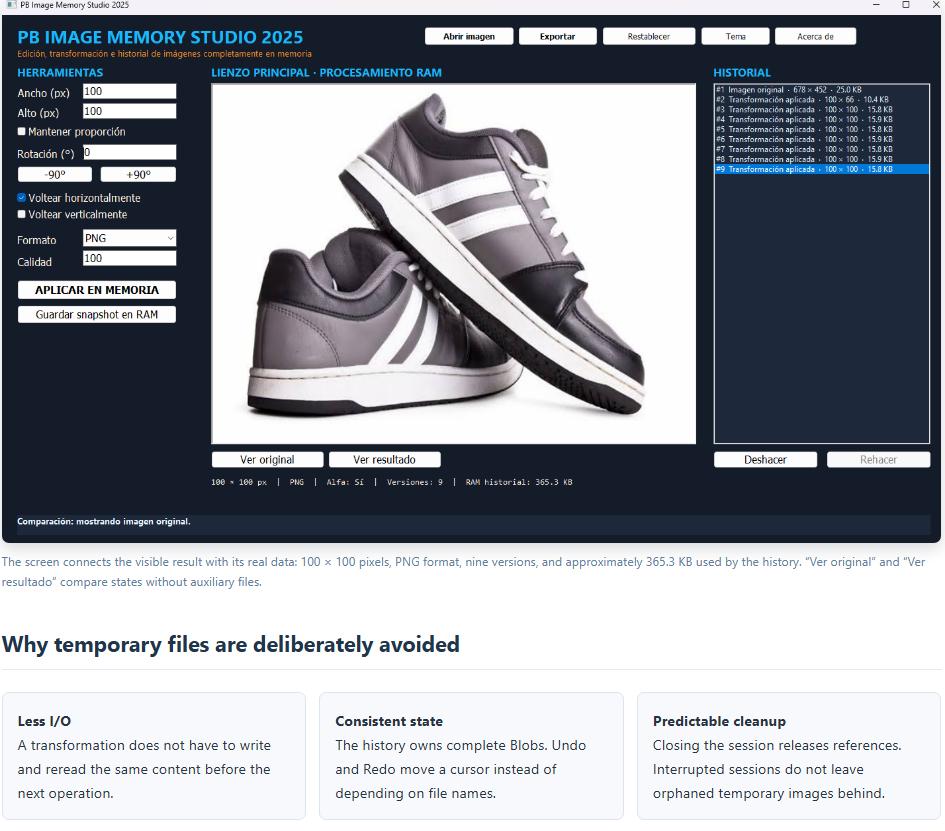
Memory also removes several operational hazards: file-name collisions, folder permissions, antivirus inspection of every temporary output, paths that differ between IDE and executable runs, and partially written intermediates. RAM is not free, though. Every retained version consumes space, and a decoded bitmap can be much larger than its compressed PNG or JPEG representation. The demo therefore reports approximate history usage and deterministically disposes of managed and native graphics resources.
Demo architecture
| Layer | Object | Responsibility |
|---|---|---|
| UI | w_estudio_imagen_memoria |
Collects size, rotation, flip, format, and quality settings; presents the image, diagnostics, and history. |
| Coordination | nvo_controlador_estudio_imagen |
Owns the original and active Blobs, delegates transformations, and decides when to register or export a state. |
| History | nvo_historial_imagen |
Manages an array of str_estado_imagen, the Undo/Redo cursor, thumbnails, and approximate byte totals. |
| Interop | nvo_puente_imagen |
Loads the DLL, creates the .NET class, and bridges PowerScript Blob calls to C# byte[] calls. |
| Graphics engine | PBImageMemoryStudio.MotorImagen |
Uses System.Drawing/GDI+ to resize, rotate, flip, inspect, and encode PNG, JPEG, BMP, or GIF content. |
The main data path is intentionally short:
The DLL behind the processing pipeline
The demo uses its own assembly, PBImageMemoryStudio.Puente.dll. Its source is src\puente_imagen\MotorImagen.cs, and compilar_puente.ps1 writes the compiled DLL directly to the project root. It is neither a downloaded generic library nor a COM component. It is a .NET Framework assembly created specifically for this lab.
PowerBuilder resolves the assembly from the demo's current execution directory:
String ls_ruta

ls_ruta = GetCurrentDirectory() + "\PBImageMemoryStudio.Puente.dll"
If inv_puente.of_inicializar(ls_ruta) Then Return True
nvo_puente_imagen then creates a DotNetAssembly, loads the file through LoadWithDotNetFramework, creates a DotNetObject, and associates it with PBImageMemoryStudio.MotorImagen. The class exposes four central operations:
ObtenerMetadatos(byte[]): returns width, height, format, and alpha-channel information.ProcesarImagen(byte[], ...): performs resizing, flipping, rotation, and encoding.CrearMiniatura(byte[], ...): creates an aspect-preserving thumbnail for history.ConvertirFormato(byte[], ...): performs the final encoding before export.
demo_pb_image_memory_studio.pbl and demo_pb_image_memory_studio.pbt in the repository root. System.Drawing.dll belongs to .NET Framework, while pborc.dll belongs to the PowerBuilder build toolchain; neither should be copied and presented as a functional DLL owned by the demo.Correct memory handling in C#
An image is more than its compressed byte array. Once decoded, GDI+ allocates native surfaces and handles. The engine uses using blocks so every Image, Bitmap, Graphics, MemoryStream, and EncoderParameters instance is disposed even when an exception occurs.
public byte[] ProcesarImagen(byte[] datos, int ancho, int alto,
double angulo, bool voltearHorizontal, bool voltearVertical,
string formato, int calidad)
{
using (Image origen = CargarImagen(datos))
using (Bitmap redimensionada = Redimensionar(origen, ancho, alto))
using (Bitmap volteada = Voltear(redimensionada, voltearHorizontal, voltearVertical))
using (Bitmap rotada = Rotar(volteada, angulo))
{
return Codificar(rotada, formato, calidad);
}
}
The returned value crosses back into PowerBuilder as a Blob. Graphics objects used during calculation are no longer alive; only the encoded representation required by the active version and history remains.
Undo and Redo without disk storage
str_estado_imagen stores the image, thumbnail, dimensions, format, operation, rotation, flip flags, timestamp, duration, and byte count. nvo_historial_imagen appends states to an array and moves il_posicion for Undo and Redo. If the user moves backward and creates a new transformation, that state replaces the former future branch.
The diagnostic total adds Len(imagen) and Len(miniatura) for every active state. This is a useful measurement of Blob storage, although it does not represent the temporary GDI+ peak while an operation is being processed.
ill_limite_bytes = 268435456 (256 MiB), but the current of_agregar implementation does not enforce that limit yet. A production editor should evict older states, reject new snapshots, or ask for confirmation when the memory budget is reached.Displaying the real result matters too
Correct processing is not enough if the UI always stretches every image to fill the canvas. The window converts pixel dimensions through PixelsToUnits, displays a result at 1:1 scale when it fits, and centers it. Results larger than the available area are proportionally reduced for display only; the Blob itself is not changed.
This is why a 100 × 100 output should visibly look small when “Ver resultado” is selected, while “Ver original” restores the full comparison area. The UI communicates the transformation instead of hiding it behind automatic scaling.
Disk output happens once
During export, the controller asks the DLL for the requested encoding and opens only the final destination:
lbl_exportacion = inv_puente.of_convertir_formato(
ib_imagen_actual, as_formato, al_calidad)

ll_archivo = FileOpen(as_ruta, StreamMode!, Write!, LockWrite!, Replace!)
ll_escritos = FileWriteEx(ll_archivo, lbl_exportacion)
FileClose(ll_archivo)
PNG retains transparency; JPEG applies a quality value from 1 to 100; BMP and GIF use their corresponding encoders. Until this final action, intermediate operations remain in memory.
Runtime layout
Demo_PB_Image_Memory_Studio\
├── demo_pb_image_memory_studio.pbt
├── demo_pb_image_memory_studio.pbl
├── PBImageMemoryStudio.Puente.dll
├── src\
│   ├── nvo_controlador_estudio_imagen.sru
│   ├── nvo_historial_imagen.sru
│   ├── nvo_puente_imagen.sru
│   └── puente_imagen\MotorImagen.cs
└── articulo_appeon\
├── articulo_procesamiento_imagenes_memoria_es.html
├── article_in_memory_image_processing_en.html
└── imagen1.png
Conclusion
PB Image Memory Studio shows how PowerBuilder can retain its visual workflow and NVO organization while delegating specialized graphics work to .NET. The key achievement is not simply rotating or resizing an image. It is giving the data a clear lifetime.
The image enters once, evolves as a Blob, retains navigable versions, and leaves when the user chooses to export it. The DLL contributes GDI+ processing and encoding; PowerBuilder contributes orchestration, history, diagnostics, and user experience. Memory connects both layers and turns a chain of temporary files into a controlled, visible, and reversible workflow.
Luis Avilan
This message has an attachment file.
Please log in or register to see it.
Please Log in or Create an account to join the conversation.