


From DataWindow to browser: sharing data with .NET DataStore and a REST API

From DataWindow to browser: sharing data with .NET DataStore and a REST API
Connecting an HTML and JavaScript interface to SQL Server through a .NET DataStore API, retaining the DataWindow data model while separating presentation from database access.
By Luis Avilan · September 30, 2026
The user retrieves or saves information through a screen. The application sends an HTTP request, and the service uses .NET DataStore to work with the data in SQL Server.
The starting point: a DataWindow that can serve more applications
A product catalog often needs more than one interface: a desktop application, a web page or an integration with another system. When each consumer implements its own database access, queries, validation rules and credentials can become scattered across several projects.
This demo explores a specific alternative: use C# models associated with DataWindows, perform data operations through .NET DataStore and expose them through a REST API. An HTML and JavaScript client retrieves, creates, updates and deletes products through that API. The browser receives JSON; it does not connect directly to SQL Server.
What .NET DataStore provides
In this architecture, .NET DataStore handles data inside the .NET service. The project uses DataStore<D_Demo_Productos> and DataStore<D_Demo_Clientes>, with models that declare the table, query and column mappings. The web interface is built separately.

PowerBuilder 2025 R2 includes tools to parse DataWindows, export models and generate a C# project. These are separate actions in the generation workflow. The Appeon generation guide explains their scope.
Two connections to the same database
PowerBuilder and the .NET service target PBDemoDB2025, but they use different connection mechanisms. Understanding this distinction avoids a common configuration mistake: assuming that the PowerBuilder DSN automatically connects the API.
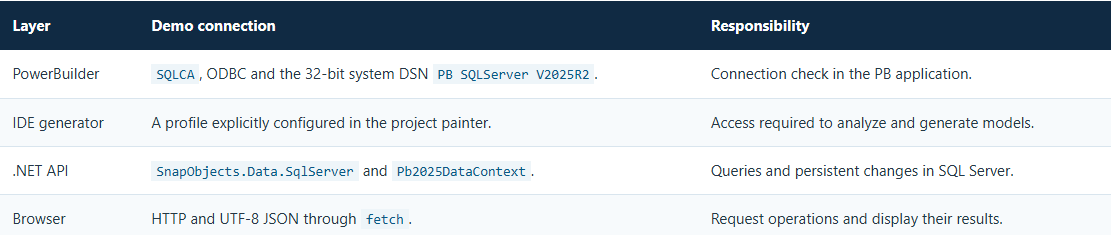
In the documented environment, the server is localhost,1433. The service connection string is configured on the server and is not sent to the web client. The package prepared for GitHub requires local connection settings before it can be used.
Preparing DataWindows and C# models

Figure 1. The two DataWindows selected in the converter. This screenshot documents the visible configuration; it does not establish that generation has completed.
The Solution is DemoNetDataStore.pbsln, the PowerBuilder project is src/DemoNetDataStore/DemoNetDataStore.pbproj and the library is src/DemoNetDataStore/demo_net_datastore.pbl. The pd_demo_netdatastore object selects d_demo_productos and d_demo_clientes.
The models used by the API are in api/Models. For example, D_Demo_Productos declares dbo.demo_producto, a query ordered by id_producto and the properties Id_Producto, Codigo, Descripcion, Precio, Existencia and Activo. Its key has the Key and Identity attributes.
The planned generator output goes into generado/, separate from the instructional API in api/. This allows generated files to be compared with the existing implementation before changes are incorporated. Converting models does not automatically convert all PowerScript window or event logic.
From the model to the HTTP contract
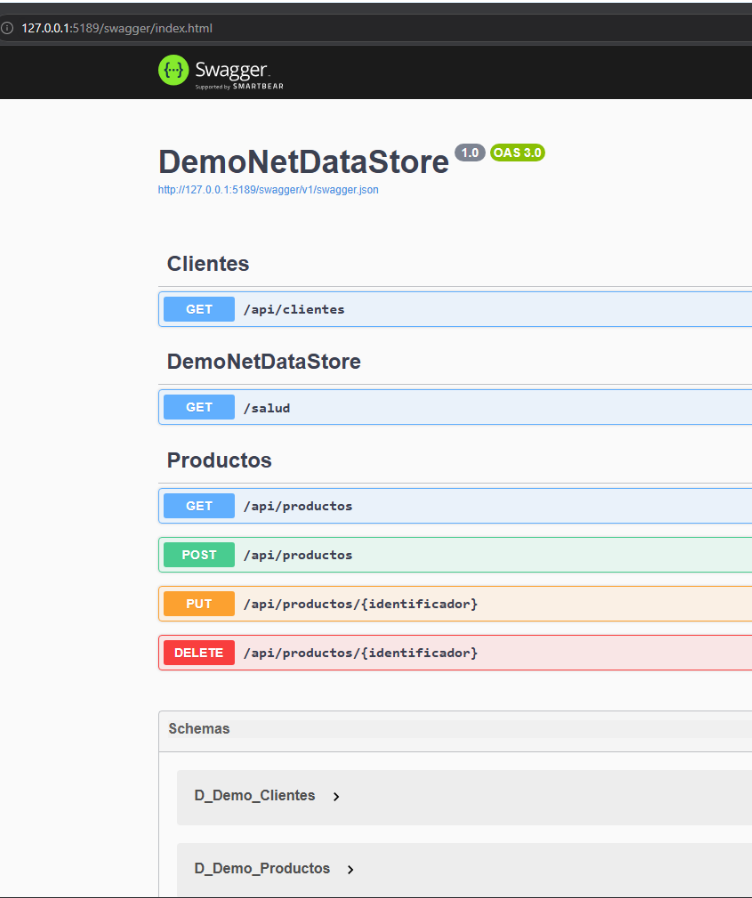

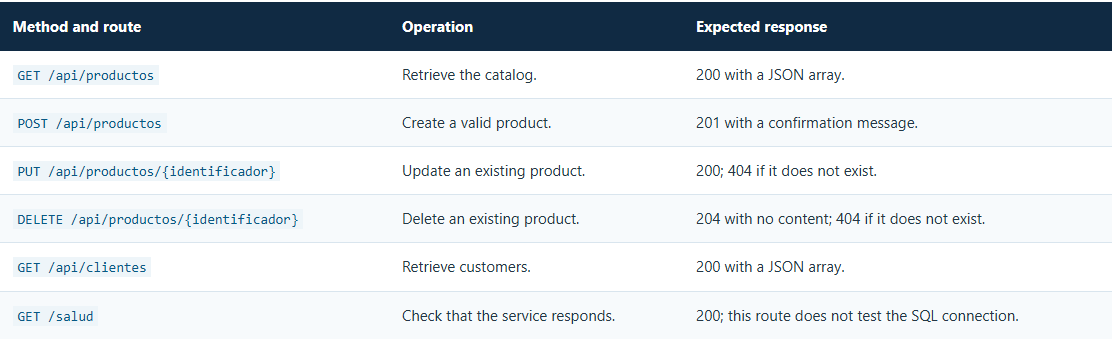
The product controller creates a DataStore for each operation. Queries use RetrieveAsync; updates and deletions first retrieve the record through RetrieveByKeyAsync. After adding, replacing or removing the relevant model, UpdateAsync persists the changes. Appeon describes this operation in the UpdateAsync reference.
Before creating or updating a product, the API requires a code of up to 30 characters, a description of up to 150 characters and nonnegative price and stock values. Empty required fields are also rejected. These checks run in the service in addition to any assistance provided by the form.
The external application in action
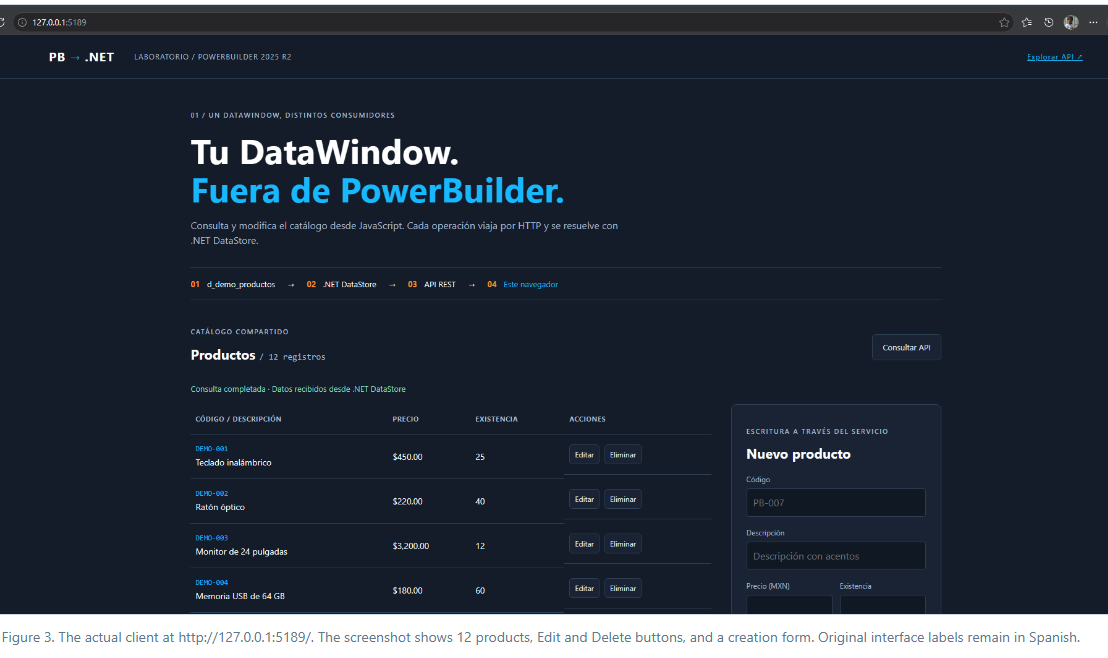
The client consists of index.html, estilos.css and demo.js in api/wwwroot. It is served from the same site as the API and uses relative routes. On save, the form sends POST for a new product or PUT when an identifier is present, then retrieves the catalog again.
The JSON contract uses names such as codigo, descripcion, precio, existencia and activo. The key received by this client is id_Producto. Preserving these exact names prevents integration errors when adding another consumer.
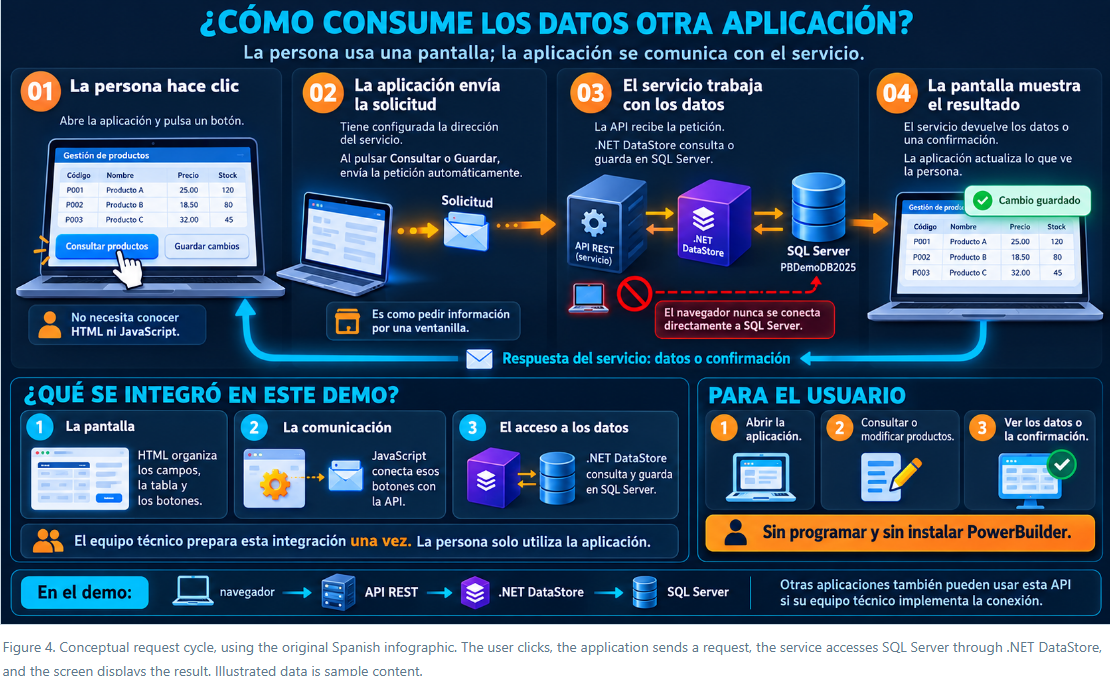
Figure 4. Conceptual request cycle, using the original Spanish infographic. The user clicks, the application sends a request, the service accesses SQL Server through .NET DataStore, and the screen displays the result. Illustrated data is sample content.
- The user selects Retrieve, Save or Delete in the interface.
- JavaScript prepares the route, HTTP method and JSON body when required.
- ASP.NET Core receives the request and validates the data.
- .NET DataStore queries or updates SQL Server through the configured context.
- The API returns data, a confirmation or an error, and the interface updates its state.
Requests with a body declare application/json; charset=utf-8. The persistence test used a description containing “José,” “Muñoz,” “conexión” and “ñ,” then compared the retrieved text with the original. This checks the complete data path through HTTP and the database.
IIS deployment and the WebDAV issue
For development, Iniciar-Demo.ps1 starts the API at localhost:5188/. The IIS installation uses 127.0.0.1:5189/, with a site and application pool named DemoNuevoNetDataStore. The Release package is published to publicado/.
Validation exposed an issue that a GET request alone would have missed: WebDAV intercepted update and delete operations and returned HTTP 405. The correction in api/web.config removes the WebDAV module and handler for this application. That file is also included in the GitHub package.
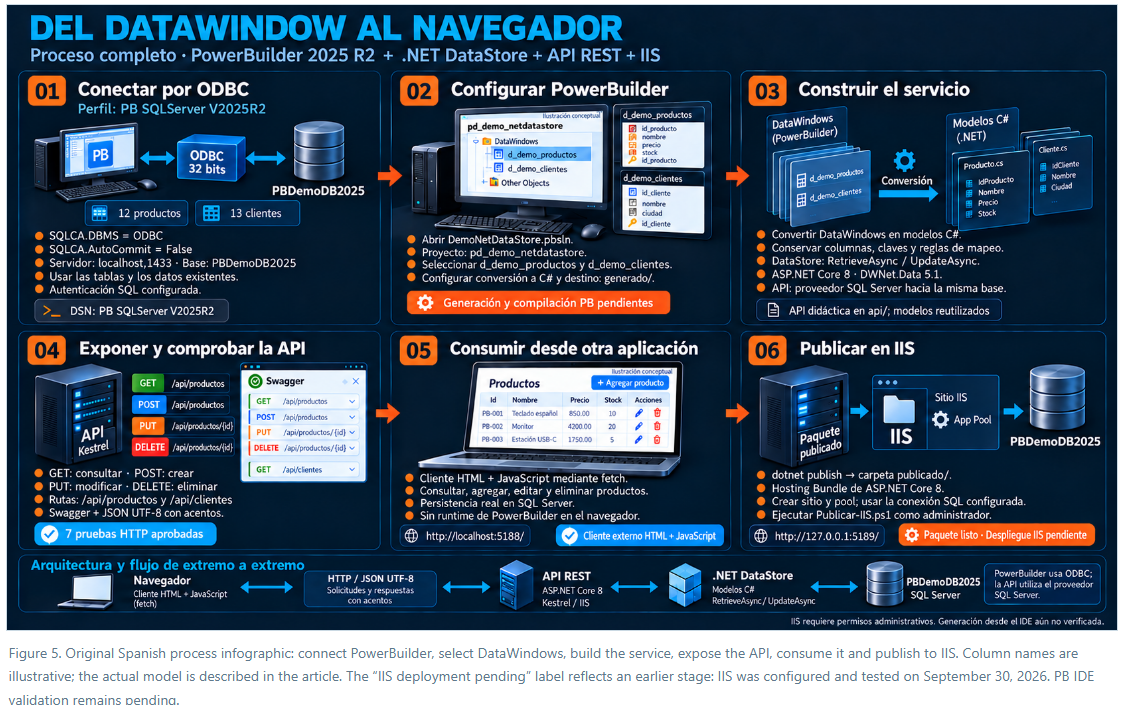
What was verified
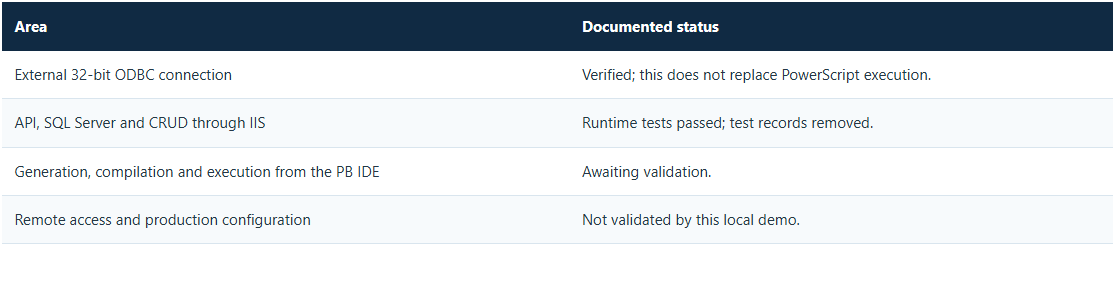
The local installation records seven successful HTTP checks against IIS: service health, customer retrieval, creation and retrieval with UTF-8, persistent updates, rejection of a negative price with 400, persistent deletion and a 404 response for a nonexistent identifier.
Temporary records created by the tests were removed. The documented final state retains 12 products and 13 customers. These counts describe this installation: scripts for an empty database and a fresh repository copy can produce a different dataset.
Requirements for another PC
To run the complete demo on another computer, prepare the following environment:
- Windows and PowerBuilder 2025 R2 with the .NET DataStore components available in the IDE.
- .NET 8 SDK to build and run the API; verify its installation with
dotnet --list-sdks. Access to NuGet is required to restore packages the first time, or you can use a local package source that already contains them. - SQL Server, either local or accessible over the network, and credentials with the required permissions on the demo tables.
- 32-bit Microsoft ODBC Driver 17 for SQL Server for running the 32-bit PowerBuilder application.
- PowerShell 7 to run the automated HTTP tests. Windows PowerShell 5.1 is used to publish to IIS.
- Only when using IIS: an IIS installation and the ASP.NET Core 8 Hosting Bundle. IIS is not required to test the demo with
Iniciar-Demo.ps1.
Reproducing the workflow
- Configure the local SQL Server connection and demo tables using the package README. Keep credentials out of the repository.
- Open the Solution and review the converter profile, the two DataWindows and the generation destination.
- Start the API and open Swagger to inspect methods and contracts.
- Open the web client, create a temporary product with accented characters, update it and delete it.
- In IIS, test PUT and DELETE as well. A visible page and a successful GET do not establish that all CRUD operations work.
Extending the example
This separation allows additional consumers to use the same HTTP contract. It also provides a clear place to extend service validation. However, it does not turn a local demo into a production deployment by itself: the example has no HTTP authentication and remote access has not been validated.
A subsequent phase should define authentication, operation permissions, HTTPS, secret management and error handling. For example, untranslated SQL errors, such as a duplicate code, can result in a generic 500 response. Hosting the web client on another origin also requires reviewing the CORS policy.
The demonstrated result is specific: a browser works with persistent data through an API based on .NET DataStore. The DataWindow supplies the data definition, the service performs operations and each interface can evolve independently.
Luis Avilan
This message has an attachment file.
Please log in or register to see it.
Please Log in or Create an account to join the conversation.