


XML Studio: visual XML document editing with PowerBuilder and PBDOM

XML Studio: visual XML document editing with PowerBuilder and PBDOM
A desktop studio that turns an XML document into a navigable tree, lets users inspect and modify its nodes, and keeps a readable, synchronized source view.
XML Studio shows how PowerBuilder can provide a structured editing experience without hiding the original document: the tree, inspector, and XML source are three views of the same PBDOM model.
What the demo solves
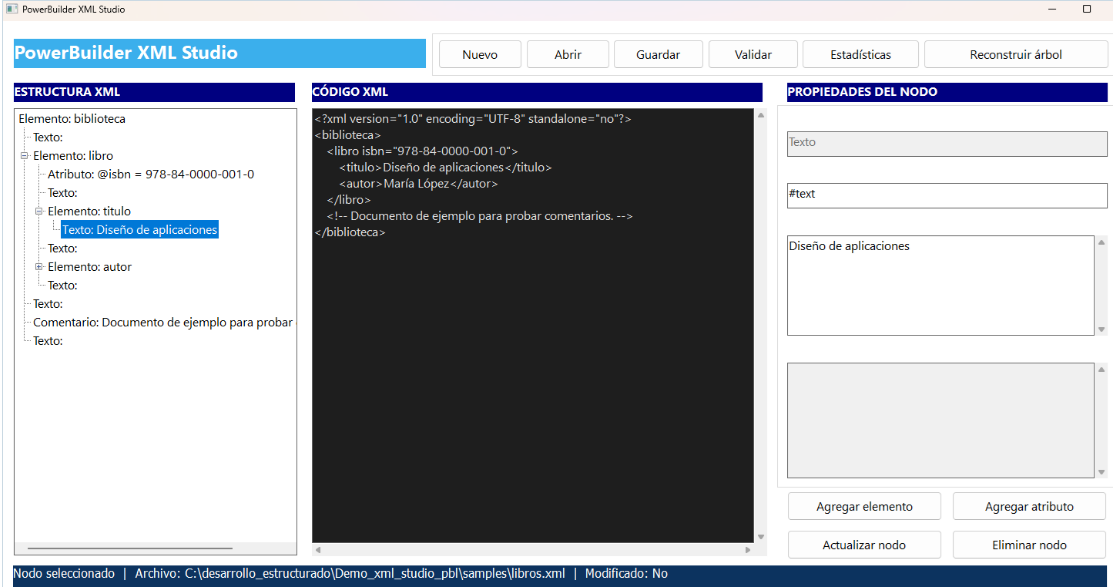
Working with XML as one long string makes it difficult to understand hierarchy, locate attributes, and identify where an error occurred. This demo presents the document in three coordinated areas: a hierarchical structure, indented XML source, and an inspector showing the selected node’s type, name, value, and attributes.
The action bar creates, opens, saves, and validates documents; calculates statistics; and rebuilds the tree after direct source edits. Users can also add elements or attributes, update a node, and remove it from the inspector.
PBDOM as the central model
PBDOM provides specialized types such as PBDOM_DOCUMENT, PBDOM_ELEMENT, PBDOM_ATTRIBUTE, and PBDOM_OBJECT. Instead of manipulating tags with text searches, the demo works with objects that preserve parent-child relationships, content, and attributes.
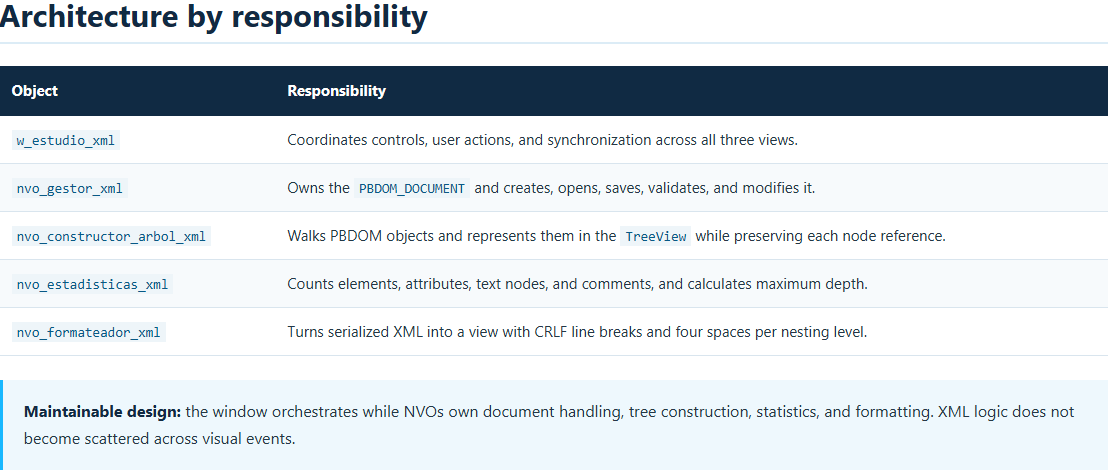
nvo_gestor_xml is the state authority. The window requests the current document and passes it to the other services. Whenever an operation changes the model, of_refrescar_vistas rebuilds the tree, serializes the source again, and clears the inspector so it cannot display a stale selection.
From document to navigable tree
nvo_constructor_arbol_xml recursively walks the hierarchy. Each TreeView entry identifies whether it represents an element, attribute, text node, or comment. Its associated PBDOM reference lets a visual selection lead directly to the real object without searching for it again by name.
Elements
Displayed by name, they can contain child nodes, text, and attributes.
Attributes
Shown below their owning element with both name and value.
Text and comments
Preserved as distinct nodes so the tree remains faithful to the document.
XML source that is genuinely readable
PBDOM serialization is correct, but it is not always convenient for an editing view. nvo_formateador_xml.of_formatear_xml walks the tags, distinguishes opening and closing tags, declarations, and self-contained elements, and produces an indented representation.
<?xml version="1.0" encoding="UTF-8" standalone="no"?>
<biblioteca>
<libro isbn="978-84-0000-001-0">
<titulo>Diseño de aplicaciones</titulo>
<autor>María López</autor>
</libro>
</biblioteca>
Elements containing simple text remain on a single line. When child elements exist, the indentation level increases. The output uses CRLF line endings, matching the Windows environment and its controls.
Editing in both directions
The inspector modifies the structured model by adding elements and attributes, updating the selected node, or deleting it. Every action goes through the manager and then refreshes all views.
The reverse direction is also supported. Users can edit the XML Source panel and click Rebuild Tree. The of_reconstruir_desde_fuente function asks the manager to parse the text and only replaces the visible structure when the XML is valid. On failure, it preserves the context and displays the error details.
Validation and statistics
The Validate action checks that an analyzable document exists and reports the result. Structural validation prevents damaged source from propagating to the tree or a saved file.
The statistics service walks the document and provides a quick view of its complexity:
- number of elements;
- number of attributes;
- text nodes and comments;
- maximum hierarchy depth.
These metrics help diagnose large documents, compare versions, or decide which sections require more focused navigation.
UTF-8, accents, and special characters
The sample explicitly uses encoding="UTF-8" and includes values such as “Diseño de aplicaciones” and “María López.” This provides an immediate visual check that accented characters survive in the source, tree, and inspector.
How to test XML Studio
- Open
demo_xml_studio.pbwin PowerBuilder 2025 R2 and run the application. - Click Open and select
samples\libros.xml. - Expand the tree and select elements, attributes, text, and comments to inspect them.
- Add an element or attribute, update its content, and confirm that the XML source is synchronized.
- Edit a tag in the source panel and click Rebuild Tree.
- Test Validate and Statistics, then save a copy of the document.
- Open
samples\ejemplo_invalido.xmlto verify controlled error handling.
Technical requirements
- PowerBuilder 2025 R2.
- The
PBDOM.pbxextension matching the selected architecture; the repository provides versions underruntime\x64andruntime\x86. - The demo source objects located under
src. - The XML test files located under
samples.
Conclusion
XML Studio combines native PowerBuilder capabilities with a clear service-oriented design. PBDOM preserves document integrity, the TreeView simplifies navigation, the inspector enables focused changes, and the formatter keeps the source understandable.
The result is more than an XML viewer: it is a reusable foundation for configuration editors, integration tools, message explorers, and enterprise utilities that must manipulate XML without losing control of its structure.
Luis Avilan
This message has an attachment file.
Please log in or register to see it.
Please Log in or Create an account to join the conversation.