


Safe DataWindow SQL optimization with AI and real evidence

Safe DataWindow SQL optimization with AI and real evidence
How to build a lab that asks Ollama for SQL improvements, preserves the DataWindow contract, and recommends a change only when the candidate returns the same rows in less time.
A query is not optimized simply because an AI says so. For a DataWindow, the proposal must preserve columns, aliases, arguments, rows, and compatibility—and then prove its value against the same database.
The challenge: optimize without breaking the DataWindow
A DataWindow query is not an isolated SQL statement. Its SELECT list defines the contract PowerBuilder uses to create columns, associate data types, and retrieve rows. Changing an alias, removing an expression, or losing a retrieval argument can invalidate the object even when the statement runs in an external SQL tool.
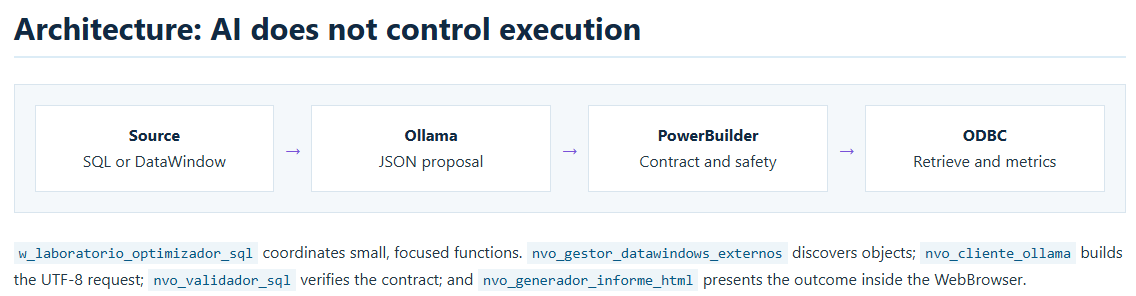
The demo addresses that risk with two dynamic copies: an original DataWindow and a candidate DataWindow. The object stored in the PBL is never modified. AI proposes; PowerBuilder validates, executes, and decides.

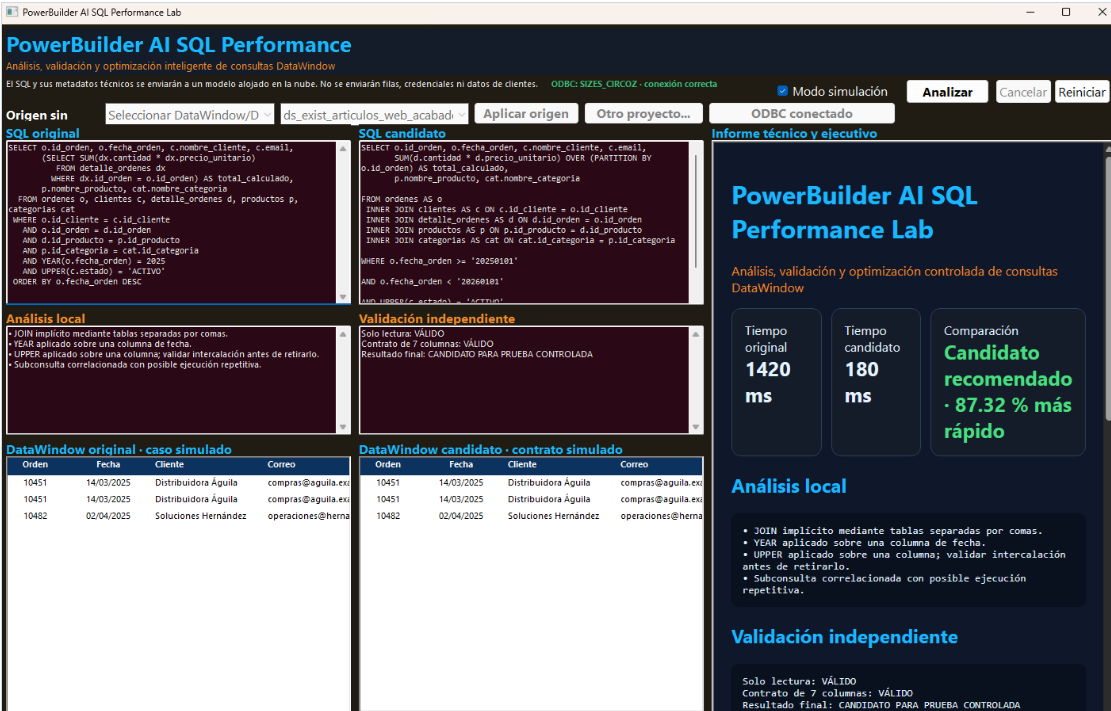
Selecting DataWindows and DataStores from other projects
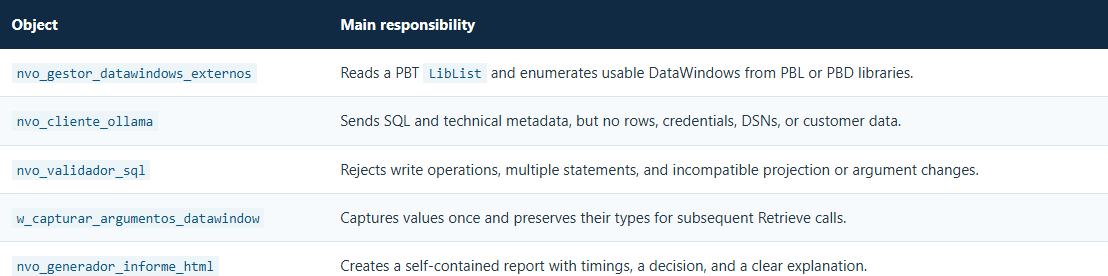
The Other project... button accepts PBT, PBL, and PBD files. For a target, the manager reads its LibList, resolves relative paths, and visits every library. For a direct library, it calls LibraryDirectoryEx(..., DirAll!) and keeps entries of type DATAWINDOW. This also covers definitions used by DataStores because a DataStore consumes the same DataWindow object stored in the library.
Library List, and its original object is never overwritten.Retrieval arguments: capture once, retrieve many times
The exported syntax contains an arguments=(...) declaration. The demo reads the name, order, and type of every argument, asks for values once, and converts them to their corresponding PowerScript types. For example, number is sent as Double, while string remains String.
The same typed collection is reused for both the original and candidate. A case with values entered as 100 and RECIENTES, for example, conceptually becomes Retrieve(100, "RECIENTES")—without converting everything to text or reopening the dialog.
Choose Case ii_total_argumentos
Case 0
Return adw_destino.Retrieve()
Case 1
Return adw_destino.Retrieve(ia_argumentos[1])
Case 2
Return adw_destino.Retrieve( &
ia_argumentos[1], ia_argumentos[2])
End Choose:an_plataforma, :as_abarca, and so on. Captured values are passed to Retrieve; they must not arbitrarily replace the DataWindow argument contract.A strict contract for Ollama
The prompt turns optimization into a conservative task. It requires a single SELECT statement with no write operations, dynamic SQL, temporary tables, comments, or additional statements. The SELECT list must remain literally unchanged, and every argument must preserve its name, count, occurrences, and : prefix.
Preserve the original SELECT list literally.
Preserve every retrieval argument with its colon.
Do not invent tables, columns, functions, indexes, or values.
If there is no safe improvement, return the original SQL.
Return valid JSON only, without Markdown.
The structured response includes status, sql_optimizado, an executive summary, improvements, risks, recommended indexes, assumptions, and confidence level. If the model surrounds the response with extra text, the client keeps only the first complete JSON object and validates it with JSONParser.
Local validation before touching the candidate
The prompt reduces errors, but it is not a security boundary. nvo_validador_sql independently checks that the proposal is read-only, contains no prohibited commands or multiple-statement separators, and preserves both the projection and retrieval-argument signature.
If AI accidentally omits the colon from a known argument, normalization can restore it before comparison. If the contract remains incompatible, the SQL is not executed.
The application also respects the mechanism PowerBuilder supports for each definition: it uses SetSQLSelect when no retrieval arguments exist and modifies DataWindow.Table.Select when the DataWindow retains retrieval arguments.
- Extract
sql_optimizadofrom the JSON response. - Normalize only the prefixes of known retrieval arguments.
- Compare projection, aliases, and argument signature with the original.
- Apply the SQL to the candidate copy through the compatible mechanism.
- Run the original and then the candidate with the same values.
- Compare rows and timings before making a recommendation.
The only valid optimization is the one that wins the comparison
After applying the proposal, the demo repeats the original Retrieve and immediately runs the candidate. Keeping both measurements close together reduces environmental variation and avoids comparing a fresh timing with an older one.
If ll_filas_originales <> ll_filas_candidatas Then
Return False
End If
If il_tiempo_optimizado >= il_tiempo_original Then
Return False
End If

ib_candidato_recomendado = True
Return True
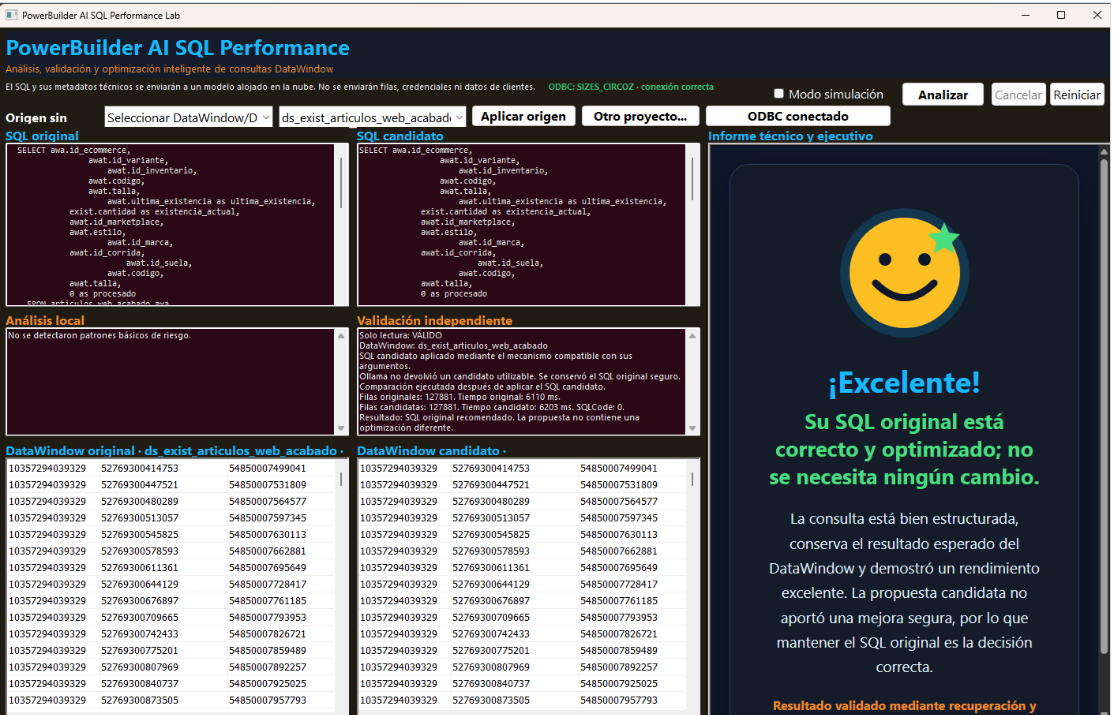
If the row count changes, no comparable measurement exists, both SQL statements are identical, or the candidate takes the same time or longer, the original is recommended. The system never labels a slower query as “optimized.”
Outcome: bounded AI, evidence, and a safe exit
This lab turns a probabilistic suggestion into a controlled process. Ollama supplies an alternative; PowerBuilder preserves the DataWindow contract; ODBC supplies evidence; and a deterministic rule decides which query to recommend.
The value of this approach is not changing SQL at any cost. It is finding improvements without sacrificing compatibility—and stating just as clearly when the original SQL is already the right decision.
This message has an attachment file.
Please log in or register to see it.
Please Log in or Create an account to join the conversation.