


Intelligent document mapping with PowerBuilder, Ollama, and dynamic DataWindows

Intelligent document mapping with PowerBuilder, Ollama, and dynamic DataWindows
A technical walkthrough of a designer that lets users mark fields and tables on an image, turn those regions into a JSON contract, and present AI-extracted values inside configurable DataWindows.
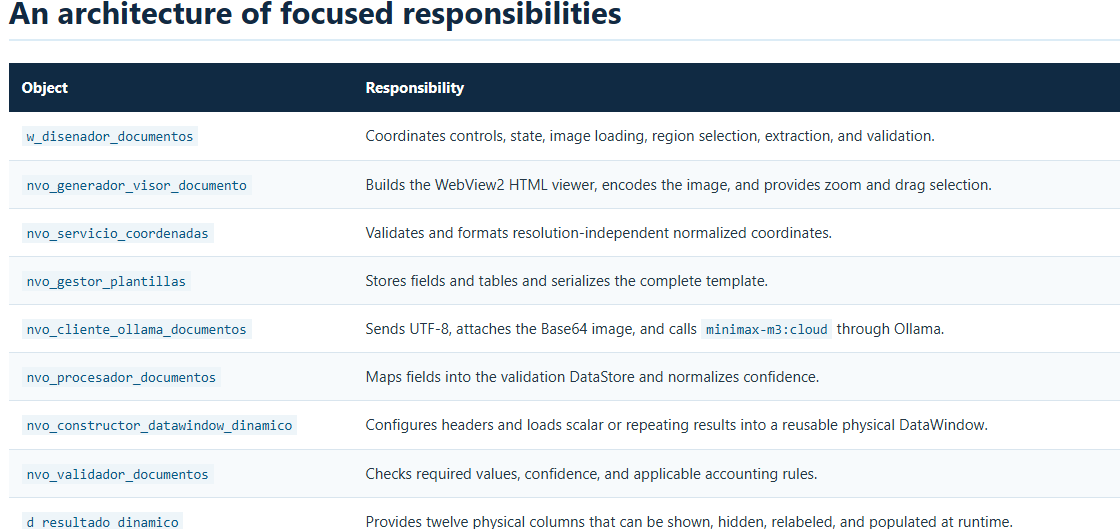
The demo does not replace PowerBuilder business rules. AI interprets the image and returns data; PowerBuilder owns the template, controls the regions, validates the contract, and decides how results are presented.
The problem: visual documents with variable structures
An invoice, an energy bill, or a purchase order contains both scalar values and repeating blocks. Customer name, address, and total can be mapped as independent regions, while a consumption table requires discovering headers, columns, and rows. Building a different DataWindow for every layout quickly becomes difficult to maintain.
Demo_Document_Template_Ai_PB2025 separates document definition from presentation. The user loads an image, draws normalized regions, and assigns technical names. A complete table is mapped by selecting its rectangle and registering a name such as tabla_documento. The model receives the template and returns structured JSON.
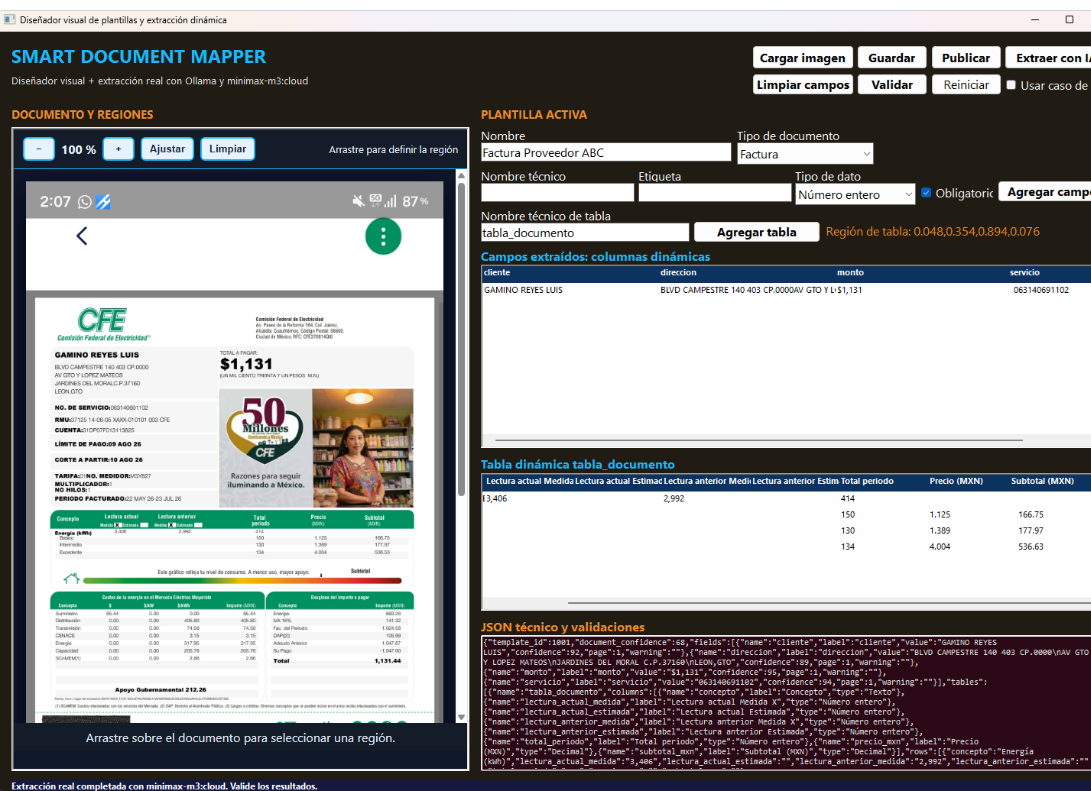
Defining fields and tables with normalized regions
The viewer converts the user's drag gesture into four decimals: X position, Y position, width, and height. Coordinates range from zero to one, so the template does not depend on the original pixel size or current zoom. WebView2 sends a message shaped as region:x,y,width,height.
A field contains name, label, type, required, page, and region. A table contains its name, page, region, extraction method, and dynamic_columns=true. That flag tells the model to discover the visible headers.
{
"name": "tabla_documento",
"page": 1,
"region": "0.051,0.358,0.888,0.070",
"extraction_method": "region_vision",
"dynamic_columns": true
}
Confirming a new document clears previous definitions and results. An explicit Clear fields action is also available. This double safeguard prevents regions from two images from being mixed.
Zoom and selection inside WebView2
The viewer supports zoom from 40% to 300%, increase and decrease buttons, fit-to-width, and selection clearing. Pointer events draw an orange rectangle over the image. When the drag operation ends, JavaScript calculates the region against the displayed image and sends it to PowerBuilder through WebMessageReceived.
Sending the image and enforcing a JSON contract
The client calls localhost:11434/api/chat with stream=false, think=false, JSON format, and minimax-m3:cloud. The image is read into a Blob, converted to Base64 with CoderObject, and added to the message's images array. The body uses EncodingUTF8!.
The HTTP timeout is 1,800 seconds to accommodate long visual analyses. If the model returns consecutive JSON fragments, the client makes a short second call without the image and consolidates them into one root object.
template_id, document_confidence, fields, tables, and warnings. Every table must include name, columns, and rows.{
"fields": [
{"name":"monto","label":"amount","value":"1131","confidence":88}
],
"tables": [{
"name":"tabla_documento",
"columns":[
{"name":"concepto","label":"Concept","type":"Text"},
{"name":"subtotal","label":"Subtotal (MXN)","type":"Decimal"}
],
"rows":[
{"concepto":"Basic","subtotal":"168.75"}
]
}]
}The critical JSONParser lesson: arrays start at one
PowerBuilder returns an array length through GetChildCount, but GetChildItem uses one-based indexes. Starting at zero silently shifts the mapping: the first visual column remains unconfigured and the final field disappears. In this demo, the symptom was a generic header, a missing monto value, and a table incorrectly reported as absent.
For ll_indice = 1 To ll_total
ll_item = anv_json.GetChildItem(ll_arreglo, ll_indice)
ls_nombre = anv_json.GetItemString(ll_item, "name")
Next
The correction applies to fields, headers, rows, and table lookup. With the actual test JSON, the mapper obtains three fields, monto=1131, six columns, and four rows. The PowerBuilder 2025 reference demonstrates the same one-based indexing.
A dynamic DataWindow without ephemeral library objects
A DataWindow created only through Create exists at runtime and does not appear as an object in the PBL. For an observable and stable result, the project uses d_resultado_dinamico, a physical DataWindow with twelve text columns.
nvo_constructor_datawindow_dinamico assigns that DataObject, hides unused columns, and configures position, width, visibility, and header text through Modify. Scalar fields produce one row. Tables produce as many rows as the JSON rows array. Physical names range from c01 to c12, while visible headers preserve document labels.
Validation remains independent from AI
Visible output does not replace business validation. Internal DataStores preserve the original definition and mapped values. The validator counts missing required fields, detects confidence below 80%, and applies accounting consistency when a document total and compatible line items exist.
Confidence may arrive as a percentage or a fraction. When the model returns 0.92, the processor normalizes it to 92. Model warnings remain in the technical JSON so the application can explain when the document does not match the template's declared type.
Testing the complete workflow
- Open the workspace in PowerBuilder 2025 R2 and confirm that
d_resultado_dinamicoexists in the library. - Verify that Ollama responds and
minimax-m3:cloudis available. - Load a PNG, JPG, JPEG, WEBP, or BMP image.
- Select customer, address, and total; assign technical names and click Add field.
- Select the complete table, enter
tabla_documento, and click Add table. - Click Extract with AI and wait for the visual analysis.
- Confirm that the first DataWindow contains every field and the second contains headers and rows.
- Review the technical JSON and run Validate.
The official build path is ORCA\compilar_todo.ps1. Import order matters: temporary Application, three DataWindows, NVOs, window, and final Application. The validated flow reports thirteen successful imports.
Conclusion
The demo combines native PowerBuilder capabilities with document vision without making AI the authority of the application. WebView2 handles visual interaction, Ollama interprets the image, and PowerBuilder owns templates, state, DataWindows, and validation.
Normalized regions, an explicit contract, and a configurable physical DataWindow make the project extensible to new document types. Future PDF rendering, persistence, and enterprise catalogs can be added behind the current NVO boundaries without redesigning the visual mapper.
Https://blogluisavilan.vercel.app
Luis Avilan
This message has an attachment file.
Please log in or register to see it.
Please Log in or Create an account to join the conversation.