


Elevating Code Quality: Automated Dead Code Analysis in PowerBuilder 2025 R2

Elevating Code Quality: Automated Dead Code Analysis in PowerBuilder 2025 R2
Maintaining legacy codebases can be challenging, especially when attempting to locate orphaned functions and unreferenced variables. This technical demo showcases how to engineer a custom clean-code analyzer within PowerBuilder, leveraging native PB APIs to dynamically evaluate target applications and enforce cleaner programming practices.
Why this demo exists
In large PowerBuilder workspaces, dead code accumulates over time. Developers often leave behind obsolete methods or declare local variables that are never utilized, increasing maintenance overhead. This demo introduces nvo_engine_analyser, an analytical engine that programmatically traverses .pbt workspaces, inspects source code, and precisely detects unused components.
Dynamic Target Resolution
Rather than relying on fixed or hardcoded directories, the tool dynamically traces the ecosystem of a project. By extracting the LibList directly from a target .pbt file, it constructs relative paths referencing the base workspace or current execution directory. This ensures complete portability regardless of where the project is deployed.
GetCurrentDirectory() and the original .pbt path context to reliably locate PBL files.The Analytical Engine: nvo_engine_analyser
The core of this architecture is an automated scanner that loads the entire universe of objects into memory. It features two primary analytical pipelines:
- Dead Method Detection: The engine isolates
FUNCTIONandSUBROUTINEdefinitions within exported source code, strips out comments, and measures global invocation counts. If a function is called fewer times than strictly required by its own declaration, it gets flagged asMETODO SIN USO. - Unused Variable Parsing: Through the
of_unused_varsroutine, the tool parses the body of every function and identifies variable definitions (e.g.,String,Integer,DataStore). By validating their internal occurrence count, it isolates variables that are instantiated but never invoked.
Source Code Extraction
To inspect the inner structure of a target application, the analyzer relies on LibraryDirectoryEx and LibraryExport. It evaluates every script dynamically and subjects the raw code to a deep scrub (of_hard_scrub), stripping away simple and multiline comments to prevent false positives during token searches.
ls_dir_info = LibraryDirectoryEx(ls_pbl, DirAll!)
ls_source = LibraryExport(ls_pbl, ls_obj, le_type)
// Deep scrub to eliminate comments
ls_source_clean = of_hard_scrub(ls_source)
The Visual Experience: w_analizador_codigo
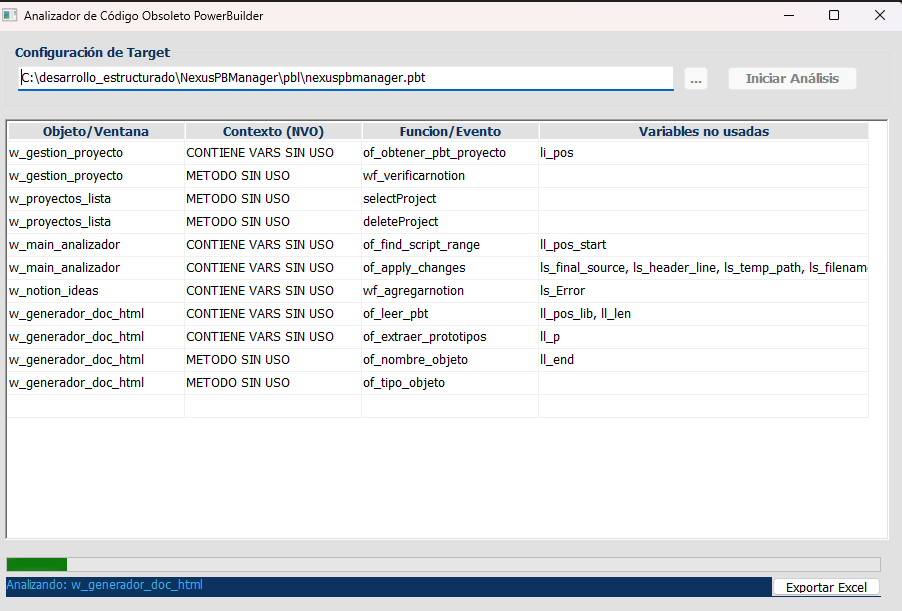
The analyzer provides a clear, tabular user interface via w_analizador_codigo. The results datawindow maps each component, highlighting the exact functions and variables that can be safely removed. It also enables seamless export to Excel directly in the current executing directory, empowering developers to share reports with their teams.
Conclusion
This demo proves that PowerBuilder 2025 R2 developers possess all the native tooling required to perform advanced static code analysis. By dynamically crawling project structures and parsing raw source code, teams can establish robust quality gates, deprecate obsolete logic with confidence, and foster dramatically cleaner architectures.
Luis Avilan
This message has an attachment file.
Please log in or register to see it.
Please Log in or Create an account to join the conversation.
 Posts: 1
This sounds like a very useful tool. I am using Solutions and not even Workspaces, so can I modify this and use the .pbproj instead of the .pbl
Please Log in or Create an account to join the conversation.