


Comprehensive Architectural Analysis with the PowerBuilder Dependency Explorer

Comprehensive Architectural Analysis with the PowerBuilder Dependency Explorer
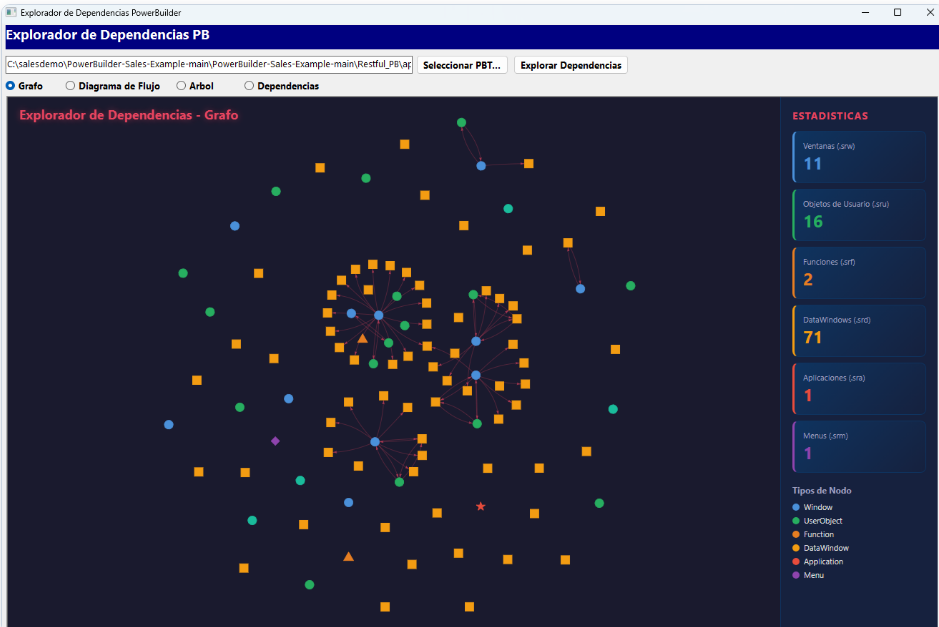
Understanding the structure of a large-scale project is a constant challenge. The Dependency Explorer parses PBT files and PBLs to discover, map, and visualize the interactions between components. Through dynamic views such as graphs, flowcharts, and hierarchical trees, this tool transforms source code into actionable architectural intelligence.
What does the Dependency Explorer solve?
In mature applications, modifying a core object can have unforeseen cascading effects. This explorer mitigates the risk by statically analyzing the code and building a complete dependency map. By directly reading the project file (PBT), the tool identifies libraries, extracts objects, and visually exposes the system's coupling, allowing architects to make informed decisions before refactoring.
System Architecture
| Component | Responsibility |
|---|---|
w_explorador_dependencias |
Coordinates the user interface, manages PBT selection, and controls the WebBrowser component for rendering visualizations. |
nvo_lector_pbt |
Parses the PBT file to extract and validate the library list (PBLs) that make up the workspace. |
nvo_analizador_pbl |
Inspects each PBL to identify and classify the contained objects (windows, functions, structures, etc.) and generate global metrics. |
nvo_analizador_dependencias |
Evaluates objects and determines the edges (dependencies) between them, generating structured data representations in JSON format. |
nvo_generador_html |
Assembles the JSON data with HTML templates and JavaScript libraries to produce interactive views (Graph, Flow, Tree, Architecture). |
This modular architecture clearly separates data collection (reading and parsing) from its visual representation, facilitating the maintenance and extensibility of the visualization engines.
Dynamic Data Visualization
The explorer leverages PowerBuilder's native WebBrowser control to embed powerful web visualization engines. Users can switch between different perspectives based on their analysis goal:
- Graph: An interactive network that highlights highly connected nodes and coupling clusters.
- Flowchart: Ideal for tracing logical sequences and inheritance hierarchies.
- Tree: An expandable structure perfect for top-down navigation from the main application down to base objects.
- Architecture: A structured view that categorizes components by their role in the system.
Integrating PowerBuilder with JSON and Web Technologies
The core analysis generates JSON strings representing nodes, edges, and statistics. This data is injected into temporary HTML files which are then loaded into the embedded viewer.
is_json_nodos = inv_analizador_dep.of_generar_json_nodos()
is_json_aristas = inv_analizador_dep.of_generar_json_aristas()
ls_html = inv_generador.of_generar_html_grafo(is_json_nodos, is_json_aristas, is_json_estadisticas)
inv_generador.of_guardar_html(ls_html, ls_ruta)
wb_visor.Navigate("file:///" + ls_ruta)
This pattern demonstrates how PowerBuilder can act as a robust backend processing engine while delegating complex rendering to modern web technologies.
Complete Execution Flow
- The user selects a project file (PBT) through the interface.
nvo_lector_pbtreads the file and retrieves the complete list of associated libraries.nvo_analizador_pbliterates over each library, cataloging all objects and consolidating statistics.nvo_analizador_dependenciascross-references the data to build the interdependency map.- The system compiles the data into JSON format.
- Depending on the selected view,
nvo_generador_htmlcreates a temporary HTML file and loads it into the WebBrowser.
Strategic Applications
- Impact Analysis: Identify which areas of the system must be tested when modifying a base object.
- Refactoring: Discover circular dependencies or high coupling that requires redesign.
- Onboarding: Provide new developers with an immediate visual map of the application.
- Quality Audit: Generate objective statistics on project complexity and size.
Prerequisites to Run the Demo
If you want to clone this repository and run the demo from the IDE on another computer, ensure you meet the following requirements:
- PowerBuilder IDE: A version compatible with the Chromium-based WebBrowser control (PB 2022 or 2025).
- Internet Connection: Required at runtime, as the WebBrowser component loads graphic libraries (such as vis-network) directly from external CDNs.
- Microsoft Edge WebView2 Runtime: The underlying engine used by PowerBuilder for the web viewer. It is usually pre-installed on recent versions of Windows.
- A PBT File: In addition to the demo code itself, you will need a project file (.pbt) and its corresponding PBLs to perform the analysis.
Conclusion
The Dependency Explorer transcends traditional code navigation by offering a complete X-ray of the software's architecture. By combining PowerBuilder's static analysis with dynamic web visualizations, it equips technical teams with the necessary tools to master complex systems, reduce technical debt, and plan architectural evolutions with confidence.
Luis Avilan
This message has an attachment file.
Please log in or register to see it.
Please Log in or Create an account to join the conversation.