


Building a voice AI studio with PowerBuilder 2025 R2

Building a voice AI studio with PowerBuilder 2025 R2
A natural voice conversation requires more than a microphone and an HTTP request. Demo_PB_Voice_AI_Studio coordinates permission handling, continuous recognition, conversational context, an Ollama request, and speech synthesis through a native PowerBuilder window and a local WebView2 interface.
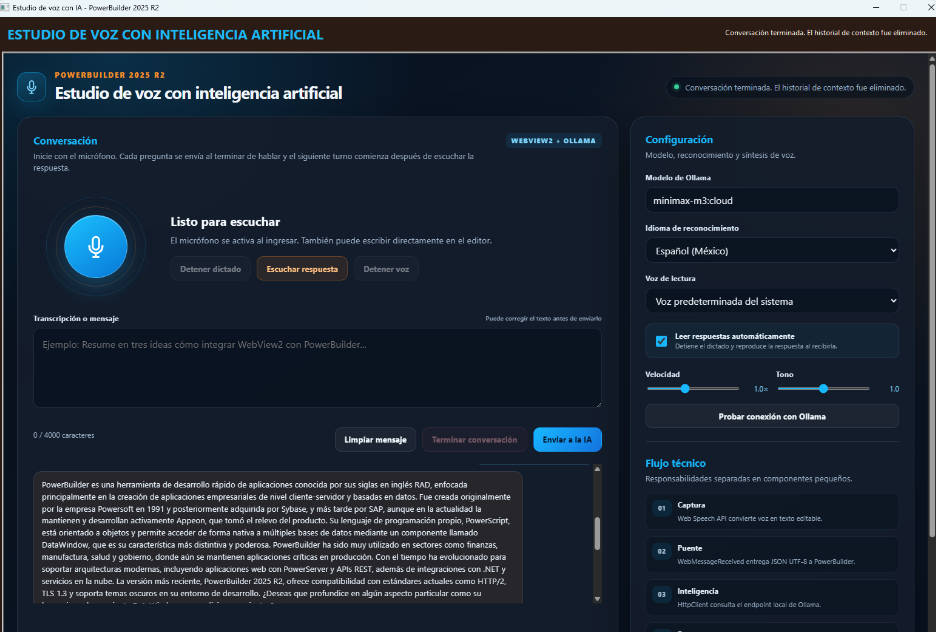
The problem addressed by the demo
A text box and an API call do not create a fluid conversation. The application must request microphone access, preserve the recognition session, determine when the user has finished speaking, prevent synthesized speech from becoming new input, and retain context until the user explicitly ends the conversation.
Prerequisites for running from the IDE
This demo is intended to be opened and run directly from the IDE; it does not require an EXE or a deployment package. The test computer must meet the following requirements:
- Windows 10 22H2 or later: this is Ollama's current minimum requirement for Windows. Windows 11 can also be used.
- PowerBuilder 2025 R2: open
Demo_PB_Voice_AI_Studio.pbwand use runtime25.1.0.6430, as declared by the Application. A separate runtime installation is unnecessary when running inside an IDE that already has it configured. - Microsoft Edge WebView2 Runtime: it must be installed and current. PowerBuilder uses it to render
estudio_voz_ia.html, request microphone access, and execute browser speech APIs. - Ollama for Windows: it must remain active in the background and expose its local API at
localhost:11434. - Ollama account and Internet access:
minimax-m3:cloudis a cloud model. Runollama signinand thenollama pull minimax-m3:cloudon each PC. The conversation requires Internet access even though PowerBuilder calls the local endpoint. - Microphone and audio output: Windows must allow desktop applications to use the microphone. A Windows synthesis voice must be installed, and speakers or headphones must be enabled.
- Complete project folder: keep
src\estudio_voz_ia.htmland run with the project root as the current directory because the window loads that exact path.
ollama run minimax-m3:cloud "Reply OK". If the model answers, open the workspace in PowerBuilder, run the target, and click Allow the first time WebView2 requests microphone access. Python, Node.js, a database, and GPU drivers are not required for this cloud model.Architecture and responsibilities
| Component | Responsibility |
|---|---|
demo_estudio_voz_ia |
Configures the persistent WebView2 profile, enables media access, and opens the main window. |
w_estudio_voz_ia |
Loads the local HTML, validates JSON messages, and coordinates calls between JavaScript and the NVOs. |
nvo_cliente_ia_voz |
Stores conversation turns, builds the JSON request, calls Ollama, and extracts message.content. |
nvo_utilidades_voz |
Converts file paths to URIs and escapes text before executing JavaScript functions. |
estudio_voz_ia.html |
Implements the visual experience, speech recognition, synthesis, and turn-taking flow. |
The visual events remain short and delegate specialized tasks. HTTP, JSON, encoding, and conversation management are kept outside the window's coordination code.
Configuring WebView2 before opening the window
The Application assigns a dedicated data folder and enables media access before the WebBrowser control is created. The profile stores browsing data associated with the voice studio.
w_estudio_voz_ia lw_estudio
Integer li_resultado_datos
Integer li_resultado_medios

li_resultado_datos = WebBrowserSet("UserDataFolder", "datos_webview2_voz")
li_resultado_medios = WebBrowserSet("enable-media-stream", "true")
Open(lw_estudio)Continuous recognition and end-of-question detection
The page creates one SpeechRecognition instance, enables interim results, and uses continuous mode. Every result refreshes the editor and resets a two-second timer. When the pause is detected, the query is sent without stopping the recognition session.
reconocimiento = new ConstructorReconocimiento();
reconocimiento.continuous = true;
reconocimiento.interimResults = true;

function finalizarPreguntaPorSilencio() {
temporizadorFinPregunta = null;
if (!elementos.textoConsulta.value.trim()) return;
enviarConsulta();
}
While Ollama is processing or speech synthesis is reading the answer, consultaEnCurso causes new recognition results to be ignored. This prevents the assistant's own audio from becoming another user question.
The JSON bridge between JavaScript and PowerBuilder
The page sends actions and values through window.chrome.webview.postMessage. The window's WebMessageReceived event delegates the payload to of_procesar_mensaje_web, which validates the JSON and selects a short specialized function.
Choose Case ls_accion
Case "CONSULTAR_IA"
of_atender_consulta(ls_texto, ls_modelo)
Case "INICIAR_CONVERSACION"
of_atender_inicio_conversacion()
Case "TERMINAR_CONVERSACION"
of_atender_fin_conversacion()
End Choose
The reverse path uses EvaluateJavascriptAsync. nvo_utilidades_voz.of_escapar_javascript protects backslashes, quotes, and line breaks before commands such as recibirRespuesta(...) are built.
Conversation history and the Ollama request
nvo_cliente_ia_voz stores parallel arrays of roles and contents. Before each request, JSONGenerator creates the system message and appends every accumulated turn. Context is cleared only when an independent conversation begins or the user selects End conversation.
lnv_json.AddItemString(ll_raiz, "model", ls_modelo)
lnv_json.AddItemBoolean(ll_raiz, "stream", False)
lnv_json.AddItemBoolean(ll_raiz, "think", False)
ll_mensajes = lnv_json.AddItemArray(ll_raiz, "messages")

For ll_indice = 1 To il_total_mensajes
ll_mensaje = lnv_json.AddItemObject(ll_mensajes)
lnv_json.AddItemString(ll_mensaje, "role", is_roles[ll_indice])
lnv_json.AddItemString(ll_mensaje, "content", is_contenidos[ll_indice])
Next
Explicit HTTP and UTF-8 handling
The client converts the JSON body to a Blob with EncodingUTF8!, declares the content type, and sends a POST request to localhost:11434/api/chat. It then validates the HTTP status and uses JSONParser to retrieve message.content.
lblb_cuerpo = Blob(as_cuerpo, EncodingUTF8!)
lnv_http.SetRequestHeader("Content-Type", "application/json; charset=utf-8")
lnv_http.SetRequestHeader("Accept", "application/json")
li_envio = lnv_http.SendRequest("POST", &
"localhost:11434/api/chat";, lblb_cuerpo)
Explicit UTF-8 handling preserves accents, non-English characters, and punctuation while text travels between JavaScript, PowerBuilder, and Ollama.
Speech synthesis and turn transitions
When PowerBuilder returns an answer, JavaScript creates a SpeechSynthesisUtterance, applies language, voice, rate, and pitch, and sends it to speechSynthesis. After playback, a short delay avoids residual echo, clears the transcript, and accepts the next user question without starting a new recognition session.
lecturaActual = new ConstructorLectura(ultimaRespuesta);
lecturaActual.lang = elementos.idioma.value;
lecturaActual.rate = Number(elementos.velocidad.value);
lecturaActual.pitch = Number(elementos.tono.value);
lecturaActual.onend = prepararSiguienteTurno;
sintetizador.speak(lecturaActual);
Complete execution flow
- The Application configures WebView2 and opens
w_estudio_voz_ia. - The window navigates to
src\estudio_voz_ia.html. - The page starts one continuous recognition session and the user grants initial microphone access.
- Interim results update the editable transcript.
- Two seconds of silence trigger
CONSULTAR_IAwithout stopping recognition. - PowerBuilder stores the turn, generates UTF-8 JSON, and calls Ollama.
- The response returns to WebView2, appears in the history, and is read through speech synthesis.
- Recognition results are ignored during playback and enabled again for the next turn.
TERMINAR_CONVERSACIONcancels recognition and removes the stored context.
Practical applications
- Internal assistants for procedures and technical documentation.
- Spoken note capture with an editable review step.
- Accessible interfaces for users who prefer voice interaction.
- Support, training, or customer-service prototypes backed by local or cloud models.
- Reusable bridges between PowerScript and modern HTML experiences.
Conclusion
Demo_PB_Voice_AI_Studio demonstrates how PowerBuilder 2025 R2 can coordinate a modern voice experience while preserving a native architecture. WebView2 handles interaction, the NVOs centralize JSON and HTTP, Ollama maintains the dialogue, and synthesis closes the loop. Clear responsibility boundaries, explicit UTF-8 handling, and a single recognition session provide a practical foundation for enterprise voice assistants.
Luis Avilan
This message has an attachment file.
Please log in or register to see it.
Please Log in or Create an account to join the conversation.