


Developing a Secure WebBrowser Session Manager in PowerBuilder 2025 R2

Developing a Secure WebBrowser Session Manager in PowerBuilder 2025 R2
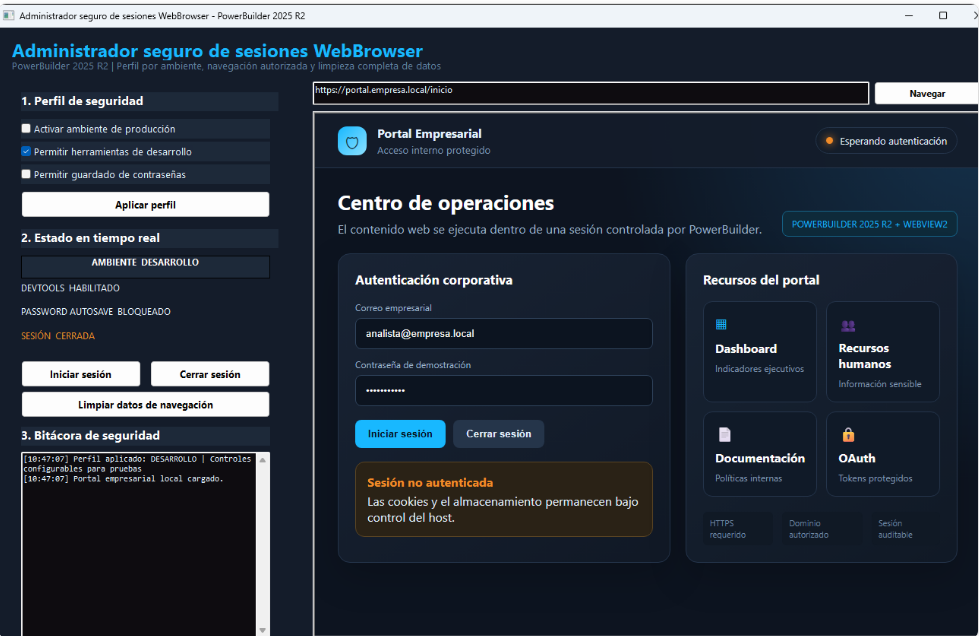
Embedding dashboards, internal portals, OAuth workflows, or JavaScript applications in PowerBuilder creates a modern user experience, but it also introduces a new security boundary. This demo shows how to control that boundary with environment-based profiles, authorized navigation, and complete session-data removal.
The security problem
A visual logout does not guarantee that the embedded browser has forgotten the user. Persistent cookies, Local Storage, Session Storage, IndexedDB, cache, and saved passwords can survive the portal's logout operation. On a shared workstation, kiosk, or medical application, that persistence can expose information to the next person using the device.
There is also an operational risk: when developer tools remain enabled in production, a user can inspect the DOM, review network requests, or execute JavaScript inside the embedded content.
Demo architecture
| Component | Responsibility |
|---|---|
w_navegador_seguro |
Coordinates the UI, updates status indicators, validates navigation, starts or closes the session, and records each operation. |
nvo_seguridad_navegador |
Centralizes the security profile, allowed domains, and WebBrowser cleanup. |
wb_portal |
WebView2-based WebBrowser control that hosts the enterprise portal. |
portal_empresarial_seguro.html |
Self-contained local portal that simulates authentication and creates a cookie, Local Storage, and Session Storage to demonstrate cleanup. |
This separation prevents long visual scripts. The window owns the interaction flow, while the NVO applies rules that can be reused by other windows in the project.
Development and production profiles
PowerBuilder 2025 R2 provides the DevTools and PasswordAutosave properties to control developer tools and password-save prompts.
// Controlled development profile
awb_navegador.DevTools = TRUE
awb_navegador.PasswordAutosave = FALSE

// Production profile
awb_navegador.DevTools = FALSE
awb_navegador.PasswordAutosave = FALSE
The of_configurar_perfil method forces both properties to FALSE in Production. A permissive UI selection therefore cannot accidentally weaken the production profile.
Authorized navigation and logical addresses
The demo's address bar displays portal.empresa.local/inicio, not a physical path from the workstation. Before navigation, of_es_url_permitida compares the normalized address with the allowlist. Attempts to open external domains are blocked and written to the audit log.
IF NOT inv_seguridad.of_es_url_permitida(ls_direccion) THEN
of_registrar_operacion("NAVIGATION BLOCKED")
RETURN -1
END IF
To keep the demo portable, of_obtener_directorio_aplicacion obtains the executable folder through GetModuleFileNameW. Then of_buscar_portal_local searches locations relative to the executable and current directory. The source files contain no absolute path from the development workstation.
Visible authentication and persistent data
When a user starts a session, PowerBuilder calls iniciarSesionDemo() through EvaluateJavascriptAsync. The portal deliberately creates three types of data: a cookie, a Local Storage entry, and a Session Storage entry. The window indicator and audit log change at the same time, showing that the session exists in both the web content and the host.
wb_portal.EvaluateJavascriptAsync("iniciarSesionDemo()")
ib_sesion_activa = TRUE
of_actualizar_indicadores()
of_registrar_operacion("Session started")
Secure logout with ClearBrowsingData
The installed PowerBuilder 2025 R2 help documents the following signature:
Integer WebBrowser.ClearBrowsingData(BrowsingDataKinds datakinds)It returns 1 when the operation succeeds and -1 when it fails. The demo uses BrowsingDataKindsAll! for a complete cleanup:
Integer li_resultado

li_resultado = awb_navegador.ClearBrowsingData(BrowsingDataKindsAll!)
RETURN li_resultado
Available options
| Value | Data removed |
|---|---|
BrowsingDataKindsAll! |
All browsing data. |
BrowsingDataKindsFileSystems! |
Website FileSystem data. |
BrowsingDataKindsIndexedDB! |
IndexedDB databases. |
BrowsingDataKindsLocalStorage! |
HTML5 Local Storage. |
BrowsingDataKindsWebSql! |
Web SQL databases. |
BrowsingDataKindsCacheStorage! |
Cache API and Service Worker cache. |
BrowsingDataKindsAllDomStorage! |
Local Storage and Session Storage. |
BrowsingDataKindsCookies! |
Persistent and session cookies. |
BrowsingDataKindsAllSite! |
Cookies, Local Storage, IndexedDB, and other site data. |
BrowsingDataKindsDiskCache! |
Cached pages, images, and resources. |
BrowsingDataKindsDownloadHistory! |
Download history without deleting downloaded files. |
BrowsingDataKindsGeneralAutoFill! |
General form autofill data. |
BrowsingDataKindsPasswordAutoSave! |
Saved passwords. |
BrowsingDataKindsBrowsingHistory! |
Browsing history. |
BrowsingDataKindsSettings! |
Site-specific permissions and settings. |
BrowsingDataKindsAllProfile! |
History, cache, cookies, storage, and profile data. |
Complete logout sequence
- The portal changes to a signed-out state through
cerrarSesionDemo(). - PowerBuilder resets its authentication variable.
- The NVO calls
ClearBrowsingData(BrowsingDataKindsAll!). - Status indicators change to SESSION CLOSED.
- The audit log records cleanup success or failure.
- The next authentication starts as a new session.
Testing scenarios
- DevTools enabled in Development and blocked in Production.
- PasswordAutosave blocked by the production profile.
- Creation and removal of cookies and web storage.
- Navigation attempt to an unauthorized domain.
- A new session after logout.
- Execution from another folder or workstation without path changes.
Production considerations
This pattern is especially useful for banking systems, medical portals, human-resources applications, ERP dashboards, shared terminals, kiosks, and OAuth integrations.
Conclusion
The WebBrowser control can be integrated safely when PowerBuilder owns the complete session lifecycle. Centralized rules, environment profiles, a domain allowlist, and explicit cleanup turn an embedded browser into a controlled and auditable enterprise component.
Luis Avilan
This message has an attachment file.
Please log in or register to see it.
Please Log in or Create an account to join the conversation.