


A modern MessageBox across the entire application, without rewriting its screens

A modern MessageBox across the entire application, without rewriting its screens
How to overlay a compatible implementation on top of existing MessageBox calls and modernize a finished PowerBuilder application in a natural, transparent way.
The goal is not to search for and replace hundreds of calls. The overlay preserves every existing MessageBox(...) expression and changes the function that handles it when the application is linked.
The challenge inside a mature application
A PowerBuilder application that has evolved for years may contain MessageBox calls in windows, menus, DataWindows, UserObjects, and NVOs. Editing each call creates repetitive work and unnecessary risk: a button combination may change, a return code may be lost, or a proven condition may be altered.
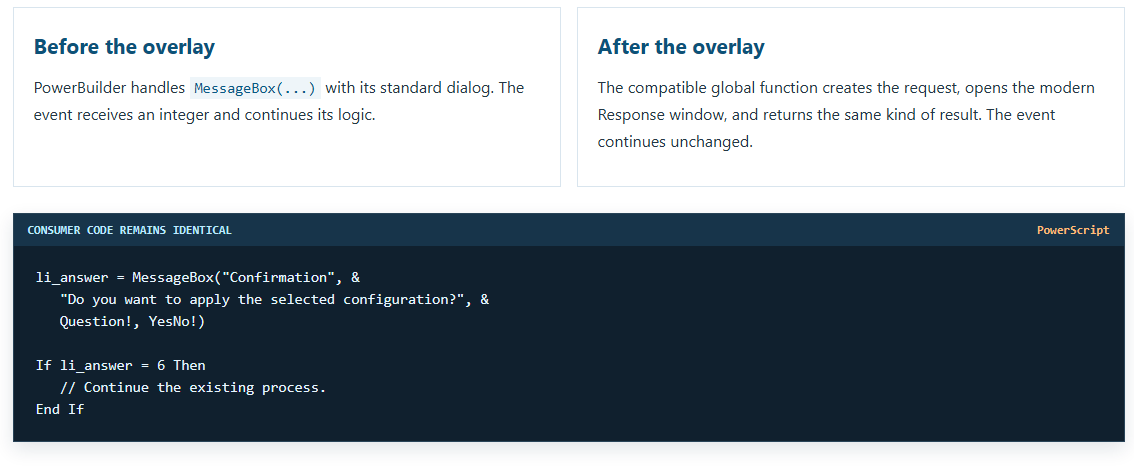
This framework avoids that large-scale migration. The application keeps statements such as:

w_mensaje_moderno. Their events, signatures, and subsequent conditions do not need to be edited.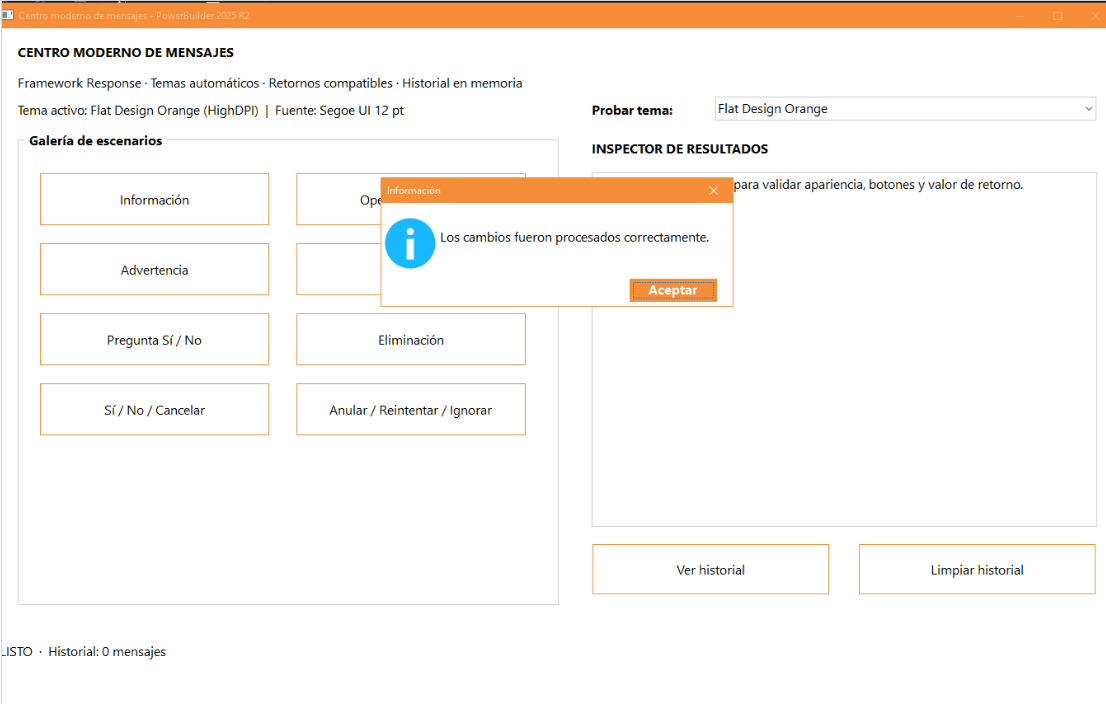
What overlay means in this project
The overlay is a compatibility layer implemented by the global object messagebox.srf. It declares the same name and parameter combinations used by the standard MessageBox: two arguments; title, text, and icon; icon and buttons; and the complete signature with a default button.
When the application objects are rebuilt, PowerBuilder resolves their calls against these global functions available in the target. The new function receives exactly the information that previously went to the standard dialog, translates it into a request, and delegates presentation to the framework.

Step 1: reproduce the public signatures
Transparency begins with the prototypes. Consumer code continues to compile because the function name, data types, and argument order match the usual call forms.
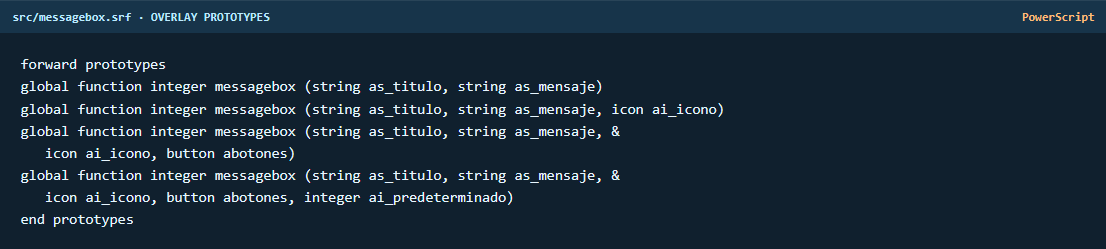
The shorter overloads converge on the complete implementation. This avoids duplicated decisions and keeps one path for icons, buttons, and the default response.
Step 2: translate native types without changing the contract
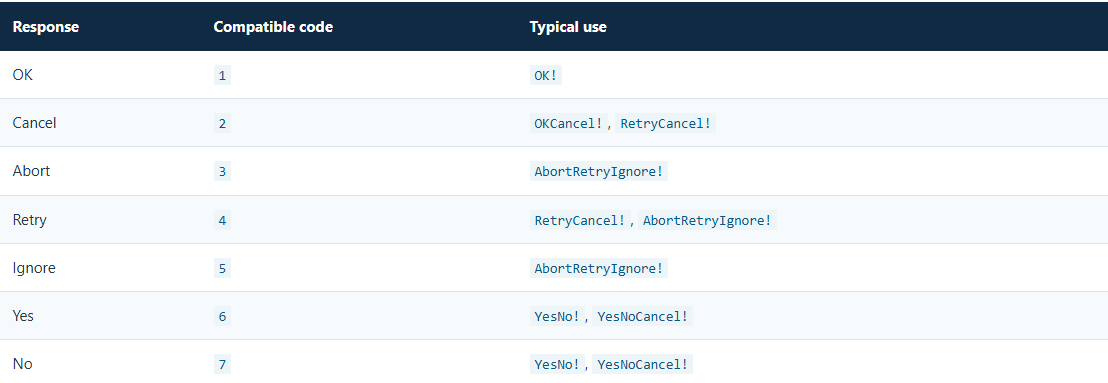
The complete signature maps the native Icon and Button enumerations to internal values. For example, Question! becomes the question category and YesNoCancel! becomes a three-button layout. The requested default button is carried in the same request.
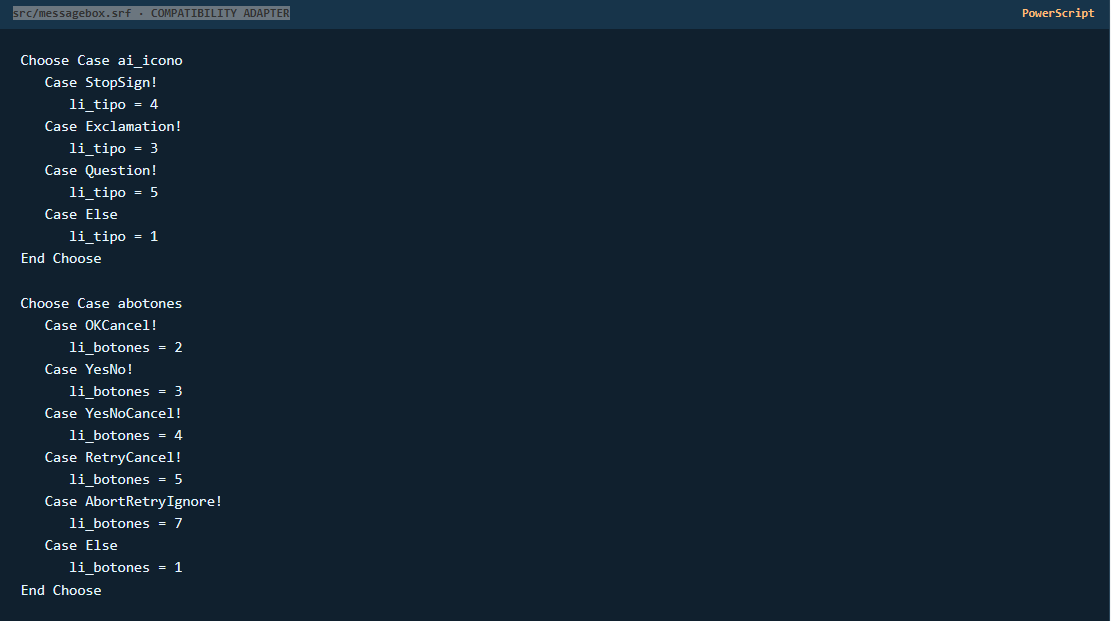
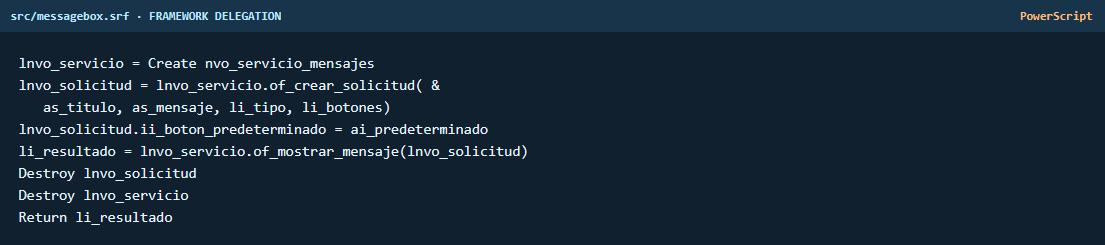
Step 3: separate the request, service, and window
nvo_solicitud_mensaje carries the title, text, category, buttons, technical details, copy option, countdown, and history flag. nvo_servicio_mensajes opens the modal window through OpenWithParm; the window retrieves the object from Message.PowerObjectParm.
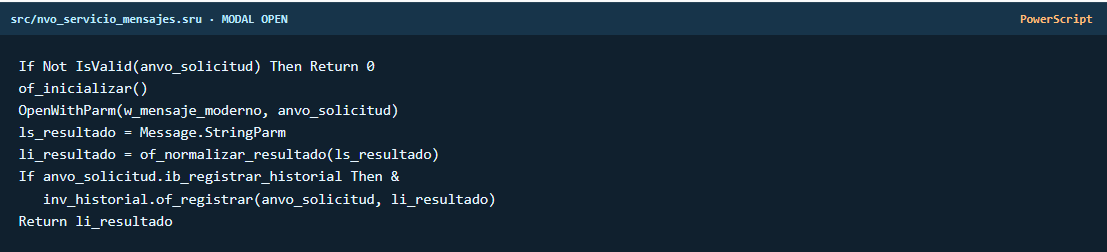
The modern window configures text, icon, theme, and buttons from the request. When the user responds, it calls CloseWithReturn. The service normalizes the returned text and hands the legacy code the same integer it already expects.

Step 4: adopt the active PowerBuilder theme
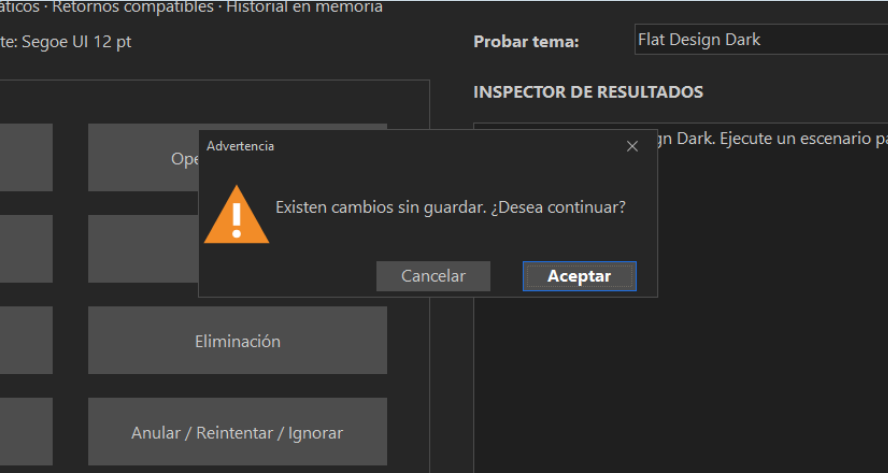
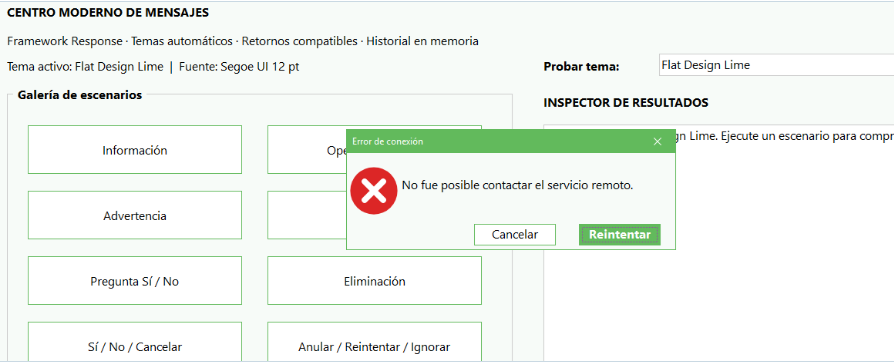
nvo_gestor_temas calls GetTheme() and derives a light or dark palette. The window applies its background, text, accent, and iconography every time it opens. The message feels native to the application because it responds to the theme that is already active instead of imposing a fixed appearance.
Appearance
Light or dark palette, theme color, Segoe UI typography, and an SVG icon for each category.
Behavior
Default button, Enter, Escape, modal return value, and the standard Windows notification sound.
Services
In-memory history, technical details, clipboard copy, and an optional countdown.
Step 5: integrate the overlay into an existing application
- Import
messagebox.srfand its supporting objects:nvo_solicitud_mensaje,nvo_respuesta_mensaje,nvo_servicio_mensajes,nvo_gestor_temas,nvo_gestor_historial,u_icono_mensaje, andw_mensaje_moderno. - Store them in a target PBL or in a new PBL included in the
LibList. The global function must be visible while every call is resolved. - Keep
recursos/svgandthemedirectly under the demo root. Absolute paths are built at runtime withGetCurrentDirectory(); there are no machine-specific paths or parent-folder fallbacks. - Run a Full Build. This recompiles the consumer objects and links their existing calls to the overlay's global function.
- Test every combination used by the application:
OK!,OKCancel!,YesNo!,YesNoCancel!,RetryCancel!, andAbortRetryIgnore!, including default-button variants. - Validate every flow that compares the numeric result. Visual compatibility is not enough: subsequent decisions must still receive 1, 2, 3, 4, 5, 6, or 7 as appropriate.
src are development backups and are not read at runtime. The demo's only file dependencies are root\recursos\svg\file.svg and root\theme\theme_name.Before and after, with an untouched event
Actual scope and limitations
- The overlay covers the signatures declared in
messagebox.srf. Inventory any additional variants before the Full Build. - It intercepts PowerScript calls resolved while the target is compiled.
- It does not replace dialogs created internally by the Runtime, Windows, DLLs, ActiveX, COM, database drivers, or third-party components.
- The SVG resources must be deployed; sound uses the Windows
MessageBeepAPI and requires no audio files. - Testing should cover light, dark, and High DPI themes, as well as keyboard input, the window close button, and return codes.
Conclusion
The safest modernization is not always the one that rewrites the most code. In this framework, a compatible global function acts as an overlay, preserves the MessageBox contract, and routes presentation to a modern Response window. The result is an application-wide upgrade: automatic themes, SVG icons, compatible return values, history, details, and sound, while existing windows and events remain untouched.
The key is to combine three simple ideas: the same public signatures, one central service, and a Full Build that relinks the entire application. A finished system can then adopt a modern visual experience without turning the migration into a manual search through hundreds of calls.
Luis Avilan
This message has an attachment file.
Please log in or register to see it.
Please Log in or Create an account to join the conversation.