


Dynamic JSON processing in PowerBuilder 2025 R2

Dynamic JSON processing in PowerBuilder 2025 R2
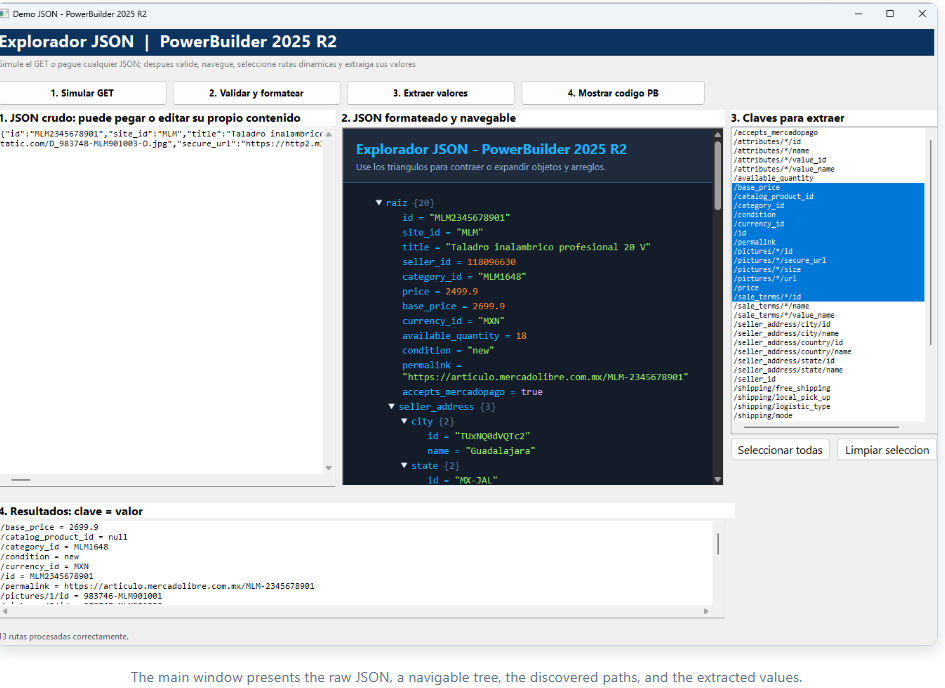
Consuming an API does not end when its response arrives. An enterprise application must also validate the JSON, discover its structure, traverse objects and arrays, preserve UTF-8, and turn the data into useful information. Demo_json_pb brings this workflow together in a visual interface built with the native JSONParser, CoderObject, and WebBrowser classes.
The problem addressed by the demo
API responses commonly combine scalar values, nested objects, arrays, and nulls. Hard-coding every access path couples the application to one response shape. This demo inspects any valid JSON document at runtime and generates reusable paths such as /seller_address/state/name and /pictures/*/secure_url.
HTTPClient.GetResponseBody.Architecture and responsibilities
| Object | Responsibility |
|---|---|
nvo_gestor_json |
Centralizes validation, recursive traversal, path construction, typed extraction, HTML tree generation, and reusable script generation. |
w_demo_json |
Coordinates the interface, validates the visible content, populates the multi-select ListBox, displays results, and navigates the HTML in the WebBrowser control. |
w_codigo_json |
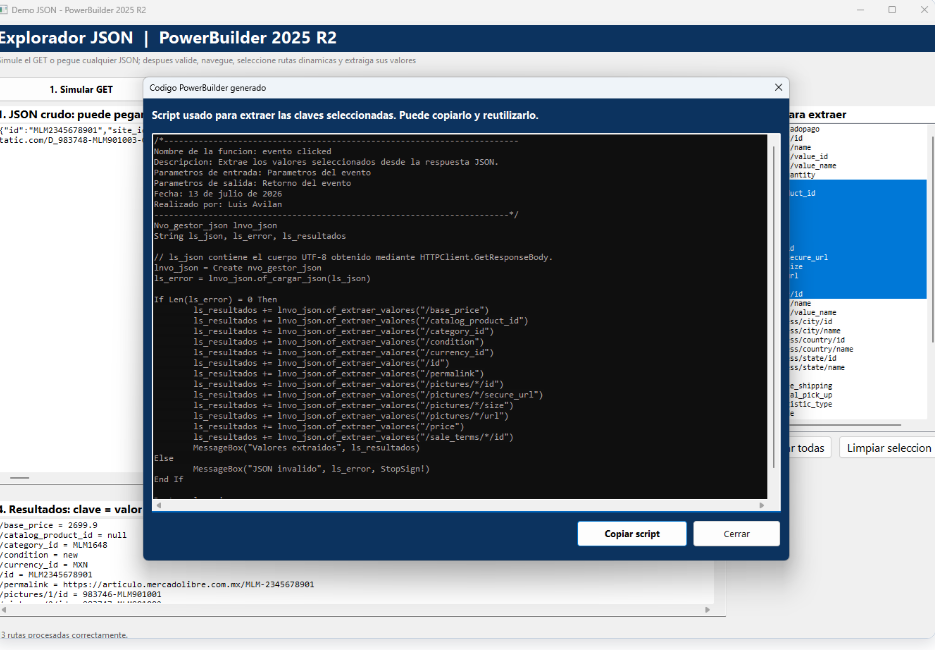
Displays the generated PowerBuilder script and lets the user copy it to the clipboard. |
JSON logic remains in the NVO. The visual window only coordinates actions and state, which makes the manager reusable from other windows, batch processes, or HTTP integrations.
Loading and validation with JSONParser
of_cargar_json creates a clean parser, loads the string, and returns the message produced by LoadString. An empty string means that the structure is valid.
String ls_error

If IsValid(i_json) Then Destroy i_json
i_json = Create JSONParser
ls_error = i_json.LoadString(as_json)

Return ls_error
The window keeps a copy of the validated content in is_json_crudo. Before extracting values, it verifies that the user has not changed the editor, preventing queries against a tree that no longer represents the visible text.
Recursive path discovery
Traversal starts with GetRootItem(). For each node, GetItemType() determines whether it is an object, an array, or a terminal value. Objects are traversed with GetChildKey() and GetChildItem(); arrays replace each concrete index with the * wildcard.
Choose Case le_tipo
Case JsonObjectItem!
ls_clave = i_json.GetChildKey(al_item, ll_indice)
ll_hijo = i_json.GetChildItem(al_item, ll_indice)
of_recorrer_rutas(ll_hijo, ls_ruta_hija, as_rutas)

Case JsonArrayItem!
ls_ruta_hija = as_ruta + "/*"
of_recorrer_rutas(ll_hijo, ls_ruta_hija, as_rutas)
End Choose
The wildcard groups elements with the same structure. For example, three pictures produce one /pictures/*/url option instead of three redundant paths. of_agregar_ruta_unica prevents duplicates, while of_escapar_clave_ruta protects slashes that are part of an actual key name.
Array expansion and typed extraction
When a selected path contains /*, of_expandir_ruta locates the array, reads its actual child count, and replaces the wildcard with indices accepted by JSONParser.GetItemByPath. Its recursive design can resolve more than one array in the same path.
ll_total = i_json.GetChildCount(ll_arreglo)
For ll_indice = 1 To ll_total
ls_ruta_resuelta = ls_prefijo + "/" + String(ll_indice) + ls_sufijo
ls_resultado += of_expandir_ruta(ls_ruta_resuelta)
Next
After reaching an exact path, of_obtener_valor_ruta converts the value according to its native type.
| JsonItemType | Method | Representation |
|---|---|---|
JsonStringItem! |
GetItemString |
Original text. |
JsonNumberItem! |
GetItemNumber |
Number converted to String. |
JsonBooleanItem! |
GetItemBoolean |
true or false. |
JsonNullItem! |
Type detection | null. |
| Object or array | Type detection | {object} or [array] in the conceptual output; the demo labels these values in Spanish. |
HTML visualization inside WebBrowser
of_generar_html_navegable builds a self-contained page with details and summary elements. JavaScript recreates the tree, shows member counts, and applies different colors to strings, numbers, Boolean values, and nulls.
To preserve accents and special characters, both JSON and HTML are explicitly converted to Blob values with EncodingUTF8!. CoderObject.Base64Encode then produces a data URI that can be navigated without temporary files.
lblb_html = Blob(ls_html, EncodingUTF8!)
ls_html_base64 = lnv_codificador.Base64Encode(lblb_html)

Return "data:text/html;charset=utf-8;base64," + ls_html_base64WebBrowser.Navigate.PowerBuilder code generation
After extracting the selected paths, the NVO generates a script that creates nvo_gestor_json, loads the response, and adds one of_extraer_valores call for every selection. The result contains the required documentation header and places all variable declarations at the beginning of the script.
Complete execution flow
- The user simulates the GET response or pastes another JSON document.
w_demo_jsonsends the content tonvo_gestor_json.of_cargar_json.- The manager traverses the tree and returns a unique list of dynamic paths.
- The window generates the UTF-8 HTML and displays it through
WebBrowser.Navigate. - The user selects one or more paths; wildcards expand to actual array indices.
- Values are displayed as
path = value, and the equivalent script is generated. w_codigo_jsondisplays the code and makes it available for reuse.
Practical applications
- Explore unfamiliar responses while integrating an API.
- Generate field mappings without hard-coding the complete structure.
- Diagnose JSON contract changes and locate missing paths.
- Build assistants for integration, testing, and technical documentation.
- Reuse the same NVO with responses obtained through
HTTPClient.
Conclusion
Demo_json_pb shows that PowerBuilder 2025 R2 can process dynamic JSON without external libraries. The combination of JSONParser, recursive traversal, wildcard paths, UTF-8 encoding, embedded HTML, and code generation turns a complex response into a visible and reusable workflow. Keeping the NVO separate from the windows makes the solution clear and helps transfer the same pattern to production integrations.
Luis Avilan
This message has an attachment file.
Please log in or register to see it.
Please Log in or Create an account to join the conversation.