Toolbox
Adds text fields, checkboxes, radio buttons, combo boxes, lists, push buttons, and labels. A TreeView also presents the available control types.




A database-free demo that turns an A4 page into a visual workspace for creating, arranging, saving, and generating interactive PDF forms.
Generating a PDF from PowerScript is useful, but manually defining every coordinate makes maintenance slow. This demo adds a visual authoring layer: users compose the form before generating it. They can add controls, move and resize them, edit their properties, and verify the result without relying on a database table or connection.
PowerBuilder 2025 expanded PDF Builder with text fields, checkboxes, radio buttons, combo boxes, list boxes, and push buttons. It also introduced radio-button groups and actions for push buttons. The demo uses that object family to produce a truly interactive PDF rather than a flat image of the design.
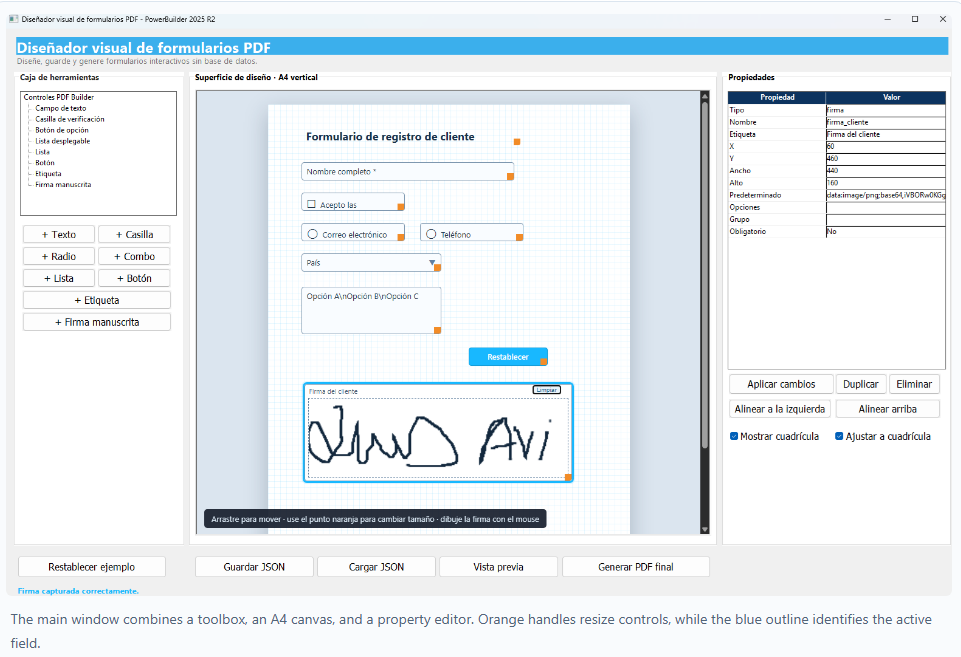
Adds text fields, checkboxes, radio buttons, combo boxes, lists, push buttons, and labels. A TreeView also presents the available control types.
uo_lienzo_pdf represents an A4 page with grid display, selection, dragging, and resizing through WebBrowser/WebView2.
The DataWindow edits name, label, position, dimensions, default value, options, radio group, and required state.
Duplicate, delete, align left, align top, show grid, and snap-to-grid commands complete a workflow similar to a traditional visual designer.
| Object | Responsibility |
|---|---|
w_disenador_formulario_pdf |
Coordinates commands, selection, properties, persistence, preview, and final generation. |
uo_lienzo_pdf |
Renders interactive HTML and converts browser JSON messages into a typed PowerBuilder event. |
nvo_formulario_pdf |
Owns the field collection, grid rules, duplication, alignment, HTML rendering, and JSON persistence. |
nvo_campo_pdf |
Defines common properties: type, name, label, coordinates, size, value, and configuration. |
nvo_campo_*_pdf |
Specializes text, checkbox, radio, combo, list, button, and label behavior through inheritance. |
nvo_generador_pdf |
Adapts the design model to native PDF Builder objects. |
w_vista_previa_pdf |
Opens the temporary PDF inside a WebBrowser using a single preview window. |
uo_lienzo_pdf.of_mostrar_diseno loads the document produced by the model:
If Len(as_html) = 0 Then Return
This.NavigateToString(as_html)
When the browser sends a message, WebMessageReceived uses JSONParser, retrieves the geometry, and triggers ue_campo_cambiado. The main window decides whether to select the field or update its position and dimensions.
nvo_formulario_pdf keeps an array of nvo_campo_pdf references. Adding a control creates the appropriate descendant; duplication produces a field copy; deletion reorganizes the collection; and alignment operations apply a shared coordinate.
Grid behavior also lives in the model. of_ajustar_valor rounds a coordinate to the configured interval, and of_ajustar_campo applies that rule to position and dimensions. These rules can therefore survive a future replacement of the visual canvas.
The design is saved locally with JSONGenerator and loaded with JSONParser. Files use UTF-8 to preserve accents and special characters correctly.
{
"document": {
"pageSize": "A4",
"orientation": "Portrait",
"showGrid": true,
"snapToGrid": true,
"gridSize": 10
},
"fields": [
{
"type": "text",
"name": "customer_name",
"x": 55,
"y": 95,
"width": 350,
"height": 30,
"required": true
}
]
}
This approach makes it easy to save templates, version them with Git, share them with another team, or generate multiple documents without installing a database engine.
nvo_generador_pdf.of_generar_pdf creates a PDFDocument and a PDFPage. It then iterates over the fields and delegates each type to a short, focused function.
| Designer type | PDF Builder object | Behavior |
|---|---|---|
| Text | PDFFormFieldText |
Editable field with an initial value and tooltip. |
| Checkbox | PDFFormFieldCheckBox |
Default state and visible label. |
| Radio | PDFFormFieldRadioButton |
Joins a PDFFormFieldRadioButtonGroup. |
| Combo | PDFFormFieldComboBox |
Receives the pipe-delimited option collection. |
| List | PDFFormFieldListBox |
Displays the configured set of options. |
| Button | PDFFormFieldPushButton |
Runs a PDFActionResetForm action. |
| Label | PDFText |
Adds static content to the document. |
lpdf_campo = Create PDFFormFieldText
lpdf_campo.Tooltip = anv_campo.is_nombre + " - " + anv_campo.is_etiqueta
lpdf_campo.CurrentValue = anv_campo.is_valor_predeterminado
of_aplicar_geometria(lpdf_campo, anv_campo)
ll_resultado = apdf_pagina.AddContent(lpdf_campo)
Appeon's official documentation describes the form-field family added to PDF Builder and provides examples for the PDF objects.
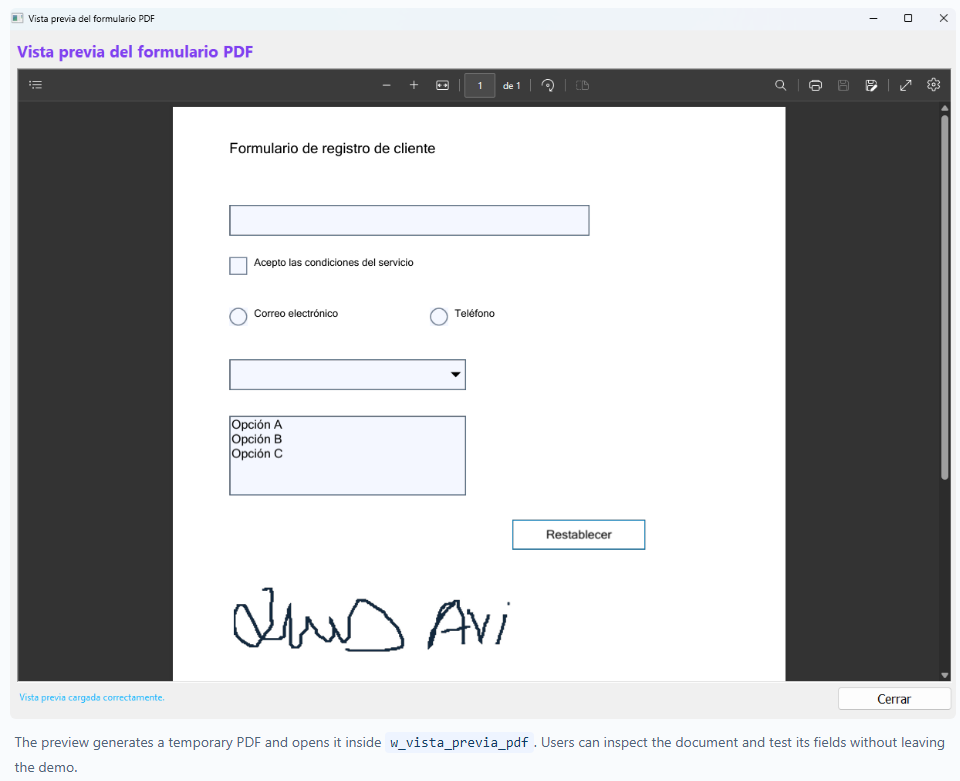
The Preview button creates a temporary file, keeps a single viewer instance, and navigates the WebBrowser to the local URI. The Generate final PDF button lets the user select the permanent output location.
The executable sources contain no absolute paths from the development workstation. The temporary path is resolved at runtime and has a fallback based on the current directory. JSON projects and final PDF files use user-selected locations.
demo_disenador_pdf.pbw with PowerBuilder 2025 R2.demo_disenador_pdf.pbt target.The demo is a practical reference for applications that need configurable forms: case files, requests, inspections, customer records, consent forms, or internal documents. Separating model, canvas, and generator makes it possible to add multiple pages, undo/redo, templates, validation rules, fonts, colors, more actions, and batch generation.
The project's value is not limited to creating a PDF. It demonstrates how PowerBuilder 2025 R2 can combine a modern visual interface, WebView2 interoperability, native JSON, inheritance, and PDF Builder into a complete form-authoring tool.
Luis Avilan
This message has an attachment file.
Please log in or register to see it.
Please Log in or Create an account to join the conversation.