


PowerBuilder 2025 R2: Runtime DataWindow Inspection with GetDWObject

PowerBuilder 2025 R2: Runtime DataWindow Inspection with GetDWObject
How to build a runtime metadata inspector by combining Describe, GetDWObject, DWObject, Modify, a shared DataStore, and UTF-8 JSON export.
Introduction
A DataWindow is not merely a row container. Its definition contains a tree of visual and functional objects: columns, text labels, computed fields, buttons, and other controls. Each element has an identity, type, band, geometry, visibility, and specialized properties. That information is usually implicit in the DataWindow Painter, but PowerBuilder can also inspect and modify it at runtime.
The Demo_GetDWObject project turns this capability into a visible tool. Users can enumerate the objects in a DataWindow, filter them by type, select one by name, retrieve its properties, locate it through temporary highlighting, export the result to JSON, and run basic design validation. The entire demo uses local data and requires no database connection.
The technical value of the demo is not a single method call. It presents a complete pipeline:Describe("DataWindow.Objects")discovers names,GetDWObjectobtains a typed object, the NVO normalizes its properties,Modifyapplies a reversible visual change, andFileWriteExproduces a UTF-8 JSON artifact.
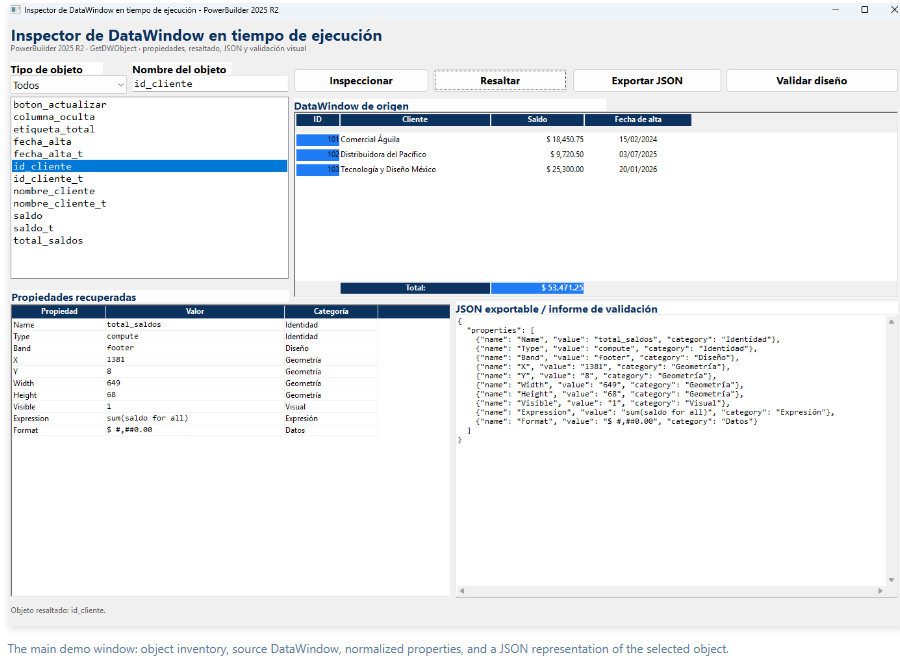
For more information and detailed specifications, see the article “PowerBuilder 2025 R2: Runtime DataWindow Inspection with GetDWObject.”
This message has an attachment file.
Please log in or register to see it.
Please Log in or Create an account to join the conversation.