


PowerBuilder 2025 R2: Dynamic Diagram Rendering with Mermaid

PowerBuilder 2025 R2: Dynamic Diagram Rendering with Mermaid
How to integrate Mermaid.js into your PowerBuilder applications to generate diagrams on-the-fly using the WebBrowser control and Data URIs, without relying on temporary files.
Introduction
Visualizing processes, architectures, and data flows is essential in enterprise software. Tools like Mermaid.js allow defining diagrams (such as flowcharts, sequence diagrams, Gantt charts, etc.) using simple text-based syntax. Integrating this capability directly into PowerBuilder enriches the user experience and facilitates the dynamic generation of graphics from structured data.
The Demo_uso_mermaid_pb project demonstrates how to encapsulate Mermaid.js logic into a Non-Visual Object (NVO) and instantly display the result in a WebBrowser control. This is entirely achieved by generating Base64-encoded Data URIs, eliminating the need to create, manage, and clean up temporary HTML files on the client's disk.
The technical value of this solution lies in its cleanliness and portability: the NVO builds the required HTML, converts it to Base64, and injects it directly into the WebBrowser control, ensuring fast execution without leaving a trace on the file system.
Demo Architecture
The project maintains a simple structure with well-defined responsibilities:
| Object | Technical Responsibility |
|---|---|
w_demo_mermaid.srw |
Main window managing the interaction. It contains a MultiLineEdit for syntax input, a trigger button, and a WebBrowser for rendering. |
nvo_manejador_mermaid.sru |
Encapsulates the logic to build the HTML string, include Mermaid libraries via CDN, and convert the entire document into a Base64-encoded Data URI using UTF-8. |
Complete Execution Flow
- The user enters or edits the Mermaid text syntax in the
mle_sintaxiscontrol. - Upon clicking the Renderizar (Render) button, the window captures the text and instantiates
nvo_manejador_mermaid. - The
of_generar_archivo_htmlmethod is invoked, passing the Mermaid code as an argument. - The NVO builds a complete HTML document in memory, which includes the Mermaid library from a CDN and the diagram code.
- The HTML document is converted into a UTF-8 encoded Blob and then Base64-encoded using the
CoderObject. - The NVO returns a string in the Data URI format:
data:text/html;charset=utf-8;base64,.... - The window calls the
Navigatefunction on thewb_visor(WebBrowser) control using the generated URI, instantly rendering the graphic.
Step 1: User Interface and Interaction
In the button's clicked event, the code retrieves the input text, invokes the NVO, and handles the WebBrowser navigation. It is a straightforward, synchronous process.
event clicked;
nvo_manejador_mermaid lnvo_mermaid
String ls_codigo, ls_uri

// Retrieve the code written by the user
ls_codigo = mle_sintaxis.Text

IF Trim(ls_codigo) = "" THEN
MessageBox("Aviso", "Por favor ingresa la sintaxis de Mermaid.")
RETURN
END IF

// Instantiate the NVO and generate the URI
lnvo_mermaid = CREATE nvo_manejador_mermaid
ls_uri = lnvo_mermaid.of_generar_archivo_html(ls_codigo)
DESTROY lnvo_mermaid

// Render in the WebBrowser control
IF ls_uri <> "" THEN
wb_visor.Navigate(ls_uri)
ELSE
MessageBox("Error", "No se pudo generar la URI local.")
END IF
end event
Step 2: Dynamic HTML Document Generation
The magic resides in the of_generar_archivo_html function of the nvo_manejador_mermaid object. Instead of writing to a physical file, we build an HTML structure inside a String variable. We include the Mermaid script from a CDN (https://cdn.jsdelivr.net/npm/mermaid@9/dist/mermaid.min.js) and call mermaid.initialize() to render divs with the mermaid class.
String ls_html

// 1. Define the HTML template with the Mermaid CDN
ls_html = "<!DOCTYPE html><html><head><meta charset='utf-8'>"
ls_html += "<style>body { font-family: sans-serif; background-color: #f9f9f9; padding: 20px; }</style>"
ls_html += "<script src='cdn.jsdelivr.net/npm/mermaid@9/dist/merm...</script>";
ls_html += "<script>mermaid.initialize({startOnLoad:true});</script>"
ls_html += "</head><body>"
ls_html += "<h3>Diagrama Mermaid</h3>"
ls_html += "<div class='mermaid'>" + as_codigo_mermaid + "</div>"
ls_html += "</body></html>"
Step 3: Base64 and Data URI Conversion
To avoid managing temporary files (which could lead to permission issues, antivirus blocking, or disk fragmentation), the code transforms the HTML string into a Blob using EncodingUTF8!. Following this, it leverages the native PowerBuilder CoderObject to generate a Base64 representation.
String ls_base64
Blob lblb_html
CoderObject lnv_coder

// 2. Encode to Base64 to use Data URI (avoids creating local files)
lnv_coder = CREATE CoderObject
lblb_html = Blob(ls_html, EncodingUTF8!)
ls_base64 = lnv_coder.Base64Encode(lblb_html)
DESTROY lnv_coder

// 3. Return the Data URL
Return "data:text/html;charset=utf-8;base64," + ls_base64Extensibility: Gallery and Theme Customization
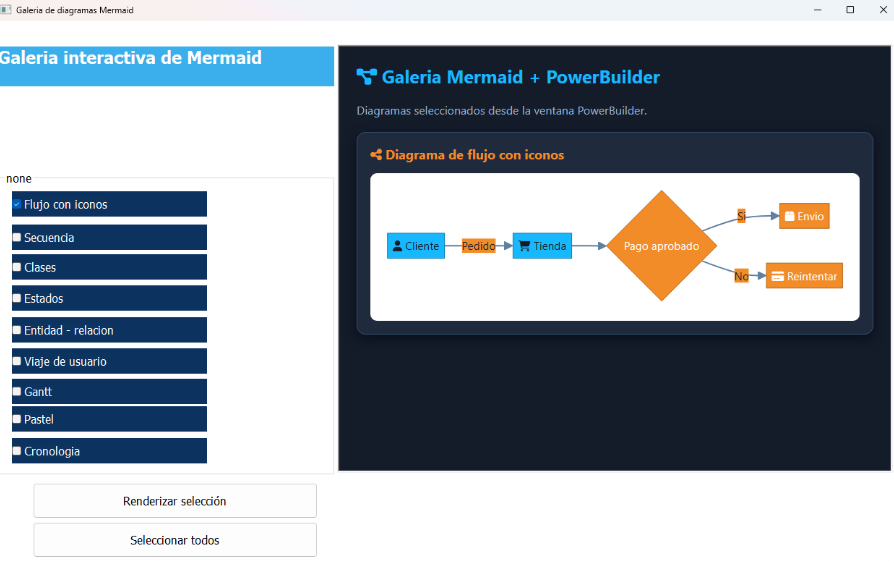
The NVO also provides an additional function, of_generar_galeria_html, designed for building reports or galleries that group multiple diagrams. This approach demonstrates Mermaid's flexibility by injecting custom style sheets for a dark theme, utilizing fonts like Segoe UI, and integrating icons via Font Awesome.
Mermaid is explicitly configured upon initialization, passing theme variables that adjust colors to the desired style. This enables PowerBuilder applications to seamlessly integrate diagrams that harmonize with their own visual aesthetic (such as dark mode or corporate colors).
mermaid.min.js and font-awesome libraries, the client workstation must have internet access at rendering time. For offline scenarios, the libraries should be downloaded and either injected directly into the HTML or bundled with the PowerBuilder application.Practical Applications
- Process Visualization: Dynamically transform the state of a database record into an interactive flowchart without relying on costly third-party components.
- Online Documentation: Display Entity-Relationship Diagrams (ERDs) generated directly from the queried schema.
- Task Tracking: Represent schedules or Gantt Charts computed from live DataWindows.
- Modern Reporting: Embed the Data URI output in reports for eventual export as enriched PDFs or interactive HTML.
Conclusion
The combination of PowerBuilder 2025 R2's WebBrowser control, CoderObject, and the Data URI scheme opens up a powerful integration window with modern JavaScript libraries like Mermaid.js.
Demo_uso_mermaid_pb establishes a robust, reusable architectural foundation: by isolating the HTML composition logic within an NVO, we streamline our window code and pave the way for highly advanced implementations. Graphics are generated on-the-fly based on application state, without sacrificing performance or littering the operating system with residual files.
Luis Avilan.
This message has an attachment file.
Please log in or register to see it.
Please Log in or Create an account to join the conversation.