


Building a bidirectional WebBrowser bridge in PowerBuilder

PowerBuilder 2025 R2 technical article
Building a bidirectional WebBrowser bridge in PowerBuilder
This demo shows how a PowerBuilder window can host a modern HTML interface inside the WebBrowser control, receive commands from JavaScript, execute native PowerScript logic, and push results back into the page through WebView2.
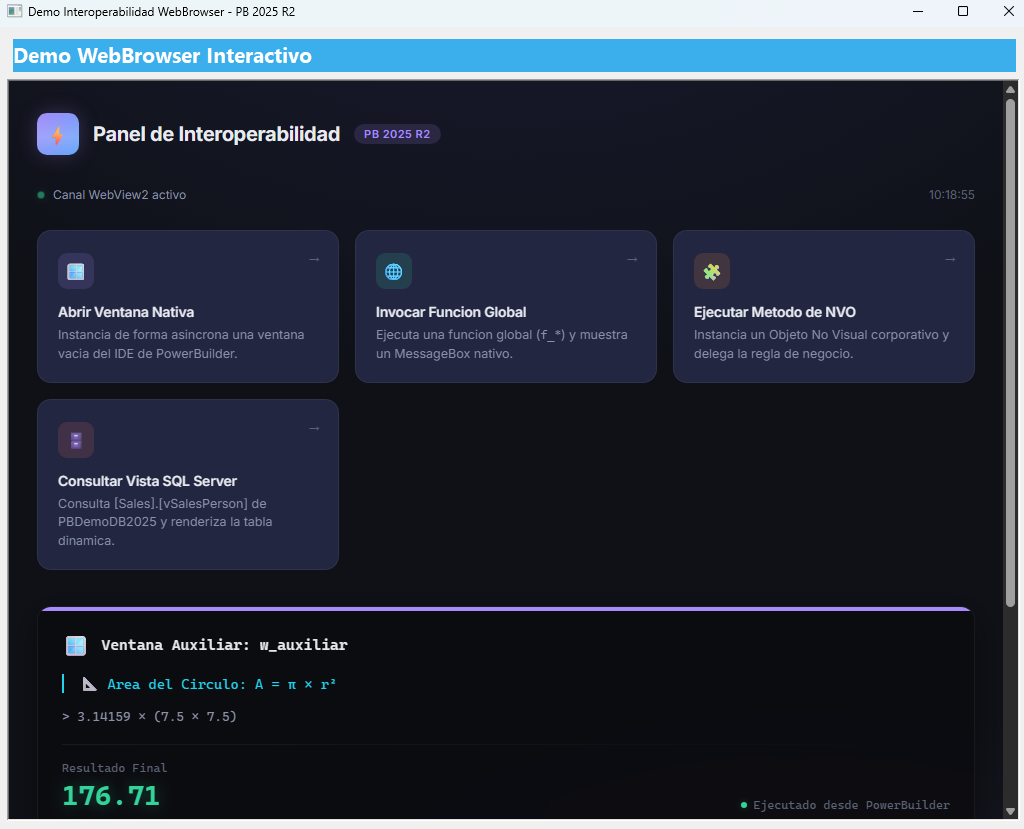
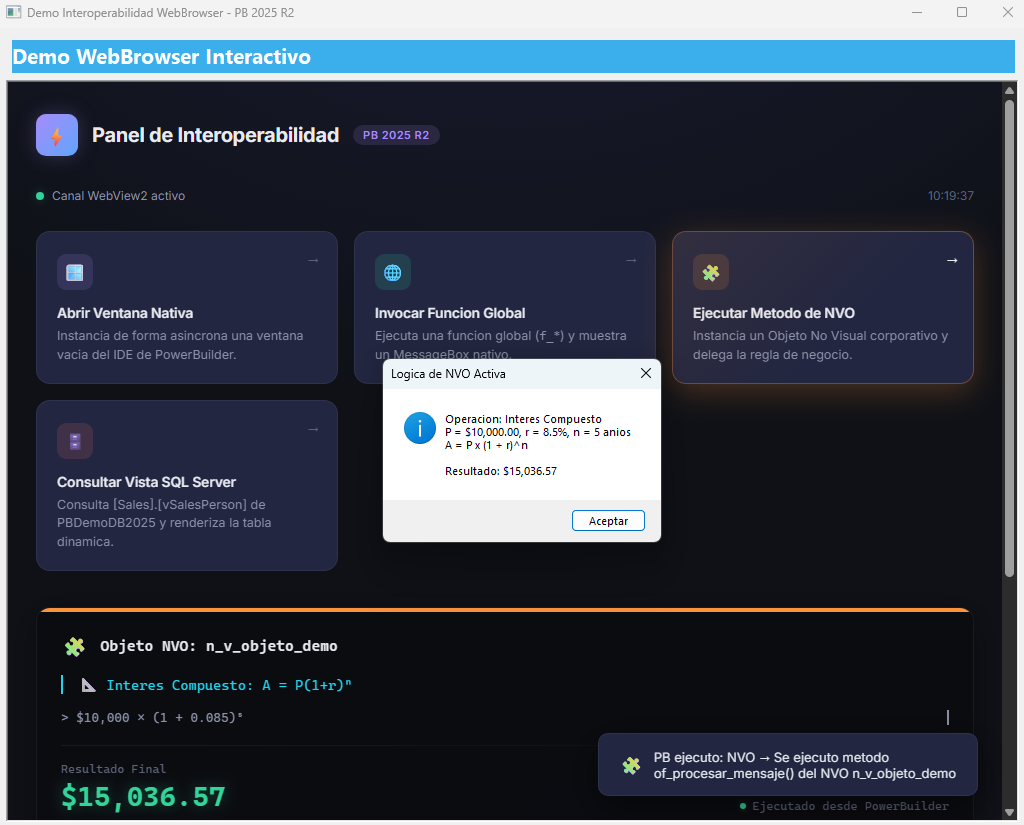
The project combines w_demo_interop, interop.html, w_auxiliar, f_global_demo, and n_v_objeto_demo to demonstrate communication from HTML to PowerBuilder and from PowerBuilder back to HTML.
window.chrome.webview.postMessage(), PowerBuilder receives it in WebMessageReceived, and PowerBuilder later updates the page with EvaluateJavascriptAsync().Demo architecture
HTML card click
-> enviarComando()
-> window.chrome.webview.postMessage(JSON)
-> wb_1.WebMessageReceived(uri, isJson, webmessage)
-> PowerScript command dispatcher
-> native PB action, SQL query, global function, window, or NVO
-> wb_1.EvaluateJavascriptAsync("javascriptFunction(...)")
-> DOM update inside interop.html
The browser page is not a static report. It acts as a command surface. Each card in interop.html creates a JSON payload with an action key, an optional object name, a client label, and a timestamp.
The WebBrowser control
The main PowerBuilder window, w_demo_interop, owns a WebBrowser control named wb_1. The control is the boundary between the native PowerBuilder runtime and the HTML5 interface rendered by Chromium WebView2.
| Element | Purpose |
|---|---|
wb_1.Navigate(ls_ruta_html) |
Loads interop.html from the project folder using a local file:/// URL. |
WebMessageReceived |
Receives the serialized JSON sent by JavaScript through the WebView2 native channel. |
EvaluateJavascriptAsync() |
Executes JavaScript functions inside the page after PowerBuilder completes an action. |
uri, isJson, webmessage |
Event parameters that expose message origin, JSON metadata, and the message payload. |
HTML to PowerBuilder
The outbound JavaScript function is enviarComando(tipoAccion, parametroObjeto). It builds a payload and sends it to PowerBuilder only when the WebView2 channel is available.
var payload = {
accion:  tipoAccion,
objeto:  parametroObjeto,
cliente: "Navegador Chromium PB",
ts:      new Date().toISOString()
};

window.chrome.webview.postMessage(JSON.stringify(payload));
This design keeps the HTML layer clean. The page does not know how to open a PowerBuilder window or query SQL Server; it only sends intent through a small JSON contract.
PowerBuilder dispatcher
In wb_1.WebMessageReceived, PowerBuilder reads webmessage, parses it with JsonParser, extracts accion and objeto, and routes the command with a Choose Case block.
lnv_json = Create JsonParser
lnv_json.LoadString(ls_json_crudo)
ll_root = lnv_json.GetRootItem()

ls_accion = lnv_json.GetItemString(ll_root, "accion")
ls_objeto = lnv_json.GetItemString(ll_root, "objeto")

Choose Case ls_accion
Case "ABRIR_VENTANA"
Case "LLAMAR_FUNCION_GLOBAL"
Case "LLAMAR_NVO"
Case "CONSULTAR_VISTA_SQL"
End Choose
Object communication matrix
| Action | PowerBuilder object | Behavior |
|---|---|---|
ABRIR_VENTANA |
w_auxiliar |
PowerBuilder opens a native window, and that window calls back into the browser to display the circle-area calculation. |
LLAMAR_FUNCION_GLOBAL |
f_global_demo |
A global function calculates Factorial(12), shows a native MessageBox, and sends the result to the HTML terminal panel. |
LLAMAR_NVO |
n_v_objeto_demo.of_procesar_mensaje() |
The dispatcher creates a nonvisual object, executes business logic, returns compound-interest data, and destroys the object. |
CONSULTAR_VISTA_SQL |
w_demo_interop + SQL cursor |
The main window queries Sales.vSalesPerson, packages records with JsonGenerator, and sends them to JavaScript. |
PowerBuilder to HTML
The return path uses EvaluateJavascriptAsync(). Instead of writing files or refreshing the whole page, PowerBuilder directly invokes public JavaScript functions already defined in interop.html.
wb_1.EvaluateJavascriptAsync(
"mostrarResultadoOperacion('LLAMAR_NVO', 'Objeto NVO: n_v_objeto_demo', " +
"'Interés compuesto: A = P(1+r)^n', '> $10,000 x (1 + 0.085)^5', " +
"'$" + String(ld_resultado, "#,##0.00") + "')"
)

wb_1.EvaluateJavascriptAsync(
"registrarEjecucion('LLAMAR_NVO', 'Se ejecutó el método of_procesar_mensaje() del NVO n_v_objeto_demo')"
)
The HTML page exposes three important inbound functions: mostrarResultadoOperacion() for mathematical results, registrarEjecucion() for the activity log, and renderizarTablaVista() for SQL rows.
SQL round trip
The SQL action demonstrates a complete round trip: HTML command, PowerBuilder event, SQL Server cursor, JSON generation, JavaScript injection, and DOM rendering.
CONSULTAR_VISTA_SQL -> DECLARE cur_sales CURSOR -> Sales.vSalesPerson -> JsonGenerator.AddItemObject() -> renderizarTablaVista(json) -> dynamic HTML table.Why this pattern matters
This pattern lets PowerBuilder keep ownership of business logic, database access, windows, and NVOs, while HTML provides a modern and animated user experience. The bridge is explicit, testable, and based on JSON messages.
Production notes
- Keep the JSON contract stable. New cards should add new action names, not hidden side effects.
- Escape JavaScript strings carefully when injecting values with
EvaluateJavascriptAsync(), especially when text can include quotes or special characters. - The demo uses ODBC DSN
PB SQLServer V2025R2and databasePBDemoDB2025.
Conclusion
The demo is a compact example of hybrid PowerBuilder development: WebBrowser for the interface, PowerScript for orchestration, native objects for business behavior, and JSON as the transport layer between both worlds.
Luis Avilan
This message has an attachment file.
Please log in or register to see it.
Please Log in or Create an account to join the conversation.