


AI-Powered HTML Documentation Generator for PowerBuilder

AI-Powered HTML Documentation Generator for PowerBuilder
The HTML Documentation Generator is a portable tool for automatically extracting and documenting PowerBuilder projects. It exports objects from PBL libraries, parses function prototypes, and integrates with a local AI (Ollama) to generate comprehensive technical documentation in modern HTML format.
Why this demo exists
In PowerBuilder, maintaining up-to-date technical documentation can be a tedious and manual process. This demo uses LibraryDirectory and LibraryExport to extract function prototypes directly from PBLs, and leverages modern generative AI (Ollama) to automatically document the behavior, parameters, and return types of your code.
Project structure and AI integration
The demo reads the target .pbt file, extracts the .pbl references, and scans for Windows, NVOs, Menus, and Global Functions. It extracts the forward prototypes block and parses the functions. Then, it uses a helper object nvo_ai_helper to communicate with a local Ollama instance (running the minimax-m3:cloud model by default) to generate rich descriptions and code examples.
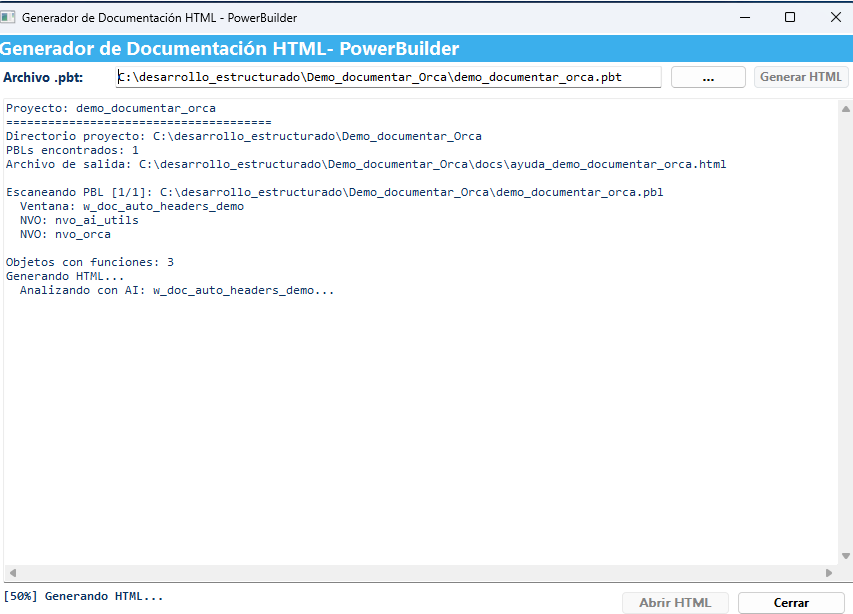
The main window: w_generador_doc_html
w_generador_doc_html centralizes the project selection, parsing, and HTML generation. The Generate button triggers the whole process:
- PBL scanning: Extracts objects from the PBLs declared in the selected
.pbt. - Parsing: Identifies function signatures and arguments.
- AI enrichment: Connects to Ollama to augment the documentation with intelligent descriptions.
- HTML generation: Outputs a fully responsive, styled HTML file (
docs\ayuda_[project].html) with a searchable sidebar and syntax highlighting.
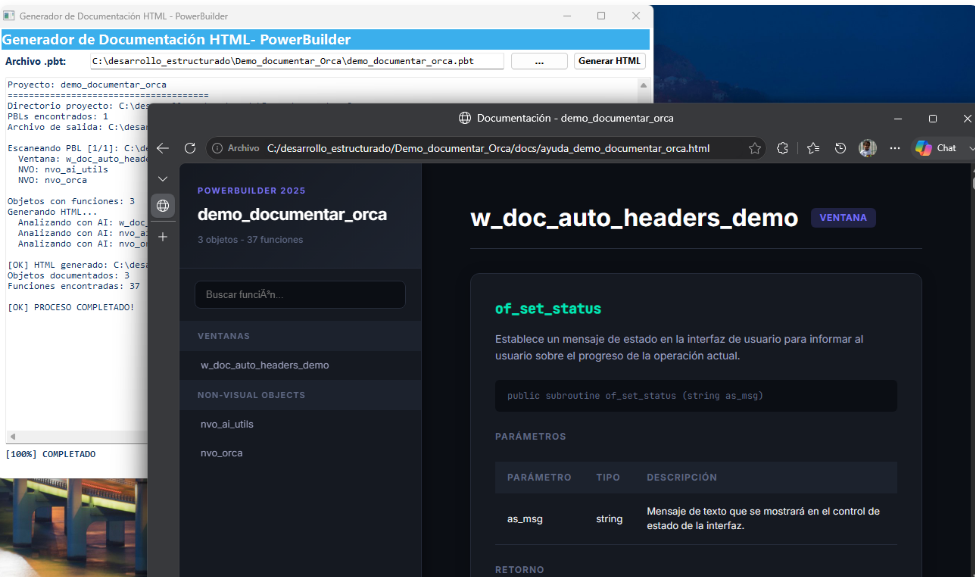
AI Helper (nvo_ai_helper)
The nvo_ai_helper non-visual object encapsulates the communication with the local Ollama API via PowerBuilder's native HttpClient and JSONGenerator. It sends the function prototypes to the AI and receives structured or descriptive text back, gracefully handling connection errors.
How to test it
1. Ensure you have Ollama running locally on localhost:11434 with the required model
2. Open demo_gen_html_pbl.pbw in PowerBuilder 2025
3. Run the application
4. Select a .pbt file from any PowerBuilder project you want to document
5. Click the "Generar" button and wait for the AI to process the objects
6. Open the generated HTML file in the docs folder
Conclusion
This generator demonstrates how to combine PowerBuilder's native library management features with modern AI capabilities and responsive HTML/CSS. The result is a powerful utility that drastically reduces the effort required to maintain high-quality project documentation.
Luis Avilan
This message has an attachment file.
Please log in or register to see it.
Please Log in or Create an account to join the conversation.