


PBL TimeLens: visual change traceability for PowerBuilder 2025

PBL TimeLens: visual change traceability for PowerBuilder 2025
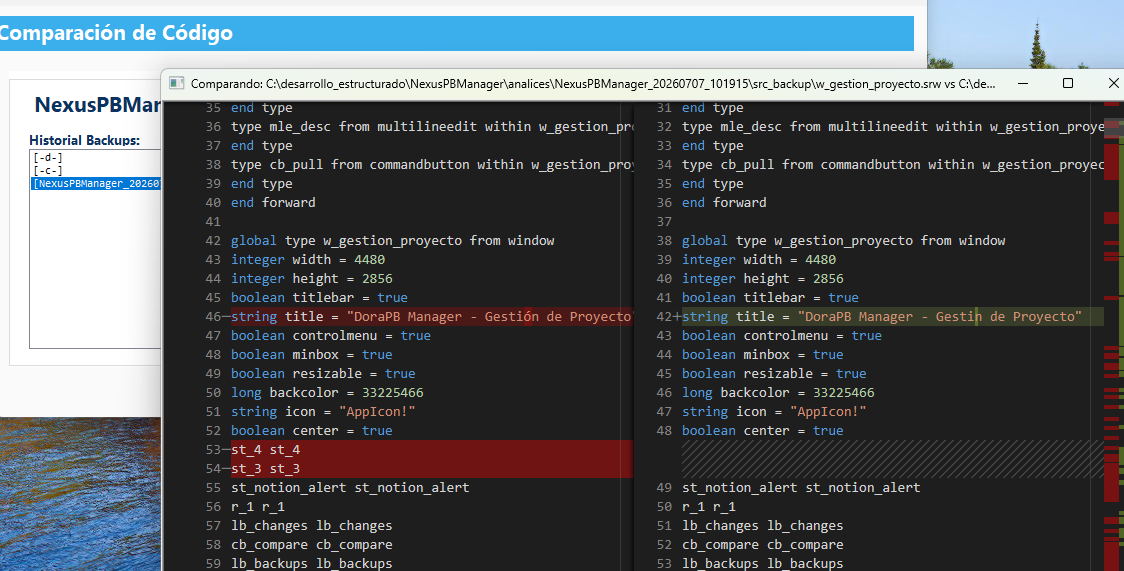
PBL TimeLens is a portable demo for inspecting real changes inside PowerBuilder projects. It exports objects from PBL libraries as .sr* source files, compares a backup version against the current version, and displays the result in an integrated Monaco Diff viewer.
Why this demo exists
In PowerBuilder, the real state of an application often lives inside its .pbl libraries. Comparing manually exported source folders can help, but it does not always represent what is currently compiled in the target. This demo uses LibraryDirectoryEx and LibraryExport to extract objects directly from PBLs and turn them into comparable files.
Independence and portability
The current version of the demo was adjusted so it does not depend on external paths or files outside the project. The user can select a .pbt from any project; the window keeps the demo base folder for the HTML viewer and uses the selected target path only to locate backups, PBLs, and exported sources.
Demo directory
├─ demo_powerbuilder_Diff.pbw
├─ demo_powerbuilder_diff.pbt
├─ demo_powerbuilder_diff.pbl
├─ assets
│ └─ monaco_diff.htmlsettings.ini or fixed paths such as C:\desarrollo_estructurado\.... If the project is moved to another folder, the viewer and the main flow still resolve local files correctly.The main window: w_gestion_proyecto
w_gestion_proyecto centralizes backup selection, source export, and the list of detected differences. The Analyze Changes button prepares the working folders, exports sources, and runs the comparison.
- Current sources: always exported from the PBLs declared in the selected
.pbtLibList. - Backup sources: exported from the PBLs stored in the selected backup and reused as cache when the same backup is analyzed again.
- Visual list: shows only objects with differences, not every exported object.
- Double-click: opens the selected object in the diff viewer.
PBL export
The of_exportar_pbl function queries the internal inventory of a PBL with LibraryDirectoryEx, determines the object type, and uses LibraryExport to generate the source code.
ls_dir_info = LibraryDirectoryEx(as_pbl_path, DirAll!)
ls_source = LibraryExport(as_pbl_path, ls_obj_name, le_type)
FileWriteEx(li_file, ls_source)
The output is saved as .srw, .sru, .srd, .srm, .srf, .srs, or .sra, depending on the PowerBuilder object type.
The comparison engine
of_preparar_comparacion creates an analices\yyyymmdd_hhmmss\src_actual folder for every run and an analices\selected_backup\src_backup cache for the backup. Then of_scan_changes compares both sets. When differences are found, it adds entries such as (Modificado), (Nuevo en actual), or (No encontrado en actual).
Integrated Monaco viewer
w_diff_viewer receives the demo base folder from w_gestion_proyecto and loads assets\monaco_diff.html from there, even when the compared files belong to another project. PowerBuilder reads the files, generates JSON with the original and modified content, and sends it to JavaScript to render the diff.
How to test it
1. Open demo_powerbuilder_Diff.pbw
2. Compile demo_powerbuilder_diff.pbt
3. Run the demo from its own folder
4. Select a backup
5. Click "Analyze Changes"
6. Double-click a modified object
Conclusion
PBL TimeLens shows how to build a portable audit and maintenance tool for PowerBuilder using native platform APIs and modern HTML visualization. Its main value is comparing what is actually inside the PBLs, without depending on manually exported sources or fixed developer-machine paths.
This message has an attachment file.
Please log in or register to see it.
Please Log in or Create an account to join the conversation.