


Demo_documentar_ai_Orca

Introduction
The Demo_documentar_Orca project implements an innovative solution to modernize and document legacy or extensive codebases in PowerBuilder. Using the native ORCA API to manipulate the library (PBL) and connecting to artificial intelligence models (LLMs) via Ollama, the system extracts the code, generates standard comments and headers, and automatically re-imports it in a validated manner.
General Flow Architecture (Infographic)
┌─────────────────────────────────────────────────────────────┐
│                 ENTORNO POWERBUILDER                        │
│                                                             │
│                   1. Crea Backup                            │
│                 ┌────────────────┐                          │
│                 ▼                │                          │
│  ┌────────────┐ │ 2. Exporta     ┌───────────────────┐      │
│  │   PBLs     ├─┴───────────────►│  nvo_orca         │      │
│  │(Originales)│◄─────────────────┤ (Controlador)     │      │
│  └────────────┘   5. Importa     └─────────┬─────────┘      │
│                                            │                │
└────────────────────────────────────────────┼────────────────┘
│
│ 3. Script
│    + Prompt
▼
┌─────────────────────────────────────────────────────────────┐
│                 CAPA DE INTELIGENCIA ARTIFICIAL             │
│                                                             │
│  ┌─────────────────────────┐         ┌───────────────────┐  │
│  │ w_doc_auto_headers_demo │◄────────┤ nvo_ai_utils      │  │
│  │ (Valida Firmas y Cierre)│ 4. JSON │ (Llama a Ollama)  │  │
│  └─────────────────────────┘         └───────────────────┘  │
└─────────────────────────────────────────────────────────────┘
Step-by-Step Process
Before manipulating any objects, the system creates a full backup of the target PBL libraries. This critical step ensures that, in the event of any unforeseen issues during AI generation or ORCA compilation, the user can safely and immediately restore their code to its original version.
Through the nvo_orca object, the system interacts natively with the PBL libraries. Scripts for functions, events, or windows are exported as plain text (.srw, .sra, etc. files), preparing them for analysis.
The extracted code is wrapped in a strict prompt (system context) that instructs the Artificial Intelligence not to alter variables, signatures, or logic. This is sent via HTTP REST to Ollama using of_send_request_ollama() within the nvo_ai_utils utility object or the demo window.
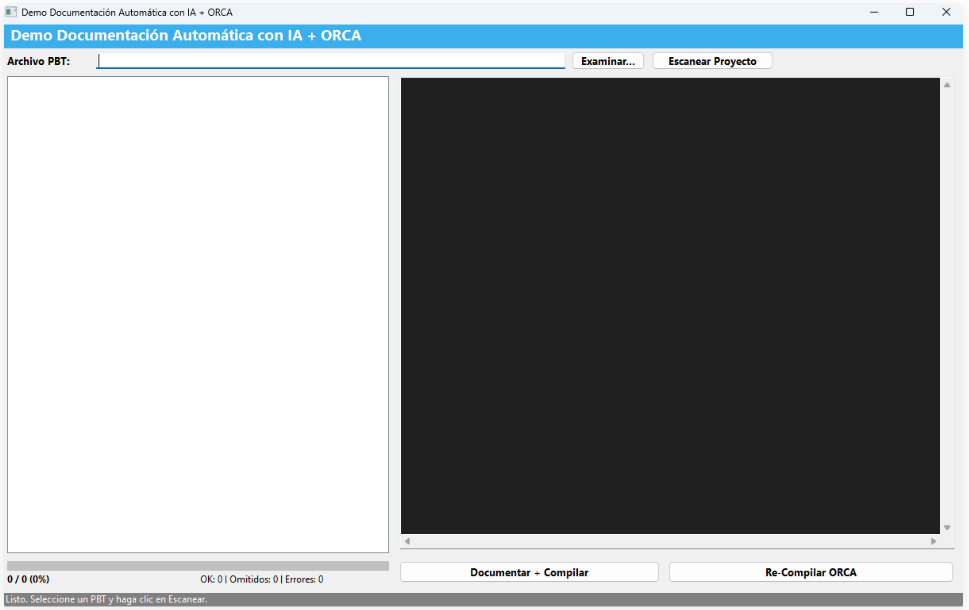
Upon receiving the AI's response in the w_doc_auto_headers_demo window, a rigorous cleaning and validation process is executed:
- Markdown tags (e.g.,
```powerscript) are removed. - The existence of the mandatory header is checked.
- Signature Validation: The first generated line is strictly verified against the original one (cleaning carriage returns
~r) to ensure an exact match. - Proper script closure is validated (
end function,end event).
If any validation fails, the code is discarded to prevent corruption.
The "original signature" validation ensures that the AI does not introduce subtle changes to function arguments, which would cause compiler errors when attempting to rebuild the object in the PBL.
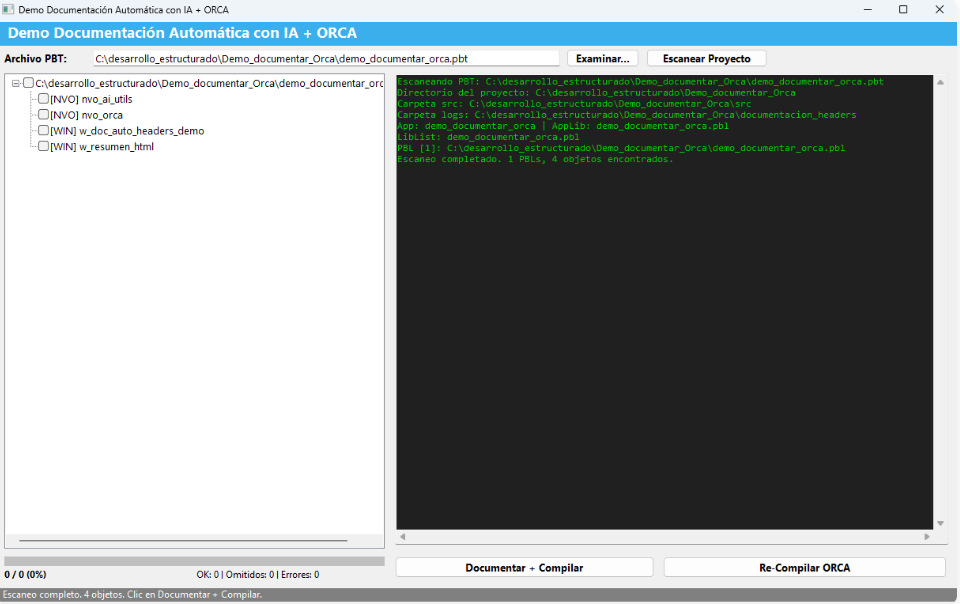
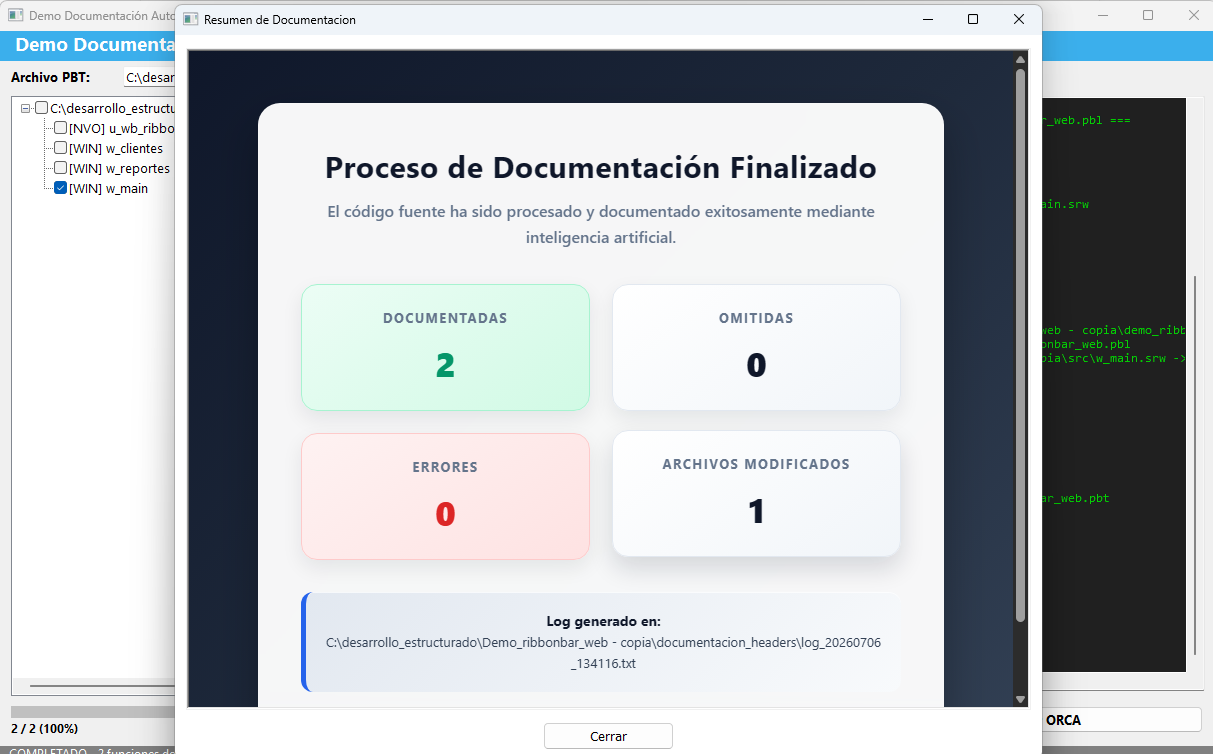
Once the documented code passes all validation tests, ORCA is used again to inject (import) the source code back into the PBL library and automatically compile it, completing the cycle.
Code Implementation (Scripts)
1. ORCA interaction to import and compile
The nvo_orca object exposes the of_importar_objeto function, which handles opening the ORCA session, injecting the updated source code back into the PBL, and closing the session:
// Fragmento de nvo_orca.sru
li_rc = of_abrir_sesion(lh_sesion, as_app_pbl, as_app_name, as_library_list, ls_mensaje)
if li_rc <> 0 then return li_rc

li_rc = of_leer_archivo(as_archivo_fuente, ls_codigo, ls_mensaje)
ll_bytes = of_len_bytes_unicode(ls_codigo)

// Función nativa de ORCA para importar y compilar
li_rc = PBORCA_CompileEntryImport(lh_sesion, as_pbl_destino, as_nombre_objeto, &
ai_tipo_orca, "Importado por nvo_orca", ls_codigo, ll_bytes, 0, 0)

if li_rc = 0 then
of_cerrar_sesion(lh_sesion)
return 1
end if
2. AI (Ollama) connection from PowerBuilder
The API invocation is performed using HTTPClient in PowerBuilder. The request JSON is strictly structured, escaping the source code to avoid syntax errors.
// Fragmento de nvo_orca.sru (of_corregir_codigo_con_ai)
httpclient lnvo_http
lnvo_http = create httpclient
lnvo_http.SetRequestHeader("Content-Type", "application/json")

ls_prompt = "Corrige este objeto PowerBuilder para que compile... " + &
"Error ORCA: " + as_error + "~r~nCódigo fuente:~r~n" + as_codigo

ls_json = '{"model":"' + of_json_escape(is_ai_model) + '","prompt":"' + of_json_escape(ls_prompt) + '","stream":false}'

li_rc = lnvo_http.SendRequest("POST", ls_url, ls_json)
lnvo_http.GetResponseBody(ls_response)
as_codigo_corregido = of_limpiar_codigo_ai(of_extraer_texto_ai(ls_response))
3. General AI Utilities (nvo_ai_utils)
The nvo_ai_utils object provides key tools like of_replace_all, which allows for iterative cleaning of line breaks or special characters before injecting or processing LLM responses.
// Fragmento de nvo_ai_utils.sru (of_replace_all)
String ls_result
Long ll_pos, ll_find_len

ls_result = as_source
ll_find_len = Len(as_find)
ll_pos = Pos(ls_result, as_find)

Do While ll_pos > 0
ls_result = Left(ls_result, ll_pos - 1) + as_replace + Mid(ls_result, ll_pos + ll_find_len)
ll_pos = Pos(ls_result, as_find, ll_pos + Len(as_replace))
Loop
Return ls_result
Key Model Benefits
- Zero Manual Touch: Documents hundreds of objects in batches without requiring copy and paste.
- Code Security: The validation barrier prevents AI hallucinations from breaking the application.
- Standardization: Ensures that all headers and comment languages maintain the same corporate structure (e.g., comments in Spanish, without problematic accents).
System Requirements & Prerequisites
To successfully run the ORCA automation and AI documentation processes, the following components must be installed:
- PowerBuilder IDE: Version 2019 R3, 2021, or 2022. The system requires the native PB ORCA compiler API. The corresponding ORCA DLL (e.g.,
pborc190.dll,pborc210.dll, orpborc220.dll) must be available in the system's PATH or the application's root directory. - Ollama: Installed locally or accessible via network (Version 0.1.28 or newer recommended) to host the LLM engine.
- LLM Model: A downloaded model in Ollama (e.g., minimax-m3:cloud, etc.) for code analysis.
This message has an attachment file.
Please log in or register to see it.
Please Log in or Create an account to join the conversation.