


Unit Testing PowerBuilder: The Story Behind PBUnit2025
- PowerBuilder
- Bruce Armstrong
- Wednesday , 28 October 2026
- 22 Hits
- 0 Comments
PowerBuilder applications tend to live for decades, and most of the code in them was never written with automated tests. That makes every change a small gamble: you fix one thing, and you find out what else you broke when a user calls.
Unit testing is the most widely used way to take that gamble out of everyday changes. This article is for PowerBuilder developers who have heard the term but never had a reason, or a practical way, to try it. It covers what unit tests are, why developers in almost every other language write them, where the idea came from, and how a PowerBuilder framework for it, PBUnit, came to exist. It ends with PBUnit2025, an updated version for PowerBuilder 2025 solutions, and a worked example from the PowerBuilder Foundation Classes (PFC). The PBUnit2025 code and instructions for using it are available on both CodeXchange and GitHub.
What a unit test is
A unit test is a small piece of code that runs a small piece of your application and checks the result automatically. In PowerBuilder terms, the "unit" is usually one function or event on one object: a string utility, a calculation in a non-visual object, the way a DataWindow service reacts to a particular row.
A good unit test has four properties:
- Automatic. It decides for itself whether it passed. Nobody reads output and judges it.
- Fast. It runs in milliseconds, so you can run hundreds of them every time you change something.
- Isolated. It doesn't depend on a database, a network share, another test, or what the last person left in a table. It sets up what it needs and cleans up after itself.
- Repeatable. It gives the same answer every time, on every machine.
Unit tests are one layer of testing, not all of it. They don't replace the other kinds:
| Kind of test | What it checks | Who or what runs it |
|---|---|---|
| Unit test | One function or object, in isolation | A test framework, in seconds |
| Integration test | Several parts working together, often with a real database | A test framework or script, in minutes |
| UI or end-to-end test | The application as a user drives it | A UI automation tool or a tester |
| Manual and acceptance testing | Whether the application does what the business needs | People |
The usual advice is to have many unit tests, fewer integration tests and fewer still end-to-end tests, because the lower layers are cheaper to write, faster to run and more precise about what broke.
Why developers unit test
The main payoff is that you find out you broke something minutes after you broke it, not weeks later from a user. Everything else follows from that.
- Regressions get caught. A regression is something that used to work and stopped. Once a bug has a test, that bug can't come back quietly: the test fails the moment someone reintroduces it. This matters most in code that many applications share, such as a framework like PFC, where one change ripples into every application built on it.
- Changing old code becomes safe. Most developers avoid touching code they don't fully understand, so it slowly rots. With tests around it, you can clean it up, restructure it or upgrade it, and the tests tell you whether its behavior changed. This is what refactoring depends on.
- Bugs are cheaper to fix. A failing test points at one function and one input. A bug report from production points at a symptom, and someone has to reconstruct how to reproduce it before anyone can fix it.
- Tests document the code. A test shows exactly how a function is meant to be called and what it should return, including the edge cases. Unlike comments, tests can't drift out of date without failing.
- Design improves. Code that is hard to test is usually hard to reuse: it reaches into globals, mixes UI with logic, or does five things at once. Writing tests pushes you toward smaller objects with clear inputs and outputs.
- Upgrades get less frightening. Each new PowerBuilder release, database driver or operating system can change behavior in small ways. A test suite run on the new version shows what changed before your users do.
- Confidence compounds. The first few tests feel like overhead. A few hundred tests let a team make changes quickly, because they no longer have to retest everything by hand to feel safe.
The costs, and the usual objections
Unit tests are not free, and pretending otherwise is how teams start a test suite and abandon it. The costs are real but smaller than they first look.
| Objection | The honest answer |
|---|---|
| "We don't have time to write tests." | Writing a test takes time up front. But you already spend that time, and more, testing by hand and chasing bugs that come back. Start with tests for bugs you are fixing anyway; that time was already budgeted. |
| "Our code is all windows and DataWindows. It can't be tested." | The parts tied to user interaction are hard to unit test. But most PowerBuilder applications keep a lot of logic in non-visual objects, services and DataWindow handling, and that can be tested. The PFC example later in this article tests a DataWindow service without showing a window or touching a database. |
| "Tests have to be maintained too." | True. When behavior changes on purpose, tests change with it. Tests that check what a function returns, rather than how it works inside, need far less upkeep. |
| "Our application is too old to start now." | You don't need to test the existing code all at once. Add a test whenever you fix a bug or change a function. Coverage grows where the code actually changes, which is where the risk is. |
| "Passing tests don't prove the code is correct." | Also true: tests only check what someone thought to check. They don't replace review or user testing. They make sure that what was checked once stays checked forever. |
The realistic expectation: the first tests feel slow to write and seem to catch little. The payoff arrives the first time a test fails on a change you were sure was safe.
Where xUnit came from
Nearly every unit testing framework in use today descends from one small Smalltalk framework that Kent Beck wrote in 1989. The family is called xUnit, after the naming pattern its members follow: SUnit, JUnit, NUnit, CppUnit, and PBUnit for PowerBuilder.
SUnit (Smalltalk). Beck described the framework in a paper called "Simple Smalltalk Testing: With Patterns". It was later reprinted as a chapter of Kent Beck's Guide to Better Smalltalk (Cambridge University Press, 1998) (SUnit). It was deliberately tiny. Beck expected each team to build its own copy in a couple of hours rather than install a product, and it was used on the Chrysler C3 payroll project where Martin Fowler and Ron Jeffries worked with Beck. For years it was barely known outside the Smalltalk community (Fowler, "Xunit").
JUnit (Java, 1997). Beck and Erich Gamma, one of the "Gang of Four" design patterns authors, wrote the first version of JUnit on a flight from Zurich to the OOPSLA 1997 conference in Atlanta. They pair-programmed it and wrote it test-first (Fowler). JUnit introduced the green bar that turns red when a test fails, and it spread quickly. A 2013 survey of 10,000 Java projects on GitHub found JUnit tied for the most commonly included external library, used by 30.7% of them (JUnit).
The ports. Michael Feathers wrote CppUnit for C++, possibly the first port. NUnit followed for .NET, and today almost every language has an xUnit framework. Some ports are line-for-line translations of JUnit and others adapt it to their language (Fowler).
The practices around it. xUnit grew up alongside Extreme Programming, which began in 1999, and test-driven development (TDD), which Beck described in Test-Driven Development: By Example. In TDD you write a failing test first (red), write just enough code to pass it (green), then clean up the code with the test as a safety net (refactor) (Test-driven development). You don't have to practice TDD to benefit from unit tests, but the two ideas spread together.
Fowler credits JUnit with a major shift in how developers thought about testing over the decade that followed. Before it, testing was mostly something a separate team did after the code was written. After it, programmers were expected to test their own code.
How an xUnit framework is put together
Every xUnit framework, in any language, is built from the same handful of parts. Once you know them, you can read tests in Java, C# or PowerScript equally well.
| Part | What it does | In PBUnit2025 |
|---|---|---|
| Test case | A class that groups related tests | An object that inherits from testcase, named to end in tests |
| Test | One scenario: arrange the inputs, act, then assert the result | An event whose name starts with test and takes no arguments |
| Fixture | The known starting state every test in the case needs | Instance variables, built in setup and released in teardown |
| setUp / tearDown | Run before and after each test, so no test sees another's leftovers | The setup and teardown events |
| Assertion | A check that records a failure when the result is wrong | assertEquals, assertTrue, assertNull, assertRowCount, assertThrows and others |
| Suite | The collection of tests to run together | Found automatically: every *tests class in the project |
| Runner | Runs the suite and reports the results | n_pbunit_runner, driven by Invoke-PBUnit.ps1 |
| Result | Pass, fail or error for each test | Text results, JUnit XML, and an exit code of 0, 1 or 2 |
Two details matter more than they look. First, each test runs on a fresh instance of its test case, with setup before it and teardown after, so tests can't depend on each other's order. Second, a framework distinguishes a failure, where an assertion found a wrong answer, from an error, where the code crashed before it could be checked.
A short history of PBUnit
PowerBuilder had its own xUnit framework by 2000, and a small group of developers kept it alive for more than a decade before it went quiet.
PBUnit (2000). John Urberg ported JUnit 2.1 to PowerBuilder as PBUnit, translating its code, comments and documentation. Its change log already shows version 2 features in August 2000. Version 1.1 added AsyncTestCase for windows that post events from their open event, version 2.0 let PBUnit run as a standalone program, and version 3.0 (February 2003) moved it to PowerBuilder 8.0 (from the PBUnit 3.0 readme and change log). Its design follows JUnit's closely: testcase, testsuite and testresult objects, tests found by their test prefix, and a GUI test runner with the familiar green bar.
Urberg registered PbUnit on SourceForge on April 30, 2002, describing it as "an implementation of the xUnit framework for PowerBuilder," and Phil Yandel later joined him as a maintainer (jurberg, philcya). The SourceForge listing gives its license as the Common Public License 1.0; the download itself names no license. Its last files there date from May 2003 and have been downloaded 3,534 times (files).
PowerUnit (2007). Frank Mao registered PowerUnit in October 2007 as an extension of PBUnit. It added a command-line mode and XML results that the CruiseControl build server could read, so tests could run automatically on every build, and it supported PowerBuilder 9.0 through 12.0. Mao's 2008 quick start documented the convention that test case names end in tests, which PBUnit2025 still uses.
The community years. The comments on that quick start, running from 2009 to 2012, show who was using it and where it hurt. Developers ran it on PowerBuilder 11.5 and 12.5 and wired it into continuous integration servers. One reported a suite of more than 3,200 assertions, including tests of shared DataWindows and the PFC linkage service. The recurring complaints were that tests couldn't be run in the IDE's debugger, that code relying on global variables was hard to test, and that it wasn't clear how to test events on windows.
The quiet years. PowerUnit's last SourceForge update was in March 2014, and the original project has seen no real development since its 2003 release. Meanwhile PowerBuilder moved from Sybase to SAP and then to Appeon, and newer PowerBuilder releases, including 2025, use solutions and projects (.pbsln and .pbproj) that store source as plain text files instead of binary PBLs. The old runner reads the earlier .pbt target format and loads compiled PBD files at run time, so it can't run tests in a solution-format project as it stands.
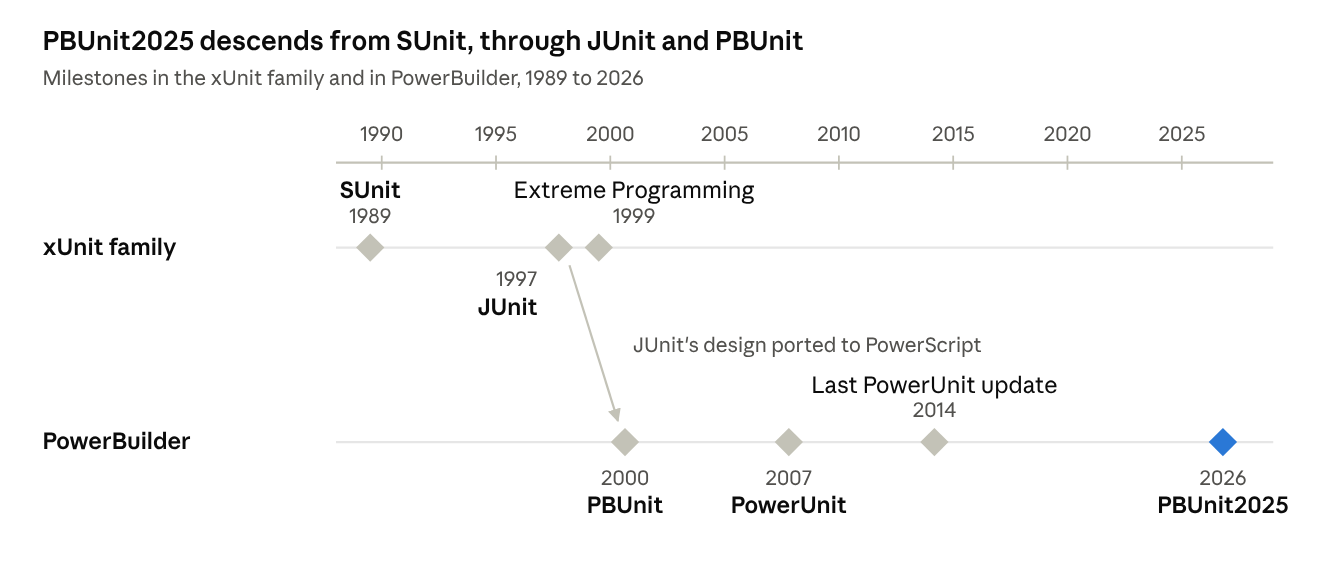 The xUnit line runs from Smalltalk to Java; PBUnit took JUnit's design to PowerBuilder by 2000, and PBUnit2025 picks it up after twelve quiet years.
PBUnit2025
PBUnit2025 keeps PBUnit's core and replaces the parts that no longer fit how PowerBuilder projects are built today. It started from a copy of Frank Mao's PowerUnit fork migrated to PowerBuilder 2025. Because PowerUnit is listed under a different license, the Sybase Open Watcom Public License, and none of its additions were used, PBUnit2025 later removed them. Its core is now John Urberg's PBUnit 3.0 code extended with new assertions, and the runner and scripts are new. It is released under the Common Public License 1.0, the license of the original PBUnit.
| Area | PBUnit / PowerUnit | PBUnit2025 |
|---|---|---|
| Project format | .pbt targets and PBLs |
PowerBuilder 2025 solutions and projects |
| Running tests | A GUI runner that loads PBDs at run time | A command-line runner compiled into the test application |
| Finding tests | Read from the target's library list | Generated before each build from every *tests class |
| Assertions | assert, assertIsValid, assertNotNull |
Those, plus assertEquals for six types, assertTrue, assertFalse, assertNull, assertRowCount and assertThrows |
| Failure messages | Whatever the test author wrote | expected <1> but was <0>, prefixed with the test's own message |
| Runtime errors | Could stop the whole run | Recorded as an error for that test; the run continues |
| Results | GUI, plus XML for CruiseControl | Text, JUnit XML for current CI servers, and an exit code |
| Building | By hand in the IDE | Invoke-PBUnit.ps1 builds with PBAutoBuild and runs the tests |
The framework has its own self-tests: one test case checks every assertion, including the exact wording of each failure message.
A worked example: PFC Issue #8
The first real use of PBUnit2025 was a regression test for a PFC bug, and it shows why a passing test only counts if it can also fail.
Issue #8 reported that a change in the PFC DataWindow linkage service combined two checks into one line:
If ( IsNull(la_args[li_i]) or IsNull(la_detail) ) Or ( la_args[li_i] <> la_detail ) ThenThe intent was that a null key always triggers a retrieve. But the comparison on the right still runs when a key is null. The fix split it into an If for the null check and an ElseIf for the comparison.
The first five tests written for it covered the obvious cases: keys that match, keys that differ, a null master key, a null detail key, and both null. All five passed on the fixed code. They also passed on the old code. With two long keys, comparing a value to a null is harmless, so those tests could never have caught the bug.
The sixth test linked a string master key to a long detail key and set the master key to null. On the old code it failed with the error the issue described:
ERROR n_cst_dwsrv_linkage_tests.test_null_key_of_other_datatype_retrieves
        Runtime error 40: Mismatched ANY datatypes in expression: string, double
On the fixed code it passes. That test now lives in PFC's test project, so anyone who runs the suite will see it fail if the bug ever comes back. The test itself never touches a database: a small test DataWindow control counts each retrieve attempt and cancels it.
Getting started
The easiest first test is for the next bug you fix: write a test that fails because of the bug, fix the code, and watch it pass.
A complete PBUnit2025 test looks like this:
global type n_cst_string_tests from testcase
event test_trims_both_ends ( )
end type

event test_trims_both_ends();n_cst_string	lnv_string

assertEquals("abc", lnv_string.of_Trim("  abc  "))
end event
Some habits that make the difference between a suite people trust and one they ignore:
- Start where the code changes. Don't try to cover an old application all at once. Add tests to the objects you are fixing or changing this week.
- Make each test fail once. Before trusting a new test, break the code it covers, or run it against the old version, and make sure it goes red. The Issue #8 example shows why: five reasonable-looking tests passed against the bug.
- Test one behavior per test, and name it after that behavior.
test_null_master_key_retrievestells you what broke without opening the code. - Arrange, act, assert. Set up the inputs, call the code once, then check the result. If a test needs a page of setup, the code under test probably does too much.
- Keep the database and the user out of it. A test that needs a live database or clicks a message box is slow and fragile. Use small stand-in objects, like the retrieve-counting DataWindow in the PFC tests, and configure code to log instead of showing dialogs.
- Move logic out of windows. Logic in a non-visual object is easy to test. The same logic in a button's
clickedevent is harder: the test has to open the window and keep dialogs from blocking it. Frank Mao gave the same advice to PBUnit users back in 2010. - Run the suite often. Run it before every commit, and on a build server if you have one. The JUnit XML that PBUnit2025 writes is understood by GitHub Actions, Azure DevOps and Jenkins.
- Treat a failing test as a broken build. A suite with a few tests that "always fail" teaches everyone to ignore it.
To set up PBUnit2025 in your own project, follow the README. The PFC repository's README shows the same setup for a real project, including how to get the framework when you open the solution in PowerBuilder.
Further reading and sources
Books
- Kent Beck, Test-Driven Development: By Example: the red, green, refactor cycle from the person who popularized it.
- Michael Feathers, Working Effectively with Legacy Code: how to get tests around old code safely. Frank Mao recommended it to PBUnit users facing older applications.
- Mike Cohn, Succeeding with Agile (2009): the source of the "test automation pyramid" (Fowler, "TestPyramid").
Sources for this article
- Martin Fowler, "Xunit" (2006)
- Wikipedia: SUnit, JUnit, xUnit, Test-driven development
- SourceForge: PbUnit, PowerUnit
- Frank Mao, "PBUnit/PowerUnit quick start" (2008) and its comments
- PBUnit2025 and PFC Issue #8 on GitHub